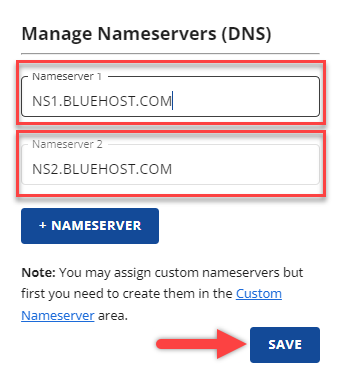
Bluehost nameservers are specific server addresses that manage your domain’s DNS settings. They direct web traffic to your Bluehost hosting account.
Bluehost nameservers play a crucial role in domain management. They translate your domain name into an IP address, ensuring visitors reach your website. This process is essential for your site’s accessibility and performance. Configuring your domain to use Bluehost nameservers is straightforward.
You simply update your domain’s DNS settings with the nameserver addresses provided by Bluehost. This step is key for seamlessly integrating your domain with Bluehost’s hosting services. By using Bluehost nameservers, you ensure optimal connectivity and reliability for your website. This setup is vital for maintaining a professional online presence.
Introduction To Nameservers
Nameservers are an essential part of the internet. They play a crucial role in directing traffic to your website. Without nameservers, users would not find your site. They act as translators between human-friendly domain names and IP addresses.
Role In Domain Management
Nameservers manage the connection between your domain name and your web hosting. They store all the DNS records for your domain. These records include:
- A Record
- MX Record
- CNAME Record
When someone types your domain into a browser, the nameserver translates it to an IP address. This process directs the user to the correct server.
Importance For Websites
Nameservers are critical for website functionality. They ensure users can access your site easily. Without them, your domain name would not lead to your website. This is why choosing reliable nameservers is vital.
Bluehost provides robust nameservers. Their nameservers offer high uptime and fast response times. This ensures your website remains accessible and loads quickly.
Credit: kinsta.com
Overview Of Bluehost
Bluehost is a leading web hosting company. They provide various hosting services. Their nameservers play a crucial role in website management. Let’s explore more about Bluehost.
Company Background
Bluehost was founded in 2003. They are based in Utah, USA. They are one of the largest hosting companies. Over 2 million websites use their services.
Bluehost is part of the Endurance International Group. This group is a big player in the hosting industry. They focus on customer satisfaction and innovation.
Services Offered
Bluehost offers a range of services. Here are some of their main offerings:
- Shared Hosting: Suitable for small websites.
- VPS Hosting: Offers more control and power.
- Dedicated Hosting: For large websites with high traffic.
- WordPress Hosting: Optimized for WordPress sites.
They also offer domain registration. You can register your domain name with Bluehost. They provide 24/7 customer support. Their support team is very helpful.
Bluehost nameservers help in directing your domain to your website. They ensure your site is accessible to users worldwide.
Bluehost Nameservers Basics
Understanding Bluehost nameservers is crucial for managing your website. Nameservers direct traffic from your domain to your web hosting provider. With Bluehost, you can use default or custom nameservers. Learn the basics of each below.
Default Nameservers
Bluehost provides default nameservers for all its users. These nameservers are pre-configured for your convenience.
| Nameserver Type | Nameserver Address |
|---|---|
| Primary | ns1.bluehost.com |
| Secondary | ns2.bluehost.com |
Using default nameservers simplifies the setup process. Your domain will be automatically pointed to your Bluehost hosting account. This is ideal for beginners or those who prefer a quick setup.
Custom Nameservers
Advanced users may prefer to use custom nameservers. Custom nameservers give you more control over your domain settings.
- Login to your Bluehost account.
- Navigate to the Domain Manager.
- Select the domain you want to update.
- Click on the Nameservers tab.
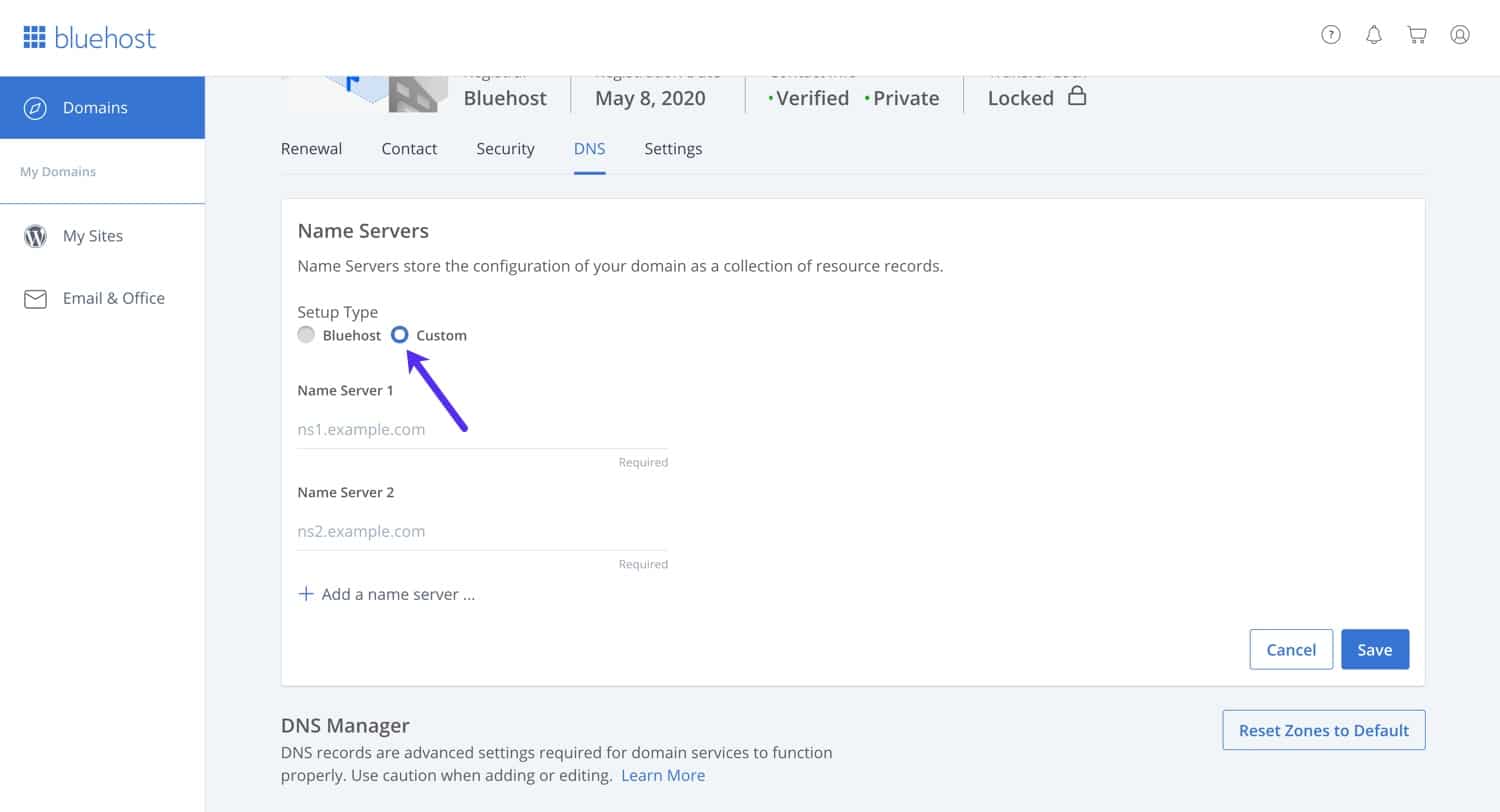
- Choose the option to use custom nameservers.
- Enter your custom nameserver addresses.
Custom nameservers are useful if you have specific DNS requirements. This can include using a different DNS provider or setting up advanced DNS configurations.
Credit: kinsta.com
Finding Bluehost Nameservers
Finding Bluehost nameservers is easy. Nameservers are crucial for directing your domain name to your website. You can find your nameservers through your Bluehost account or the welcome email. Learn how to locate them quickly and easily.
Account Dashboard
First, log in to your Bluehost account. Once logged in, navigate to the Account Dashboard.
From the dashboard, look for the Domains tab. Click on it.
In the Domains section, select the domain you want to manage.
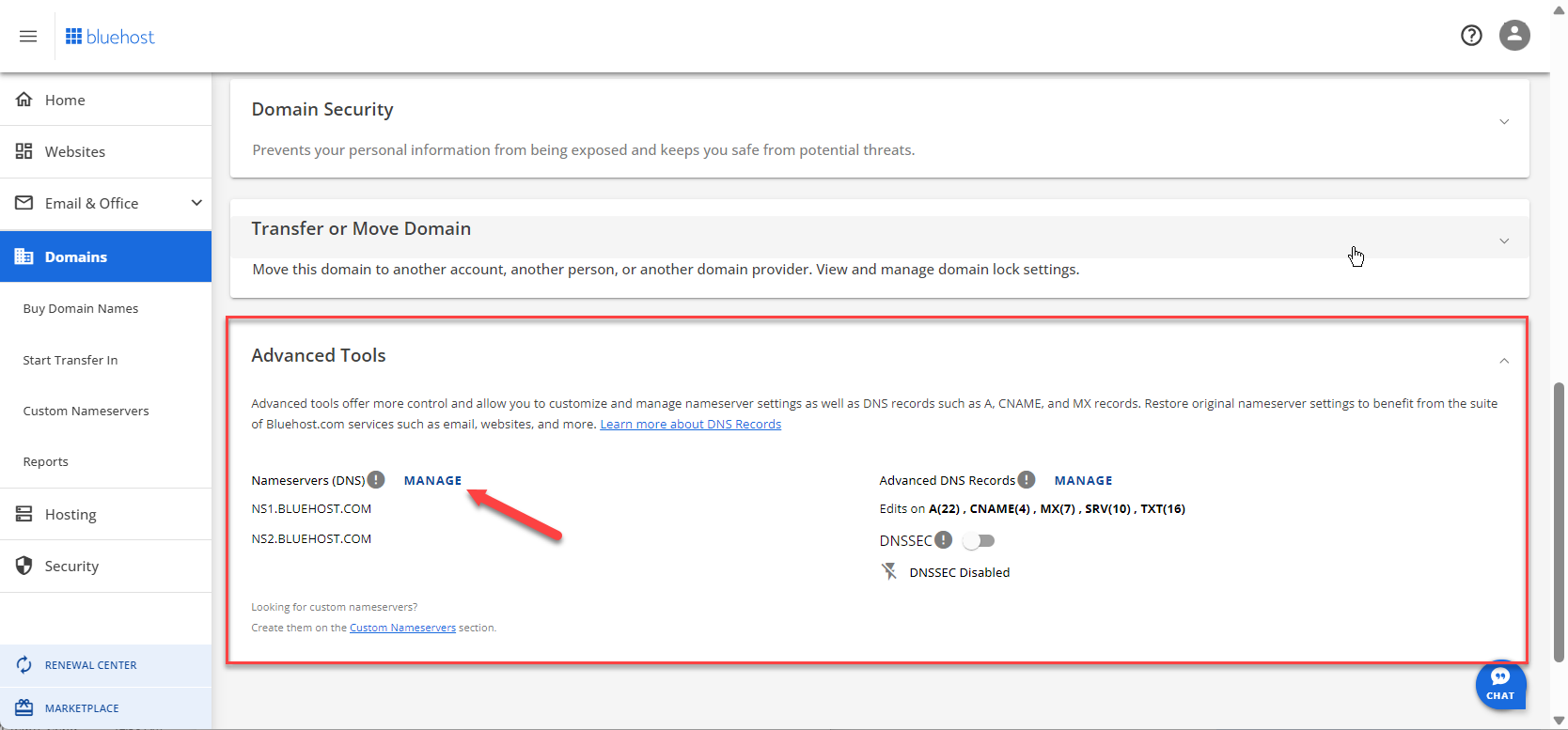
Under the domain settings, you will see the Nameservers information. The nameservers usually look like ns1.bluehost.com and ns2.bluehost.com.
Copy these nameservers. You will need them to point your domain to Bluehost.
Welcome Email
Bluehost sends a welcome email after you sign up. This email contains important account information.
Open the welcome email in your inbox. Look for a section labeled Nameservers.
In this section, you will find the nameservers listed. They usually look like ns1.bluehost.com and ns2.bluehost.com.
Copy these nameservers to update your domain settings.
Knowing where to find your Bluehost nameservers is crucial. Whether from the account dashboard or the welcome email, you can easily locate and use them.
Changing Nameservers
Changing nameservers is essential for managing your website’s domain settings. Nameservers act like a bridge, connecting your domain with your hosting service. If you use Bluehost, you might need to change your nameservers at some point.
Accessing Domain Settings
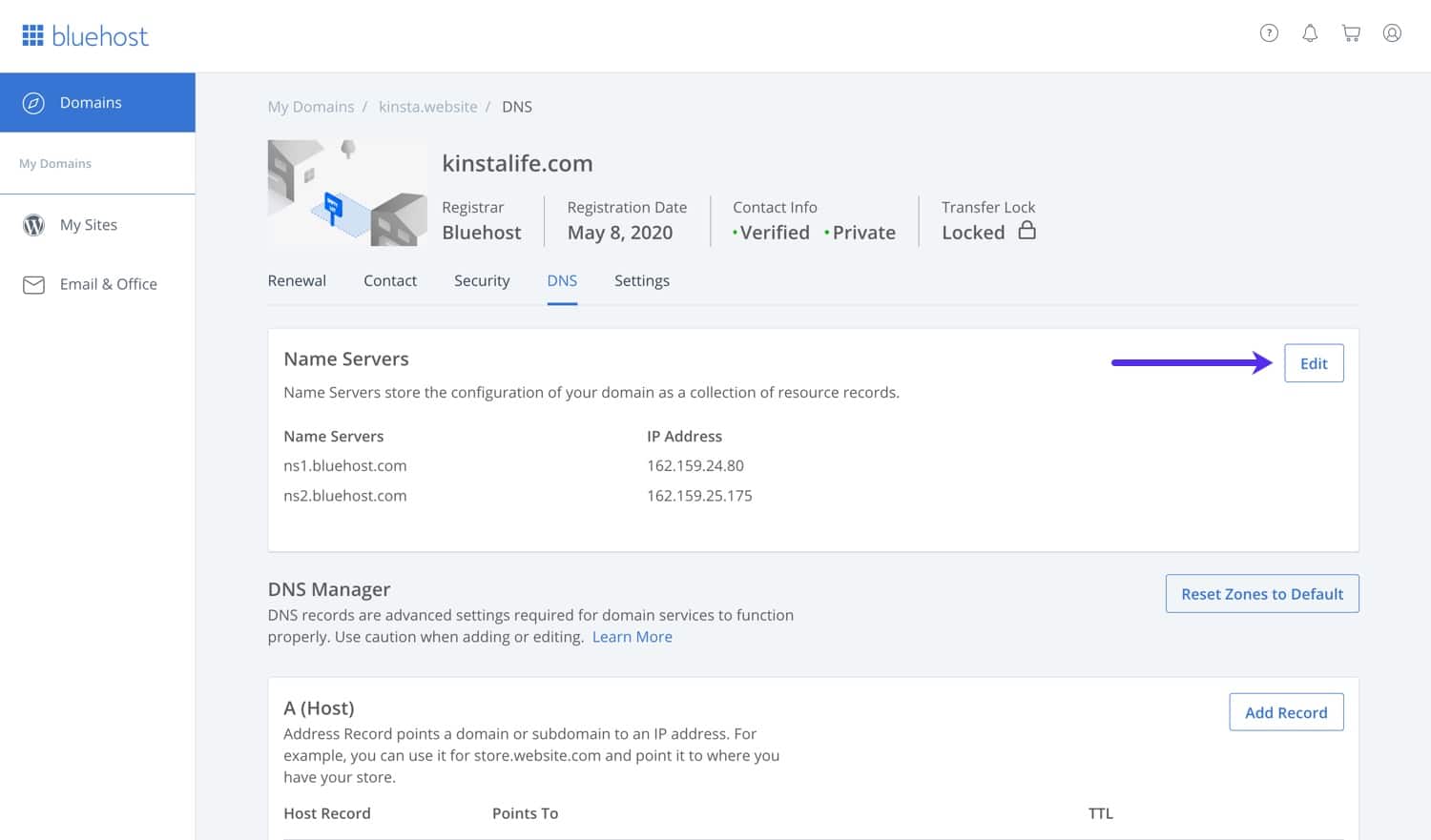
First, log in to your Bluehost account. Once logged in, navigate to the ‘Domains’ tab. Here, you will see a list of all your domains. Select the domain you want to update.
Click on the ‘Manage’ button next to your chosen domain. This will take you to the domain settings page. Look for the section labeled ‘Nameservers’.
Updating Nameserver Information
In the ‘Nameservers’ section, you will see options to either use Bluehost’s nameservers or custom nameservers. Select the custom nameservers option.
Enter the new nameserver information provided by your hosting provider. Typically, you will need at least two nameservers. For example:
| Nameserver | Address |
|---|---|
| NS1 | ns1.example.com |
| NS2 | ns2.example.com |
After entering the new nameservers, click the ‘Save’ button. Your changes will take effect, but it may take up to 48 hours to fully propagate.
This process ensures your domain points to the correct hosting service, making your website accessible to visitors.
Propagation Time
Understanding Bluehost Nameservers and their propagation time is crucial. Propagation time refers to the period it takes for changes to DNS records to spread across the internet. This process can impact website accessibility and performance.
What To Expect
During propagation, your website may be temporarily unavailable. This is normal. Propagation typically takes between 24 to 48 hours. In rare cases, it can take up to 72 hours. The duration depends on various factors like your ISP and DNS server updates.
Expect intermittent access to your website. Some visitors may see the new site, others the old. This happens because DNS updates happen at different times globally.
Checking Propagation Status
There are several tools to check DNS propagation status. These tools provide real-time updates. Popular tools include:
- Whatsmydns.net – Free and easy to use.
- DNS Checker – Provides detailed reports.
- MXToolbox – Offers additional DNS tools.
To check propagation:
- Visit a DNS propagation tool website.
- Enter your domain name.
- Select the DNS record type (A, CNAME, etc.).
- Click the “Check” button.
The tool will show the status of your DNS updates worldwide. This helps you track propagation progress easily.
Common Issues And Solutions
Setting up your Bluehost nameservers is crucial for your website’s success. However, users often face challenges. This section addresses the most common issues and their solutions.
Incorrect Entries
An incorrect nameserver entry can cause your site to be unreachable. Ensure that your nameserver details are entered correctly. Here are the steps to verify:
- Log in to your Bluehost account.
- Navigate to the Domains section.
- Select the domain you want to check.
- Click on the Nameservers tab.
- Verify the entries match the required nameservers.
If entries are incorrect, update them immediately. Correct entries look like this:
| Nameserver | Value |
|---|---|
| ns1.bluehost.com | 123.45.67.89 |
| ns2.bluehost.com | 98.76.54.32 |
Dns Propagation Delays
DNS propagation delays can be frustrating. It occurs when changes take time to reflect globally. Typically, this process can take up to 48 hours.
To minimize downtime, follow these tips:
- Plan changes during low-traffic periods.
- Inform your users about potential delays.
- Use tools like What’s My DNS to check propagation status.
Understanding these common issues can help you maintain a seamless website experience. Ensure your nameserver settings are correct and be patient during DNS propagation.
Benefits Of Using Bluehost Nameservers
Bluehost nameservers offer many benefits for website owners. These advantages help websites run better and stay safe. Let’s explore these benefits in detail.
Improved Performance
Using Bluehost nameservers can make your website faster. They are designed for speed and efficiency. This means quicker load times for your pages.
Better performance also means happier visitors. People do not like waiting for slow websites. Fast websites keep visitors engaged.
Here is a table showing the impact of faster load times:
| Load Time | Visitor Retention |
|---|---|
| 1-2 seconds | 90% |
| 3-4 seconds | 60% |
| 5+ seconds | 30% |
Enhanced Security
Bluehost nameservers offer strong security features. This protects your site from attacks. They use advanced technology to keep your data safe.
Security is important for any website. Protecting data helps build trust with your visitors. A secure site is less likely to face downtime or data breaches.
Here are some security features:
- SSL Certificates
- Two-Factor Authentication
- Regular Backups
These features make your site more secure and reliable. This ensures your visitors’ information is safe.
Credit: www.bluehost.com
Frequently Asked Questions
What Are The Nameservers For Bluehost?
The nameservers for Bluehost are: – ns1. bluehost. com – ns2. bluehost. com Use these to point your domain to Bluehost hosting.
Where Are The Servers Of Bluehost?
Bluehost servers are located in Provo, Utah, and Houston, Texas. These data centers ensure reliable performance and security.
What Are Nameservers Used For?
Nameservers direct internet traffic to the correct web server. They connect domain names to IP addresses, ensuring websites load correctly.
What Is The Difference Between Nameserver And Ip Address?
Nameservers translate domain names into IP addresses. IP addresses identify and locate devices on a network.
Conclusion
Understanding Bluehost nameservers is crucial for managing your domain. They link your domain to your hosting. Correctly configuring them ensures your website runs smoothly. Follow the steps mentioned to avoid downtime. Stay informed and maintain your website’s performance. For more tips on web hosting, visit our other blog posts.