To refund Hostinger, log in to your account and contact customer support within 30 days of purchase. Follow their instructions for a refund.
Hostinger offers a 30-day money-back guarantee on most of their hosting plans. This ensures that users can try their services risk-free. If you are unsatisfied with Hostinger’s hosting, you can easily initiate a refund within this period. Simply log in to your Hostinger account and reach out to their customer support team.
They are available 24/7 to assist you with the refund process. Hostinger’s policy makes it straightforward for users to get their money back without any hassle. This customer-centric approach helps build trust and provides peace of mind for new users.

Credit: www.youtube.com
Eligibility Criteria
Understanding the eligibility criteria is crucial for a successful refund request with Hostinger. Below, we detail the necessary conditions and non-refundable services.
Qualifying For A Refund
To qualify for a refund, your request must meet these conditions:
- Refund Period: Requests must be within 30 days from purchase.
- Service Type: Only specific services are refundable.
- Payment Method: Refunds are processed through the original payment method.
Hostinger offers a 30-day money-back guarantee on most services. Refunds are not provided for domain name renewals or privacy protection.
Non-refundable Services
| Service | Description |
|---|---|
| Domain Name Registrations | Includes new registrations, renewals, and transfers. |
| Privacy Protection | Charges for domain privacy protection services. |
| SEO Toolkit | Fees for using Hostinger’s SEO tools. |
| G Suite | Costs associated with G Suite subscriptions. |
Understanding non-refundable services helps avoid confusion. Always check the terms before purchasing.
Credit: www.websiteplanet.com
Initiating The Refund Process
Refunding your Hostinger purchase is straightforward. Follow these steps to start the refund process. This guide will help you log into your account and navigate to the refund section.
Logging Into Your Account
First, access the Hostinger website. Click the “Login” button at the top. Enter your email and password, then click “Log In”. You will be directed to your dashboard.
Navigating To The Refund Section
On your dashboard, find the menu on the left side. Click on “Billing”. In the billing section, look for “Payment History”. Locate the purchase you want to refund. Click on it to open more details.
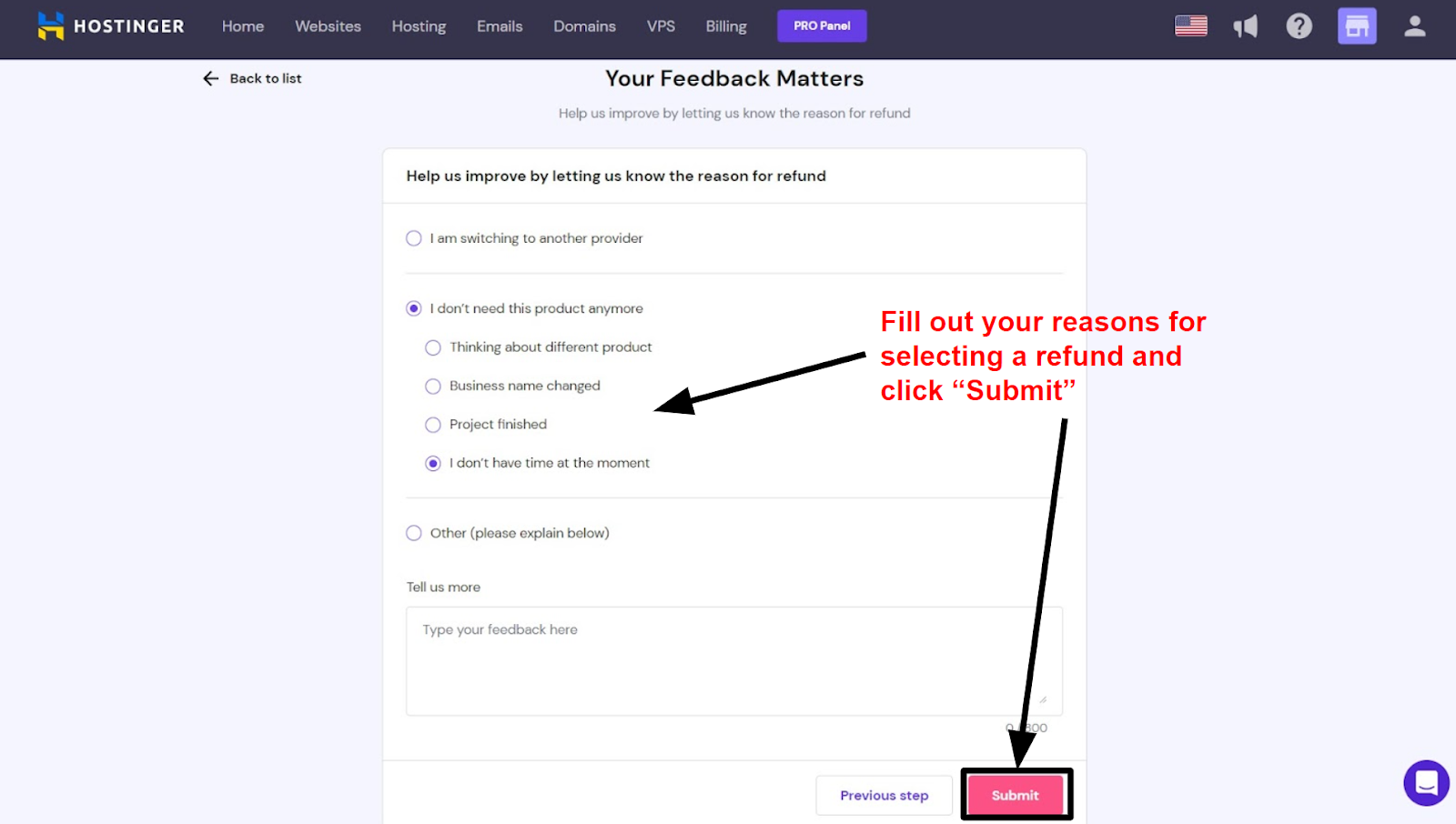
Scroll down to find the “Request Refund” button. Click it to start the refund process. A form will appear asking for details. Fill out the form accurately. Submit the form to send your refund request. Hostinger will process your request within a few days.
Submitting A Refund Request
Requesting a refund from Hostinger is a straightforward process. You need to follow a few simple steps. This guide will help you through the procedure.
Filling Out The Form
First, log in to your Hostinger account. Navigate to the Support section. Look for the Refund Request Form. Click on it to open the form.
Ensure you fill out all required fields. Double-check your input for accuracy. This ensures your request gets processed swiftly.
Providing Necessary Details
In the form, you need to provide specific details. These include:
- Your account email
- The service you want to refund
- Your payment method
- A brief reason for the refund
Ensure all details are accurate and complete. This speeds up the refund process.
| Field | Description |
|---|---|
| Account Email | Your registered email with Hostinger |
| Service | The service you want to refund |
| Payment Method | The method you used for payment |
| Reason | Why you are requesting a refund |
After filling in the form, click the Submit button. Your request will be sent to Hostinger’s support team. They will review your request and process it accordingly.
Communication With Support
Communicating with support is crucial for a smooth refund process with Hostinger. Understanding how to effectively contact customer service can save time and ensure your concerns are addressed promptly. This guide will help you navigate the communication process for a hassle-free refund experience.
Contacting Customer Service
To begin, log in to your Hostinger account. Once logged in, navigate to the Help section. You can start a live chat or submit a ticket. Hostinger’s support team is available 24/7 to assist you.
Provide all necessary details. Include your account information, reason for the refund, and any relevant transaction IDs. Clear and concise information helps expedite the process.
For urgent issues, live chat is the fastest method. A support representative will respond promptly to guide you through the refund process.
Common Questions
When requesting a refund, you might have several questions. Here are some common ones:
- How long does the refund process take? – Refunds typically take 7-14 days to process.
- Can I get a refund after the 30-day money-back guarantee? – Refunds are usually not available after 30 days.
- What if I paid with a credit card? – Refunds are credited back to your card.
- Is the refund applicable to all services? – Some services may not be refundable. Check the terms and conditions.
For any other questions, refer to Hostinger’s knowledge base or contact support directly.
Effective communication with Hostinger’s support team ensures a smooth and quick refund process. Stay patient and provide all requested information to facilitate your refund.
Processing Time
Understanding the processing time for a refund from Hostinger is crucial. This helps you plan and manage expectations. Here, we break down the specifics.
Expected Timeframes
The time it takes to process a refund can vary. Here are the typical timeframes:
| Payment Method | Processing Time |
|---|---|
| Credit/Debit Card | 5-7 business days |
| PayPal | 1-3 business days |
| Bank Transfer | 5-10 business days |
Tracking Your Refund Status
Tracking your refund status is easy. Follow these steps:
- Log in to your Hostinger account.
- Go to the “Billing” section.
- Click on “Transaction History.”
- Look for your refund request.
You can also contact Hostinger Support for updates. They will provide you with the latest information.
Common Issues
Requesting a refund from Hostinger can sometimes be a hassle. Customers face common issues that delay or deny their refunds. This section will help you understand these issues and offer solutions.
Denied Refunds
One common issue is denied refunds. Hostinger has specific refund policies. If you don’t meet these policies, you won’t get a refund. Here are some reasons for denied refunds:
- Requesting a refund after the 30-day money-back guarantee.
- Purchasing non-refundable services like domain registrations.
- Using payment methods that don’t support refunds.
To avoid denied refunds, read Hostinger’s refund policy. Ensure your request falls within the guidelines.
Resolving Disputes
If you face disputes, don’t worry. You can resolve them with Hostinger’s support team. Follow these steps to address your issues:
- Contact Hostinger support via live chat or email.
- Provide your account details and explain the issue.
- Attach any relevant documentation, such as payment receipts.
Be patient and polite during the process. The support team will investigate and resolve your dispute.
Understanding common issues helps you avoid refund problems with Hostinger. Knowing the reasons for denied refunds and how to resolve disputes is key.
Alternative Solutions
Sometimes, asking for a refund may not be the best solution. There are alternative solutions that might suit your needs better. Here are some options to consider before deciding on a refund from Hostinger.
Account Credits
Hostinger offers account credits as an alternative to refunds. These credits can be used for future purchases. This option helps retain your relationship with Hostinger while still addressing your immediate concerns.
- Use credits for domain renewals.
- Apply credits to new hosting plans.
- Save credits for future upgrades.
If you encounter issues, account credits provide a flexible solution. They are a great way to stay with Hostinger and still get value for your money.
Service Upgrades
Consider upgrading your service instead of opting for a refund. Hostinger provides various upgrade options that might better fit your needs.
- Upgrade to a premium hosting plan.
- Switch to a VPS for more control.
- Enhance your site with additional features.
Upgrading your service can offer more resources and better performance. This solution can solve many issues you might be experiencing with your current plan.
| Option | Benefit |
|---|---|
| Account Credits | Flexible use for future services |
| Service Upgrades | More resources and better performance |
By considering these alternative solutions, you can make an informed choice. This ensures you get the most out of Hostinger’s offerings.

Credit: www.youtube.com
Frequently Asked Questions
How Do I Refund My Money From Hostinger?
To refund your money from Hostinger, log in to your account, navigate to the “Billing” section, and select “Refund. “
Does Hostinger Offer A Money Back Guarantee?
Yes, Hostinger offers a 30-day money-back guarantee. This applies to most of their hosting plans. Terms and conditions apply.
How Long Does A Refund Take Hostinger?
Refunds from Hostinger usually take 7-14 business days. Processing times may vary based on your payment method.
How Do I Cancel My Hostinger Payment?
To cancel your Hostinger payment, log in to your account. Go to the Billing section. Select the subscription you want to cancel. Click on “Cancel Subscription. ” Confirm your cancellation.
Conclusion
Getting a refund from Hostinger is straightforward with our step-by-step guide. By following these steps, you ensure a smooth refund process. Remember to contact their support team for any issues. Share your experience to help others who might face similar challenges.
Happy hosting, and best of luck with your future endeavors!