Laser printers give the best quality printouts. They produce sharp text and high-resolution images efficiently.
Laser printers are renowned for their exceptional print quality. They use laser technology to produce crisp, precise text and vibrant images. Ideal for both professional and personal use, these printers handle large volumes with speed and accuracy. Businesses favor laser printers for their reliability and low maintenance costs.
Home users appreciate their efficiency and high-quality output. Compared to inkjet printers, laser printers offer superior durability and longer-lasting prints. They are versatile, supporting various paper types and sizes. For anyone seeking top-notch print quality, laser printers are the best choice. Their advanced technology ensures every document looks professional and polished.
Introduction To High-quality Printouts
High-quality printouts are essential in today’s world. Whether you need documents for work, school, or personal projects, the right printer makes a difference. Print quality affects the readability and appearance of your documents. Understanding which printer offers the best print quality can save you time and money.
Importance Of Print Quality
Print quality impacts your work’s presentation. Crisp, clear printouts enhance professionalism. Poor print quality can make documents hard to read and unprofessional. High-quality prints are crucial for important documents like resumes, proposals, and photos.
In business, print quality reflects your brand. Clients and customers notice the quality of your printed materials. High-quality prints leave a lasting impression. Investing in a good printer can boost your business image.
Factors Influencing Printout Quality
Several factors determine printout quality. Printer type is a key factor. Different printers use various technologies to produce prints. Some are better for text, while others excel in photos.
Ink or toner quality also matters. High-quality ink or toner produces better prints. Low-quality products can cause smudging and faded prints.
| Factor | Impact on Print Quality |
|---|---|
| Printer Type | Determines the overall quality and suitability for different tasks |
| Ink/Toner Quality | High-quality ink/toner produces clearer and more vibrant prints |
| Paper Quality | High-quality paper enhances print clarity and color |
Paper quality is another factor. High-quality paper enhances print clarity and color. Low-quality paper can cause bleeding and dull prints.
Printer settings also play a role. Adjusting settings to match the print task can improve quality. For example, photo prints need different settings than text documents.
- Printer Type
- Ink/Toner Quality
- Paper Quality
- Printer Settings
By considering these factors, you can achieve the best print quality. Choose the right printer and materials for your needs.
Credit: www.cnn.com
Inkjet Printers: Rich Colors And Detail
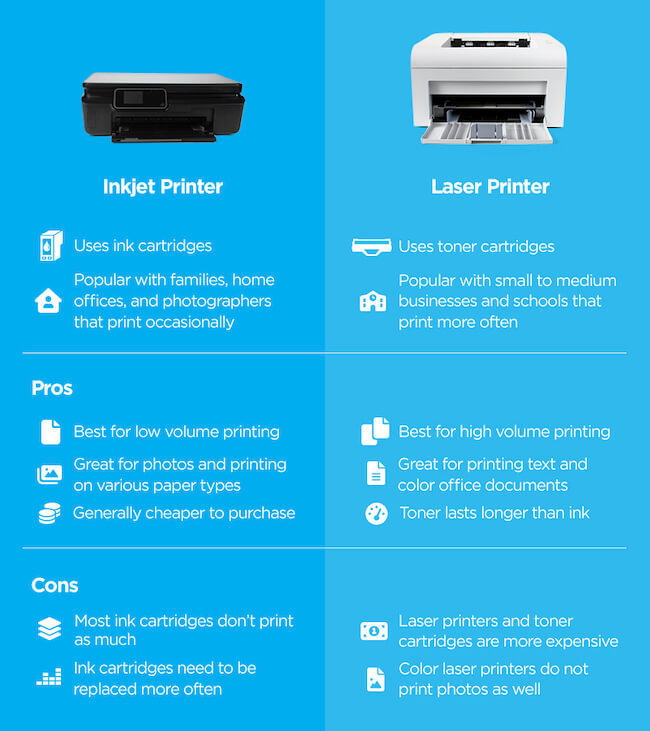
Inkjet printers are a popular choice for producing high-quality prints. They are known for their rich colors and fine detail. These printers are versatile and can handle various types of paper and media. If you want vibrant images and sharp text, inkjet printers are a great option.
Technology Behind Inkjet Printers
Inkjet printers work by spraying tiny droplets of ink onto paper. This method allows for precise control over color and detail. The printer’s nozzles are designed to deliver ink accurately and efficiently.
There are two main types of inkjet technology:
- Thermal Inkjet: Uses heat to create a bubble of ink that bursts onto the paper.
- Piezoelectric Inkjet: Uses a piezoelectric crystal to push ink out of the nozzle.
Both methods produce high-quality prints, but they have different strengths. Thermal inkjets are common in consumer printers. Piezoelectric inkjets are often used in professional-grade printers.
Pros And Cons Of Inkjet Printing
| Pros | Cons |
|---|---|
| Rich, vibrant colors | Ink can smudge if not dry |
| Can print on various media | Ink cartridges can be expensive |
| Great for photos and graphics | Requires regular maintenance |
| High resolution and detail | Slower print speed compared to laser printers |
| Compact and versatile | Ink may dry out if not used often |
Inkjet printers offer many advantages, especially for color printing and photo quality. They are ideal for home and small office use. Consider your specific needs and budget before choosing an inkjet printer.
Laser Printers: Precision And Efficiency
Laser printers are known for their precision and efficiency. They deliver high-quality printouts quickly. This makes them ideal for both home and office use. Laser printers use advanced technology to produce sharp and clear images. Their speed and accuracy set them apart from other types of printers.
How Laser Printers Work
Laser printers use a laser beam to transfer text and images onto paper. The laser beam scans across a drum inside the printer. This drum is coated with a special material that attracts toner powder. The toner powder sticks to the areas of the drum that the laser has touched.
Next, the drum rolls over a piece of paper. The toner is transferred to the paper in the form of the desired image or text. Finally, the paper passes through a fuser, which melts the toner particles. This process ensures that the toner sticks to the paper, creating a permanent print.
Advantages Of Laser Printing Over Inkjet
| Feature | Laser Printers | Inkjet Printers |
|---|---|---|
| Print Quality | High precision and sharp text | Good for photos, less sharp text |
| Speed | Fast | Slower |
| Cost per Page | Lower | Higher |
| Durability | Long-lasting | Medium |
| Maintenance | Minimal | More frequent |
Laser printers offer several advantages over inkjet printers:
- High Print Quality: Laser printers produce crisp and clear text, making them perfect for documents.
- Fast Printing: Laser printers can print large volumes of pages quickly.
- Lower Cost per Page: The cost of toner is less expensive than ink cartridges in the long run.
- Durability: Laser printers are built to handle high-volume printing tasks.
- Minimal Maintenance: Laser printers require less frequent maintenance compared to inkjet printers.

Credit: www.amazon.com
Dye-sublimation Printers: Photographic Quality Prints
Dye-sublimation printers are famous for producing high-quality prints. These printers are a favorite among photographers and graphic designers. Dye-sublimation printing offers vibrant colors, smooth gradients, and sharp details. Let’s delve into how this technology works and when it’s best to use it.
Dye-sub Technology Explained
Dye-sublimation technology uses heat to transfer dye onto materials like paper, plastic, or fabric. The process involves three main steps:
- Printing the image onto a special transfer paper.
- Applying heat and pressure to transfer the dye onto the final material.
- Allowing the material to cool, fixing the dye into place.
The dye turns into gas during the transfer process. This allows it to penetrate the material, creating a permanent image. Dye-sublimation prints are durable and resistant to fading.
When To Choose Dye-sublimation Printing
Dye-sublimation printing is ideal for various applications. Here are some scenarios where this technology shines:
- Photographic Prints: Perfect for producing high-quality photo prints.
- Custom Apparel: Great for printing on T-shirts, caps, and other fabrics.
- Promotional Items: Suitable for creating custom mugs, mouse pads, and keychains.
- Signage: Ideal for producing vibrant, long-lasting signs and banners.
Dye-sublimation printers are also a good choice for small-scale production. They offer quick turnaround times and high-quality results. Consider this technology if you need crisp, vibrant, and durable prints.
Comparing Resolution And Color Accuracy
When deciding on a printer, resolution and color accuracy are key factors. These elements affect the quality of your printouts. Printers vary in how well they handle these aspects. Let’s explore and compare them to find the best option for you.
Understanding Dpi And Color Gamut
DPI stands for dots per inch. It measures the printer’s resolution. Higher DPI means finer details. For instance, 300 DPI is good for text documents. For photos, aim for 1200 DPI or more.
Color gamut refers to the range of colors a printer can produce. A wide color gamut means more vivid and accurate colors. This is crucial for photo printing and artwork.
| Printer Type | DPI Range | Color Gamut |
|---|---|---|
| Inkjet Printers | 300-4800 DPI | Wide |
| Laser Printers | 600-1200 DPI | Narrow |
| Dye-Sublimation Printers | 300-600 DPI | Very Wide |
Which Printers Perform Best
Inkjet printers are versatile. They offer high DPI and wide color gamut. They are ideal for photos and detailed graphics. Brands like Epson and Canon excel in this category.
Laser printers are best for text documents. They have lower DPI compared to inkjets. Their color gamut is also narrower. But, they are fast and cost-effective for high-volume printing.
Dye-sublimation printers offer exceptional color accuracy. They have a very wide color gamut. However, their DPI is generally lower. They are perfect for professional photo printing.
Here’s a quick comparison:
- Inkjet: High DPI, Wide color gamut, Best for photos
- Laser: Moderate DPI, Narrow color gamut, Best for text
- Dye-Sublimation: Lower DPI, Very wide color gamut, Best for photos
Choosing the right printer depends on your needs. For text, go with laser. For photos, consider inkjet or dye-sublimation.

Credit: www.facebook.com
The Role Of Print Media
Print media plays a significant role in determining the quality of your printouts. The type of paper and other media used can drastically affect the final result. Understanding the role of print media is crucial for achieving the best print quality.
Choosing The Right Paper For Quality
Choosing the right paper is essential for quality printouts. Different types of paper are available, each suitable for specific purposes. Here are some common types:
- Glossy Paper: Ideal for photos. It provides vibrant colors and a shiny finish.
- Matte Paper: Suitable for text-heavy documents. It reduces glare and provides a professional look.
- Recycled Paper: Eco-friendly choice. It may not offer the same quality as glossy or matte but is good for everyday printing.
Choosing the right paper depends on your specific needs. For photos, glossy paper is best. For documents, matte paper is ideal.
Impact Of Media On Print Fidelity
The media you choose has a direct impact on print fidelity. This refers to how accurately the print matches the digital file. High-quality media ensures that colors are vibrant and details are sharp.
Here is a comparison table to help understand the impact:
| Media Type | Print Fidelity |
|---|---|
| Glossy Paper | High |
| Matte Paper | Medium-High |
| Recycled Paper | Medium |
Glossy paper offers the highest print fidelity. It captures vibrant colors and fine details. Matte paper provides good fidelity for text and graphics. Recycled paper, while eco-friendly, may not capture colors and details as well.
In summary, the choice of print media significantly impacts the quality of your printouts. Select the right paper for the best results.
Conclusion: The Verdict On Print Quality
Choosing the right printer is crucial for getting the best print quality. Several factors contribute to the final output, including the printer type, ink quality, and print resolution. This section will provide a clear verdict on the best printer types for high-quality printouts.
Summarizing The Best Printer Types
Different types of printers excel in various areas, but for print quality, some stand out. Here is a summary of the best printer types:
| Printer Type | Best For | Key Features |
|---|---|---|
| Inkjet Printers | Photos and Color Prints | High color accuracy, smooth gradients |
| Laser Printers | Text Documents | Crisp text, fast printing |
| LED Printers | Graphics and Text | Similar to laser, reliable |
| Dye-Sublimation Printers | Professional Photos | Vibrant colors, durable prints |
Final Recommendations For Buyers
Before buying, consider what you will print most often. Here are some final recommendations:
- For photo enthusiasts: An inkjet printer or dye-sublimation printer is ideal.
- For text-heavy documents: A laser printer provides the best clarity and speed.
- For mixed use: An LED printer balances quality and reliability.
Choosing the right printer ensures you get the best print quality. Each printer type has unique strengths, so pick one that matches your needs.
Frequently Asked Questions
Which Printer Type Offers The Best Print Quality?
Laser printers typically offer the best print quality. They produce sharp and precise text and graphics. These printers use toner rather than ink, ensuring consistency. For photos, inkjet printers can be superior. They provide vibrant and detailed images. Choose based on your specific printing needs.
Are Inkjet Printers Good For High-quality Photos?
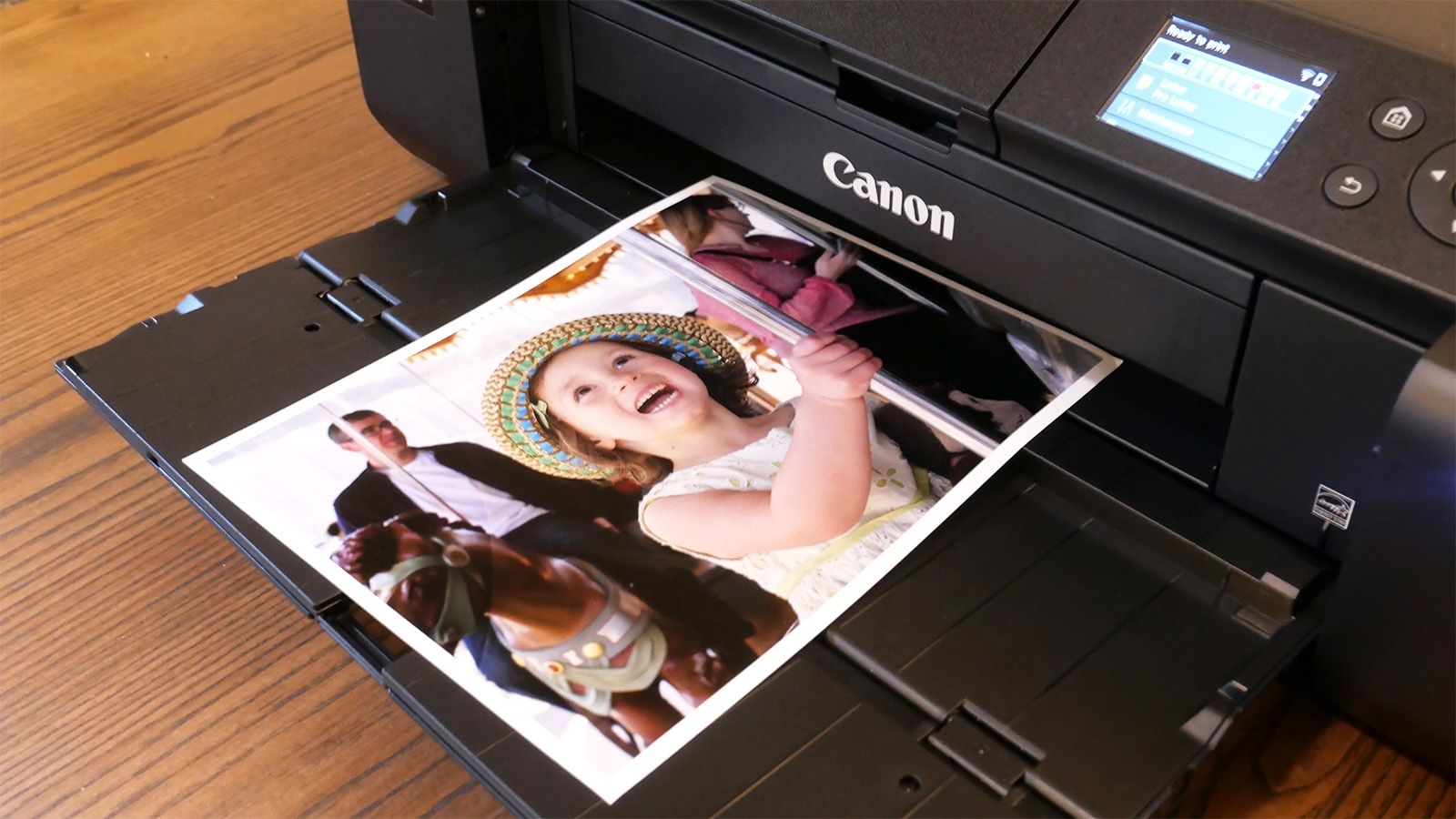
Yes, inkjet printers are excellent for high-quality photos. They use a variety of color inks. This results in vibrant and detailed prints. Many photo enthusiasts prefer inkjet printers. They offer superior color depth and gradient. Ensure to use high-quality photo paper for best results.
Do Laser Printers Produce Clearer Text?
Yes, laser printers produce clearer text. They use laser technology to create precise prints. This makes them ideal for documents. Text from laser printers is sharp and professional. They are commonly used in offices for this reason. They also handle high-volume printing efficiently.
What Is The Best Printer For Home Use?
For home use, inkjet printers are often the best choice. They are versatile and handle various tasks. From printing documents to photos, they perform well. They are also generally more affordable. Look for models with wireless capabilities. This adds convenience for multiple users.
Conclusion
Choosing the right printer depends on your specific needs. Laser printers offer sharp text and fast speeds. Inkjet printers excel with vibrant colors and detailed images. For professional-quality photos, dye-sublimation printers are ideal. Assess your priorities and select the printer that best meets your quality expectations.