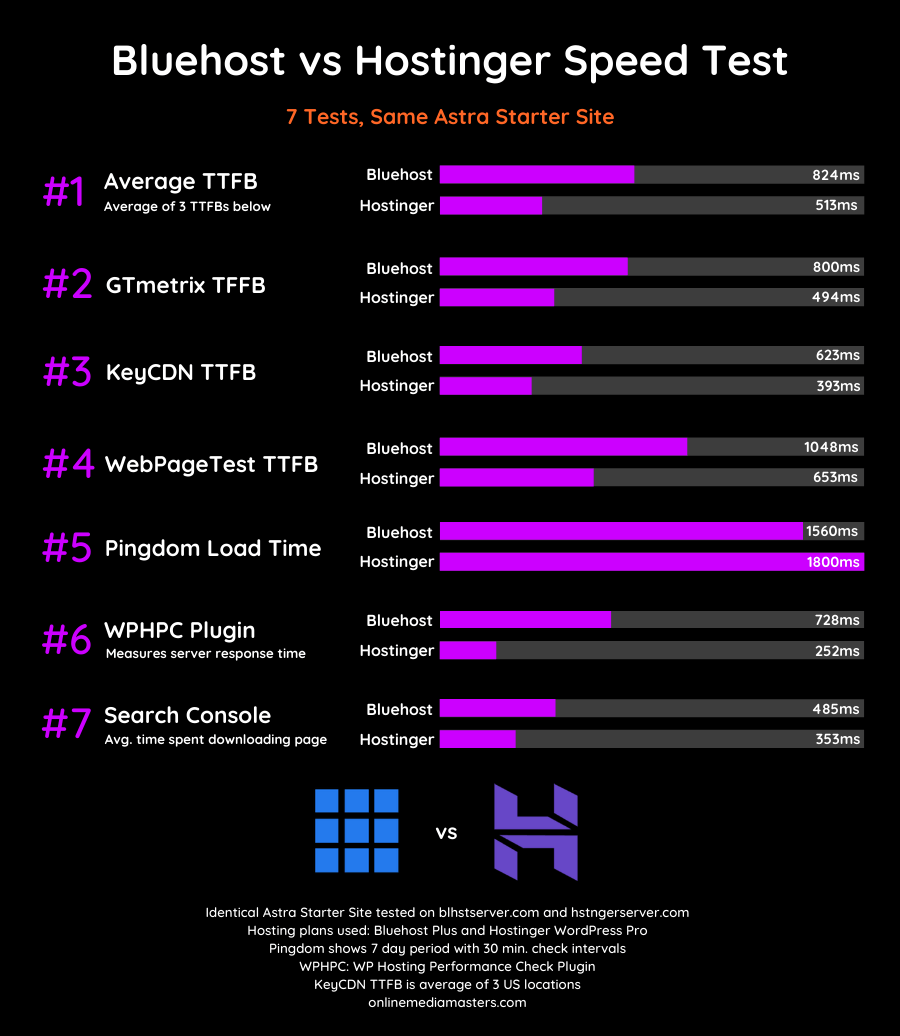
Hostinger offers affordable pricing and fast loading speeds. Bluehost excels in customer support and WordPress integration.
Hostinger and Bluehost are two popular web hosting providers, each with distinct advantages. Hostinger stands out for its budget-friendly plans and impressive speed, making it a great choice for small businesses and personal websites. On the other hand, Bluehost is renowned for its exceptional customer support and seamless WordPress integration, ideal for users looking to build or maintain a WordPress site.
Both hosts offer a range of features, including free SSL certificates, one-click installations, and robust security measures. Choosing between them depends on your specific needs, budget, and technical expertise. Whether you’re a beginner or an experienced webmaster, either option can cater to your hosting requirements effectively.

Credit: www.bluehost.com
Company Backgrounds
Understanding the history of a web hosting provider is crucial. It helps you make an informed decision. In this section, we’ll dive into the backgrounds of Hostinger and Bluehost.
Hostinger Overview
Hostinger started in 2004 in Lithuania. It aimed to provide affordable web hosting solutions. The company has grown significantly since its inception. Today, it serves over 29 million users across 178 countries.
Hostinger focuses on delivering top-notch performance and customer service. The company boasts a user-friendly interface. It also offers a wide range of hosting options. These include shared hosting, VPS, and cloud hosting.
Bluehost Overview
Bluehost was founded in 2003. It quickly became a popular choice for web hosting. Bluehost is based in the United States and is part of the Endurance International Group.
Bluehost is known for its strong WordPress integration. It is officially recommended by WordPress.org. The company serves millions of customers globally. Bluehost offers various hosting plans. These include shared hosting, VPS, and dedicated servers.
| Criteria | Hostinger | Bluehost |
|---|---|---|
| Founded | 2004 | 2003 |
| Location | Lithuania | United States |
| Users | 29 million | Millions globally |
| Specialty | Affordable hosting | WordPress integration |
Pricing Plans
Choosing the right hosting provider involves understanding their pricing plans. Hostinger and Bluehost offer different options. Let’s explore their pricing plans in detail.
Hostinger Pricing
Hostinger provides affordable and flexible plans. Here are the main options:
| Plan | Monthly Cost | Features |
|---|---|---|
| Single Shared Hosting | $1.99 | 1 Website, 30GB SSD, 1 Email Account |
| Premium Shared Hosting | $2.99 | 100 Websites, 100GB SSD, Free Domain |
| Business Shared Hosting | $4.99 | 100 Websites, 200GB SSD, Daily Backups |
Bluehost Pricing
Bluehost offers a variety of plans. Here are the main options:
| Plan | Monthly Cost | Features |
|---|---|---|
| Basic | $2.95 | 1 Website, 50GB SSD, Free Domain |
| Plus | $5.45 | Unlimited Websites, Unlimited SSD, Free Domain |
| Choice Plus | $5.45 | Unlimited Websites, Unlimited SSD, Free Domain, Free CDN |
Performance And Uptime
Performance and uptime are critical factors for website hosting. They directly impact user experience and search engine ranking. Both Hostinger and Bluehost promise excellent performance and uptime. Let’s compare their offerings.
Hostinger Performance
Hostinger is known for its fast loading times. Their servers use LiteSpeed technology to optimize speed.
Hostinger offers a 99.9% uptime guarantee. This ensures your website is almost always available.
Hostinger’s data centers are spread across the globe. This ensures faster content delivery.
They also use SSD storage which is faster than traditional storage. This further boosts performance.
Bluehost Performance
Bluehost also boasts impressive speed and 99.9% uptime. Their servers are optimized for WordPress.
Bluehost uses Cloudflare CDN for faster content delivery. This improves performance for global visitors.
They offer free SSD storage. This ensures quick data retrieval, enhancing speed.
Bluehost has multiple data centers. This ensures better performance and reliability.
| Feature | Hostinger | Bluehost |
|---|---|---|
| Uptime Guarantee | 99.9% | 99.9% |
| Speed Technology | LiteSpeed | Cloudflare CDN |
| Data Centers | Global | Global |
| Storage Type | SSD | SSD |

Credit: www.bluehost.com
Customer Support
Customer support is a crucial factor when choosing a web host. Efficient support ensures your website runs smoothly without issues. Let’s compare the customer support offered by Hostinger and Bluehost.
Hostinger Support
Hostinger provides 24/7 customer support through multiple channels. Their support team is accessible via live chat and email. Hostinger also offers a comprehensive knowledge base.
- Live Chat: Available 24/7 for instant help.
- Email Support: Quick response times for non-urgent issues.
- Knowledge Base: Extensive guides and tutorials.
Hostinger’s support is known for being friendly and efficient. Their agents are well-trained and helpful.
Bluehost Support
Bluehost also offers 24/7 customer support through various channels. You can reach their support team via phone, live chat, and email. Bluehost has an extensive support portal.
- Phone Support: Available 24/7 for immediate assistance.
- Live Chat: Instant support with knowledgeable agents.
- Email Support: Suitable for detailed queries.
- Support Portal: Rich in tutorials and FAQs.
Bluehost’s support is praised for its reliability and professionalism. They ensure quick resolutions to customer issues.
Ease Of Use
Choosing between Hostinger and Bluehost can be tough. Understanding their ease of use can help. This section will explore the user interfaces of both hosting platforms.
Hostinger Interface
Hostinger’s interface is simple and easy to navigate. They use a custom control panel called hPanel.
The hPanel is intuitive and beginner-friendly. It offers a clean layout and organized menus. Users can find what they need quickly. Here are some features of Hostinger’s interface:
- Quick Access: Essential tools are accessible from the dashboard.
- Drag-and-Drop: Site builder with drag-and-drop functionality.
- One-Click Installs: Easy installation for popular apps like WordPress.
Hostinger also provides helpful tutorials and guides. These resources assist new users in managing their websites efficiently.
Bluehost Interface
Bluehost uses the popular cPanel for its interface. cPanel is well-known and widely used in the hosting industry.
Bluehost’s interface is user-friendly and robust. It integrates seamlessly with WordPress. Here are some features of Bluehost’s interface:
- Integrated Marketplace: Access to themes and plugins directly.
- One-Click Installs: Install WordPress and other apps with one click.
- Site Management: Advanced tools for managing multiple sites.
Bluehost also offers a guided setup process. This helps new users get started without confusion.
Both Hostinger and Bluehost provide user-friendly interfaces. Hostinger’s hPanel is great for beginners. Bluehost’s cPanel is ideal for users wanting advanced features.
Features And Tools
Choosing the right web hosting provider can be challenging. Both Hostinger and Bluehost are popular choices. To make an informed decision, it’s crucial to compare their features and tools.
Hostinger Features
Hostinger offers a variety of features that cater to different needs. Here are some key features:
- Free Domain: Hostinger provides a free domain with annual plans.
- Free SSL: SSL certificates are included, enhancing website security.
- LiteSpeed Cache: This tool helps in speeding up website loading times.
- 99.9% Uptime Guarantee: Reliable uptime ensures your site is always online.
- 24/7 Support: Hostinger offers round-the-clock customer support.
Hostinger also includes an easy-to-use control panel. This makes website management straightforward. Their plans are budget-friendly, making them ideal for beginners.
Bluehost Features
Bluehost is known for its robust features. These features cater to both beginners and advanced users:
- Free Domain: Bluehost offers a free domain for the first year.
- Free SSL: Secure your website with free SSL certificates.
- 1-Click WordPress Install: Simplifies WordPress setup.
- 24/7 Support: Comprehensive support available anytime.
- Resource Protection: Ensures your site remains stable under traffic spikes.
Bluehost also provides a user-friendly control panel. This makes site management easy. Their integration with WordPress is seamless, benefiting bloggers and developers alike.
Below is a table summarizing the key features of Hostinger and Bluehost:
| Feature | Hostinger | Bluehost |
|---|---|---|
| Free Domain | Yes | Yes |
| Free SSL | Yes | Yes |
| Website Speed Tools | LiteSpeed Cache | Basic Caching |
| Uptime Guarantee | 99.9% | 99.9% |
| 24/7 Support | Yes | Yes |
| Control Panel | Custom | cPanel |
Security Measures
Website security is crucial. This section looks at how Hostinger and Bluehost keep your site safe. Both offer various security features to protect your data and website.
Hostinger Security
Hostinger provides strong security features. SSL certificates are free with all plans. SSL helps encrypt data between your site and visitors. Hostinger also includes Cloudflare protection.
Cloudflare shields your site from DDoS attacks. It helps keep your site online during traffic spikes. Hostinger has a custom firewall. The firewall blocks suspicious traffic and keeps your site secure.
Automatic daily backups are another feature. Backups ensure you can restore your site if something goes wrong. Hostinger also uses BitNinja, a security tool that combines various protection methods.
Bluehost Security
Bluehost also offers robust security features. Every plan comes with a free SSL certificate. SSL secures data transfers and boosts your site’s trustworthiness. Bluehost includes SpamExperts for email protection.
SpamExperts helps filter out harmful emails. Bluehost provides SiteLock, which scans your site for malware. SiteLock helps detect and fix vulnerabilities. CodeGuard is another tool included in Bluehost plans.
CodeGuard provides daily backups for your site. With backups, you can restore your site easily. Bluehost also has a custom firewall system. Their firewall helps block malicious traffic.
| Feature | Hostinger | Bluehost |
|---|---|---|
| Free SSL Certificate | Yes | Yes |
| Firewall | Custom | Custom |
| Daily Backups | Yes | Yes |
| Anti-DDoS | Cloudflare | Yes |
| Email Protection | BitNinja | SpamExperts |
| Malware Scanning | BitNinja | SiteLock |
Pros And Cons
Choosing the right web hosting service is crucial for your online success. Both Hostinger and Bluehost are popular options. Below, we break down the pros and cons of each to help you decide.
Hostinger Pros And Cons
Hostinger is known for its affordability and performance. Let’s take a look at its pros and cons.
| Pros | Cons |
|---|---|
|
|
Bluehost Pros And Cons
Bluehost is a reliable and beginner-friendly hosting service. Below are its pros and cons.
| Pros | Cons |
|---|---|
|
|
Credit: www.wpbeginner.com
Frequently Asked Questions
Is Hostinger The Same As Bluehost?
No, Hostinger and Bluehost are different web hosting companies. Hostinger offers affordable plans, while Bluehost is known for its WordPress integration.
Who Is Better Than Bluehost?
SiteGround, HostGator, and A2 Hosting often rank higher than Bluehost. They offer better performance, customer support, and features.
What Is Better Than Hostinger?
Bluehost and SiteGround often rank higher than Hostinger. They offer better performance, customer support, and features.
Is Bluehost Still The Best?
Bluehost remains a top choice for many, offering reliable hosting, great customer support, and competitive pricing. Evaluate your needs to decide.
Conclusion
Choosing between Hostinger and Bluehost depends on your specific needs. Hostinger offers budget-friendly plans with fast performance. Bluehost provides excellent customer support and seamless WordPress integration. Assess your requirements and budget to make the best decision. Either way, both hosts offer reliable services for your website.