To get a refund from Hostinger, submit a cancellation request through your control panel. Ensure it’s within the 30-day money-back guarantee period.
Hostinger offers a 30-day money-back guarantee on most of their hosting plans. This ensures customers can try their services without financial risk. To initiate the refund process, log in to your Hostinger account and navigate to the control panel. Locate the cancellation request option and submit it.
The process is straightforward and designed to be user-friendly. Hostinger aims to provide a hassle-free experience, ensuring customer satisfaction. If any issues arise, their support team is available to assist. This policy demonstrates Hostinger’s confidence in their services and commitment to customer satisfaction.

Credit: m.youtube.com
Hostinger Refund Policy
Understanding the Hostinger Refund Policy is important for all users. This policy outlines the conditions under which refunds are granted. Knowing these details ensures a smooth refund process.
Eligibility Criteria
To be eligible for a refund, certain criteria must be met. Below are the main points:
- 30-Day Money-Back Guarantee: Hostinger offers a 30-day money-back guarantee for most services.
- Exclusions: Domain name renewals, privacy protection, and redemption fees are non-refundable.
- Payment Method: Refunds are processed through the original payment method used.
Time Frame For Refunds
The time frame for refunds is crucial. Here’s a breakdown:
| Service | Refund Period |
|---|---|
| Shared Hosting | 30 Days |
| VPS Hosting | 30 Days |
| Domain Registrations | 4 Days |
Refund requests must be made within these periods. Any requests after these periods will not be eligible.
Credit: www.websiteplanet.com
Types Of Refunds
Understanding the types of refunds available from Hostinger can save you time and hassle. Hostinger offers different refund options based on your situation and the service you purchased. Below we explore full refunds and partial refunds in detail.
Full Refunds
A full refund means you get back all the money you paid. Hostinger offers a 30-day money-back guarantee for many of its services. This includes web hosting, cloud hosting, and VPS hosting.
- Applies to most hosting plans.
- Must be requested within 30 days of purchase.
- Excludes domain registrations and renewals.
To request a full refund, contact Hostinger support. They will guide you through the process. Make sure to provide your account details for quick service.
Partial Refunds
Partial refunds apply when you cancel a service after the 30-day period. The refund amount depends on the remaining service term.
| Service | Refund Percentage |
|---|---|
| Web Hosting | Pro-rated based on unused months |
| Cloud Hosting | Pro-rated based on unused months |
| VPS Hosting | Pro-rated based on unused months |
To initiate a partial refund, contact Hostinger support. They will calculate the amount based on the remaining term.
Remember, domain registrations and renewals are not eligible for refunds. Always check the terms of service for more details.
Refund Process
Are you unsatisfied with Hostinger’s services? The refund process is straightforward. Understanding the steps will help you get your money back quickly. This guide will walk you through the process.
Step-by-step Guide
Follow these simple steps to request your refund:
- Log in to your Hostinger account.
- Go to the Dashboard and click on Billing.
- Find the service you want a refund for.
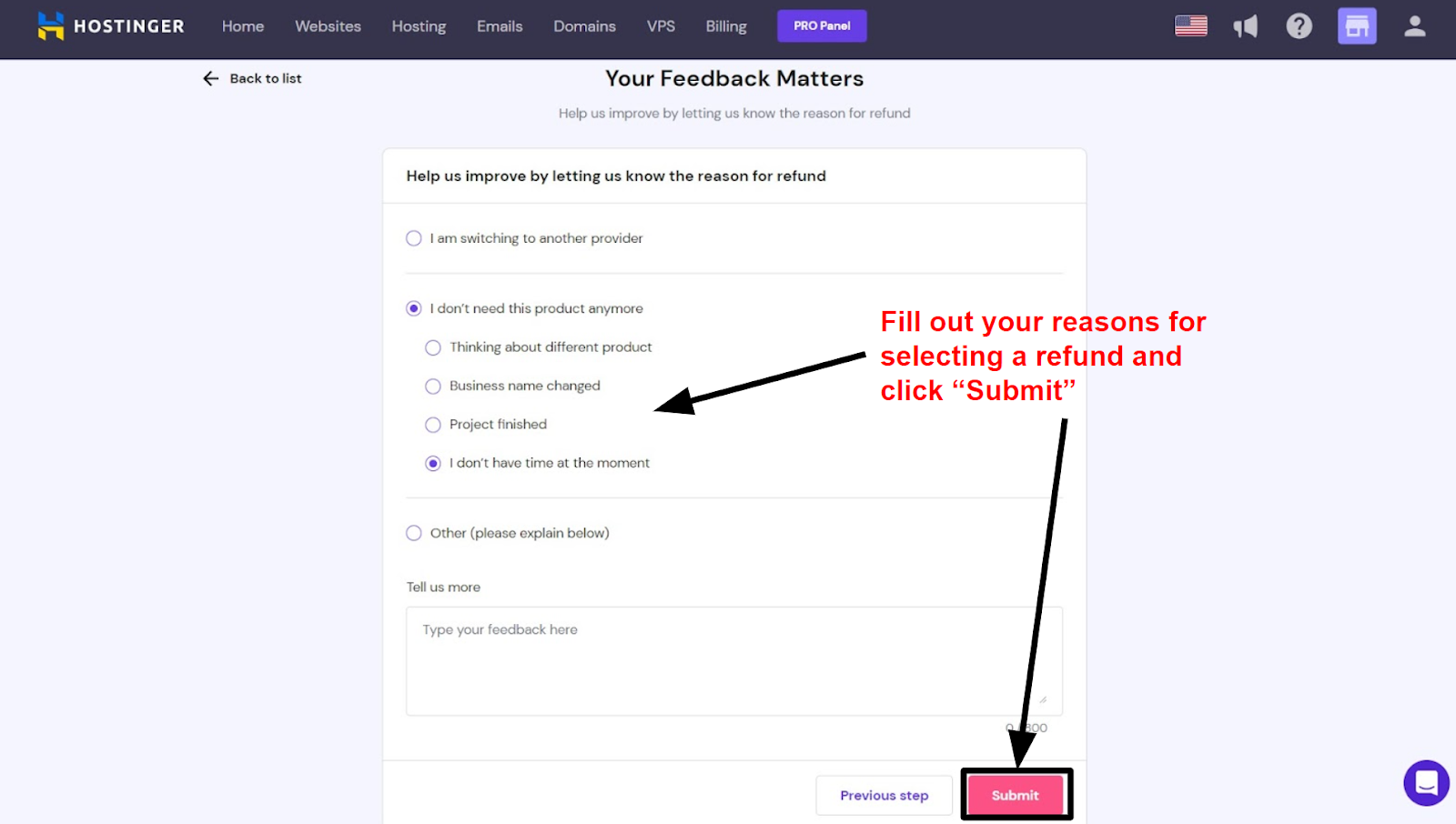
- Click on Request a Refund.
- Fill out the form with the required details.
- Submit your refund request.
After submitting, Hostinger’s team will review your request. They will usually process it within a few days.
Required Documentation
Make sure you have the following documents ready:
- Proof of purchase (invoice or receipt).
- Your account details (email and username).
- Reason for the refund (optional but recommended).
Having these documents will speed up the refund process. It ensures Hostinger verifies your request quickly.
Credit: www.websiteplanet.com
Contacting Support
Needing a refund from Hostinger can be easy. The key step is contacting their support team. This guide will show you how to get help through different methods. Let’s explore the options.
Live Chat
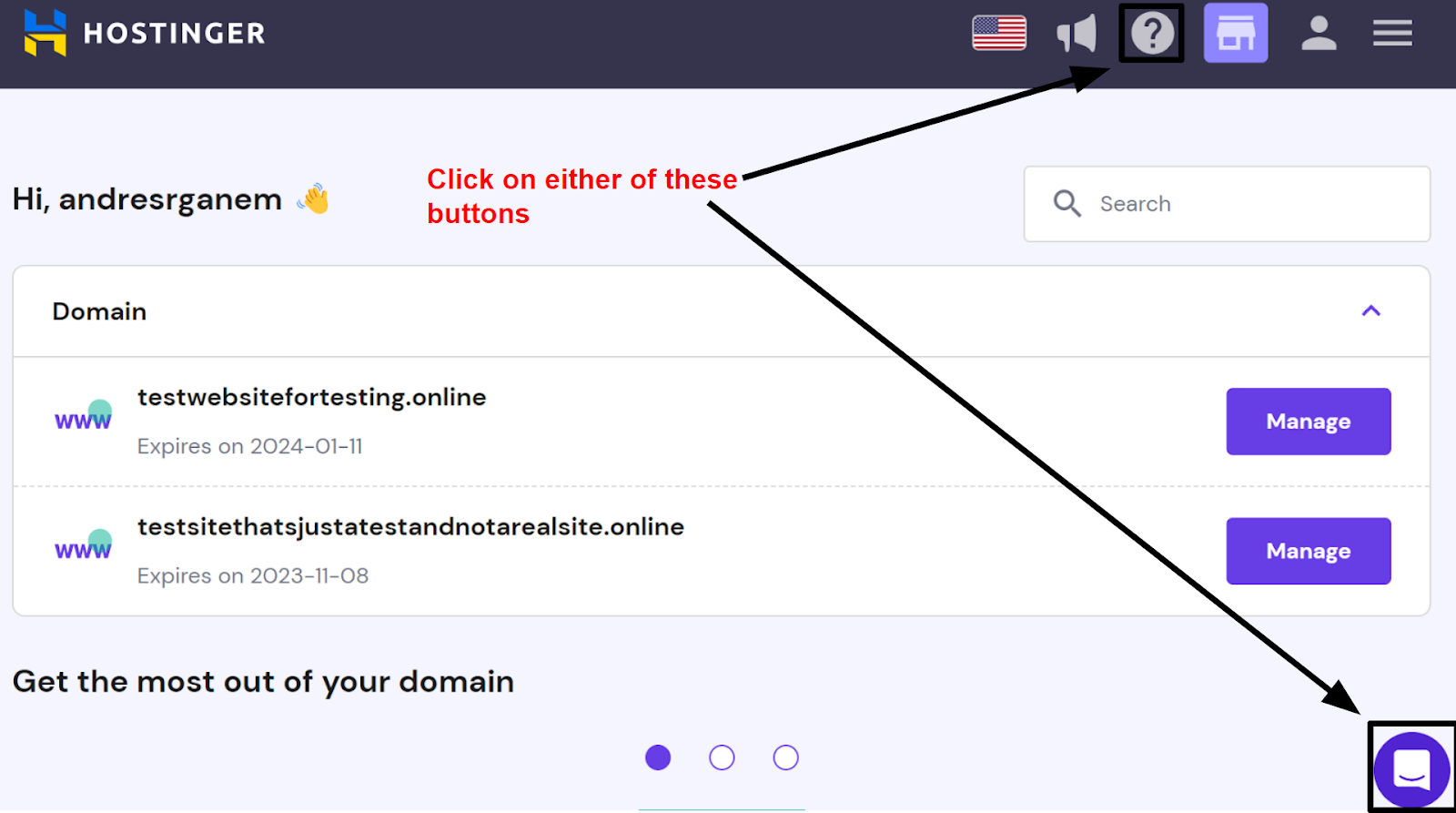
Hostinger offers a 24/7 live chat service. This is the fastest way to reach their support team. Follow these steps:
- Log in to your Hostinger account.
- Navigate to the Help section.
- Click on the Live Chat button.
- Wait for a support agent to join the chat.
- Explain your request for a refund.
The support agent will guide you through the process. Be sure to have your order details ready.
Email Support
If you prefer email, you can contact Hostinger’s email support. Here’s how:
- Compose a new email.
- In the subject line, write “Refund Request”.
- Address the email to support@hostinger.com.
- Include your order number and account details.
- Explain why you need a refund.
Send the email and wait for a response. Hostinger usually replies within 24 hours.
Common Issues
Seeking a refund from Hostinger can be challenging. Users often face different issues during the process. This section covers the common problems like refund denials and delayed refunds.
Refund Denials
Many users report refund denials for various reasons. Commonly, the request might not meet the terms and conditions. Ensure you read the refund policy carefully.
- Requests after the 30-day period are usually denied.
- Refunds for domain registrations often get refused.
- Make sure to cancel services before asking for a refund.
If your request was denied, check if you missed any steps. Contact customer support for further clarification.
Delayed Refunds
Another frequent issue is delayed refunds. Users sometimes wait weeks for their money. This can be frustrating and stressful.
- Ensure you provided the correct payment details.
- Check your email for any updates from Hostinger.
- Contact support if the refund takes more than 7 days.
Here is a quick overview in a table format:
| Issue | Action |
|---|---|
| Refund Denied | Check terms and contact support. |
| Delayed Refund | Verify details and follow up. |
These steps can help resolve your refund issues. Always keep communication clear and timely with Hostinger.
Tips For A Smooth Refund
Requesting a refund from Hostinger can be straightforward if you follow certain tips. These tips ensure a hassle-free process and increase your chances of success. Below are essential tips for a smooth refund experience.
Keep Records
Always keep records of all communications with Hostinger. Save emails, chat logs, and any other interactions. These records are crucial if disputes arise. Maintaining documentation helps track your request’s progress.
Use a spreadsheet to list dates, times, and conversation summaries. This helps you stay organized and provides quick reference points.
Follow Up Regularly
Don’t assume your refund request is being processed. Follow up regularly to check the status. Set reminders to contact Hostinger support every few days.
Polite reminders show your seriousness about the refund. They also ensure your request stays on their radar.
Alternative Solutions
Sometimes, requesting a refund from Hostinger might not be the best option. Instead, you can consider some alternative solutions that could offer better value. These include account credits or service transfers. Let’s explore them in detail.
Account Credits
If you don’t want a refund, you can ask for account credits. These credits can be used to purchase other services from Hostinger.
This option is quick and hassle-free. It ensures you don’t lose any money, and you can use the credits for future needs.
Hostinger’s account credits can be used for:
- Hosting plans
- Domain registrations
- SSL certificates
- Other add-on services
To request account credits, contact Hostinger’s support team. They will guide you through the process. Usually, the credits are added to your account instantly.
Service Transfers
Another great option is service transfers. This allows you to transfer your current service to another user.
This is useful if you no longer need the service but know someone who does. Transferring your service is straightforward and quick.
Steps to transfer your service:
- Contact Hostinger support
- Provide the new user’s details
- Confirm the transfer
- Wait for Hostinger to process the request
Once the transfer is complete, the new user will have access. This way, you make good use of your purchase without any loss.
With these alternative solutions, you can make the best out of your investment. Whether you choose account credits or service transfers, both options are simple and effective.
Frequently Asked Questions
Can I Get Money Back From Hostinger?
Yes, you can get a refund from Hostinger. They offer a 30-day money-back guarantee on most services.
Why Is The Refund Button Not Showing On Hostinger?
The refund button may not appear if your service is outside the refund period. Contact Hostinger support for assistance.
How Do I Cancel My Hostinger Payment?
To cancel your Hostinger payment, log in to your account. Go to the Billing section. Select the subscription. Click “Cancel” and confirm.
Can I Cancel An Hostinger Subscription?
Yes, you can cancel a Hostinger subscription. Go to your account, select the service, and click “Cancel. “
Conclusion
Getting a refund from Hostinger is straightforward if you follow the right steps. Ensure you understand their policy, contact support, and provide necessary details. This process will help you secure your refund smoothly. Remember to act within the specified period for the best outcome.
Happy hosting and hassle-free refunds!