Are you eager to create a landing page that captivates visitors and drives conversions? You’re in the right place.
Coding a landing page might seem daunting, but with the right guidance, you can craft a page that not only looks stunning but also performs exceptionally well. Imagine having a landing page that effortlessly guides your audience, making them eager to learn more or take action.
That’s the power of a well-coded landing page. You’ll uncover the essential steps to coding a landing page that stands out. We’ll simplify the process, ensuring you have the tools and knowledge to build a page that resonates with your audience. Get ready to transform your ideas into a digital experience that leaves a lasting impression. Dive in, and let’s unlock the secrets to crafting an unforgettable landing page.
Planning Your Landing Page
Start by thinking about what you want to achieve. Clear goals help in making a good landing page. You might want to get sign-ups or sell a product. Knowing your goals helps you create a better page.
Think about who will visit your page. Knowing your audience is key. Are they kids or adults? What do they like? This helps in making the page right for them. The audience needs to feel connected to the page.
Pick what is important for your landing page. Key features make the page useful. You might need a contact form or a buy button. Choose features that help meet your goals. Keep it simple for easy use.
Choosing The Right Tools
HTML is the skeleton of your landing page. It tells the browser what to show. Use CSS to add colors and styles. Make your page look nice. Learn the basics first. They are easy and fun to use. Start with simple tags and styles. Practice every day to get better.
JavaScript adds life to your page. It makes things move and change. You can show or hide parts of your page. Add buttons that do cool things. Start small. Learn simple scripts. As you learn, try new things. Keep your code clean and simple.
Design software helps make your page pretty. Tools like Adobe XD and Figma are popular. They help you plan your page. Create layouts and see how it looks. Choose the tool that you like best. Practice and explore. Your designs will improve with time.
Structuring The Layout
The header is the top part of a page. It often shows the logo and site name. The navigation menu helps visitors find pages easily. Use simple words for menu items. Make sure each link works. A clear header makes a page look tidy.
This is where the most important information goes. Use headings to show different sections. Keep sentences short and clear. Use images to make it interesting. Make sure the text is easy to read. Break text into small paragraphs. This helps people read faster.
The footer is at the bottom of the page. It often has contact information. You might find links to social media here. Sometimes it has a newsletter signup. The footer helps visitors find extra information. Keep it simple and neat.
Designing The User Interface
Colors make a page look nice. Pick two or three colors. Use them across the page. This keeps the look clean. Fonts are important too. Choose simple fonts. They should be easy to read. Match the font style with your colors. This creates harmony. A good design is pleasing to the eyes.
Pages should work on all devices. Tablets, phones, and computers. Make sure the layout adjusts. Use flexible grids. This helps the page fit any screen. Images should resize too. Test on different devices. See how everything looks. Ensure buttons are easy to tap. This makes the site user-friendly.
Important parts should stand out. Use size and color to highlight them. Big headings catch attention. Strong colors make things pop. Organize content from most to least important. This guides the eyes. Make sure key messages are clear. Users will find what they need quickly.
Coding The Frontend
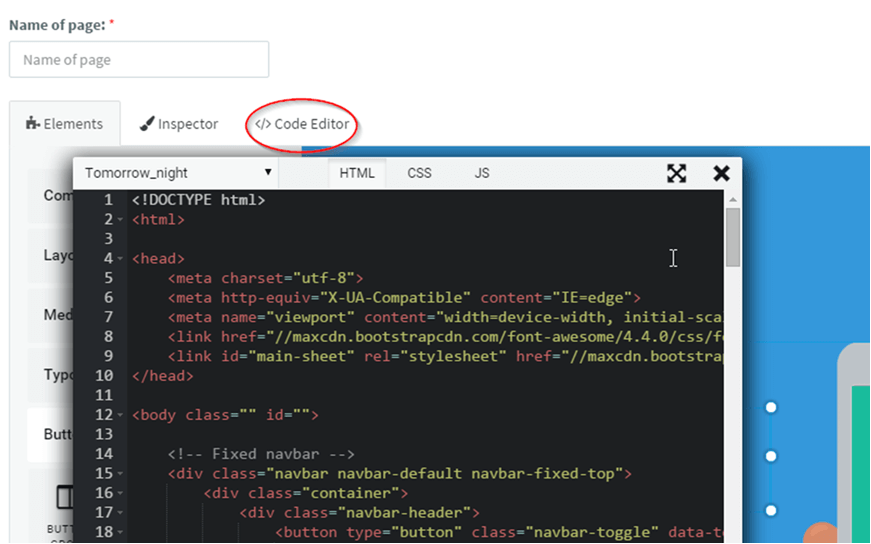
HTML is the backbone of your landing page. Use tags to structure content. Start with a
CSS makes your page look nice. Choose colors and fonts to match your brand. Use classes and IDs for specific styles. Add padding and margin to space things out. Use flexbox or grid for layout. Test on different screens. Styles should be neat and clear.
JavaScript brings life to your page. Add buttons for actions. Use events like click or hover. Show and hide content with functions. Validate forms before sending. Make slideshows or galleries. Test each script. Keep interactions simple and fun.
Optimizing For Performance
Creating a fast and smooth landing page involves clean coding and optimized images. Focus on reducing load times to improve user experience. Efficient code structure enhances performance and ensures visitors stay engaged.
Minifying Code
Minifying code means making it smaller. Remove spaces and comments. This helps pages load faster. Smaller files use less bandwidth. Users enjoy quicker access. Minified code is hard to read. Keep the original for editing. Use tools like UglifyJS or CSSNano.
Image Optimization Techniques
Images can slow down a page. Optimize images to make them smaller. Use formats like JPEG or PNG. Compress images without losing quality. Tools like TinyPNG help. Lazy loading can also help. Load images only when needed. This saves bandwidth and speeds up the page.
Reducing Load Times
Fast load times make users happy. Use fewer HTTP requests. Combine CSS and JavaScript files. Cache files to reuse them. Use a Content Delivery Network (CDN). This helps deliver content faster. Keep your server fast and responsive.
Testing And Debugging
Browsers show pages differently. Ensure your landing page works everywhere. Test it on Chrome, Firefox, Safari, and Edge. Use tools like BrowserStack for easy testing. Fix any layout or style issues. Make sure all features work the same in each browser. Keep checking with every change you make.
Many users browse on phones. Your page must look good on small screens. Use responsive design. Check how it appears on tablets too. Adjust images and text sizes. Use media queries to set rules for different screen sizes. This makes sure everyone sees your page correctly.
Bugs can break a page. Regular testing helps find them. Use debugging tools like Chrome DevTools. Look for errors in your code. Fix broken links and missing images. Check forms and buttons. Make sure everything works smoothly. Test again after fixing to confirm the bug is gone.
Credit: www.uniqode.com
Deploying Your Landing Page
Creating a landing page involves coding skills. Start by structuring HTML elements to form a basic layout. Style the page using CSS for an appealing design that attracts visitors.
Choosing A Hosting Service
Pick a reliable hosting service for your landing page. Popular options include Bluehost and HostGator. These services offer easy setup. Look for good customer support. Your website needs a fast server. A slow server can drive visitors away.
Setting Up Domain And Dns
Buy a domain name that matches your brand. Use sites like Namecheap or GoDaddy. Set up the DNS settings properly. DNS helps people find your site on the internet. Follow the hosting provider’s instructions carefully. This ensures your domain points to the right server.
Uploading Files
Use an FTP client to upload files. Programs like FileZilla can help. Connect to the server with your login details. Drag and drop your files into the server folder. Check that all files are uploaded correctly. Test your landing page in a browser. Make sure everything works as expected.
Analyzing And Improving
Knowing how users act is key. Tools like Google Analytics help. They show where users click. Heatmaps are great too. They show popular spots. Look for patterns. Identify what users like. Use this info to make better decisions.
Try out different versions of your page. See which works best. A/B testing helps find winners. Change one thing at a time. Compare results. Measure clicks or sign-ups. Pick the version that performs better. Repeat the process often. Test new ideas.
Keep the page fresh. Regular updates are essential. Listen to feedback. Fix problems quickly. Add new features if needed. Stay ahead of trends. Ensure your page stays useful and engaging. Always look for ways to improve. Small tweaks make a big difference.

Credit: landingi.com
Credit: www.agilecrm.com
Frequently Asked Questions
How To Create A Landing Page In Html?
Start by coding a basic HTML structure. Use “ for meta tags and CSS links. Use “ for content, including headings, images, and call-to-action buttons. Ensure responsive design with CSS. Optimize for SEO with relevant keywords and fast loading speed. Test functionality before publishing.
How Do You Write A Landing Page?
To write a landing page, start with a compelling headline. Focus on a clear value proposition. Include engaging visuals and concise copy. Add a strong call-to-action. Optimize for SEO with relevant keywords. Ensure mobile responsiveness for user accessibility. Keep the design simple and user-friendly.
How Difficult Is It To Build A Landing Page?
Building a landing page is relatively easy with the right tools. Use platforms like WordPress or Wix. Drag-and-drop builders simplify the process for beginners. Customize templates for a professional look. Optimize for SEO by including relevant keywords. Focus on clear, concise content and strong visuals to enhance engagement.
How Long Does It Take To Code A Landing Page?
Coding a landing page typically takes 8 to 40 hours. This depends on design complexity and developer expertise. Simple pages may be completed faster, while intricate designs require more time. Efficient planning and clear requirements can streamline the process, ensuring a quicker turnaround.
Conclusion
Creating a landing page can seem challenging, but it’s manageable. Start small. Focus on the basics: clear design, engaging content, and strong call-to-action. Use HTML and CSS for layout and style. JavaScript can add interactivity. Keep testing your page. See what works best for your audience.
Adjust as needed. Remember, practice makes perfect. As you code more, your skills will grow. Soon, you’ll build landing pages with ease. Stay patient and keep learning. Your efforts will pay off in the end. Happy coding!