Are you ready to create a stunning landing page with HTML and CSS? Imagine having a powerful tool in your hands that can capture attention and convert visitors into loyal customers.
Whether you’re launching a new product, promoting a service, or building your brand, an effective landing page is your secret weapon. This guide will walk you through the process step-by-step, ensuring you create a page that not only looks great but also performs brilliantly.
You’ll learn to craft clean, responsive designs that engage your audience from the moment they arrive. With just a few lines of code, you can transform your ideas into a visually appealing and functional landing page. By the end of this article, you’ll have the skills to build a landing page that stands out and delivers results. So, let’s dive into the exciting world of web design and discover how you can make your landing page a compelling digital asset.
Planning Your Landing Page
Every landing page needs a clear purpose. Decide what you want users to do. Is it signing up? Buying a product? Knowing this helps design your page. Set clear goals for tracking success. Make sure your goals are easy to measure. This helps see if your page works well.
Knowing who visits your page is very important. Think about who they are. Consider their age and interests. This helps tailor your message. Make sure your content speaks to them directly. This makes them feel connected. Use simple words they understand easily.
Your value must be clear and strong. Tell visitors why your product matters. Explain benefits in simple words. Show them what makes you different. A good value proposition grabs attention. It convinces them to stay and explore more.
Essential Elements Of A Landing Page
The headline should grab attention. It tells what your page is about. The subheadline gives more information. It should be clear and simple. Both should work together. They make visitors stay longer.
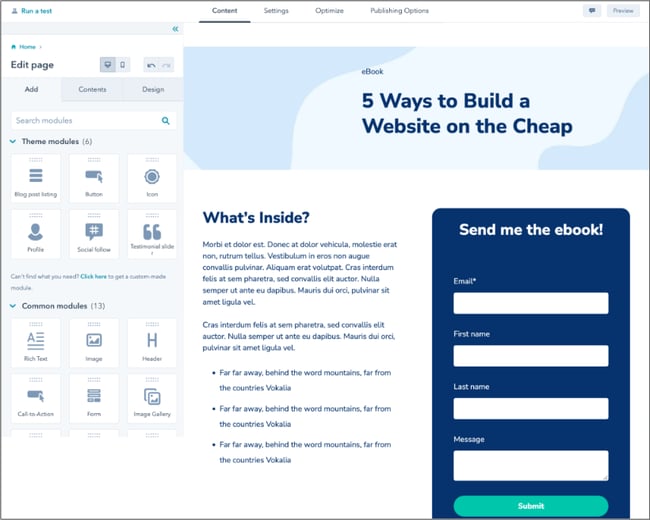
Call-to-action buttons ask people to do something. Like “Buy Now” or “Learn More.” They should be bright and easy to see. Place them where people can find them quickly. They help guide visitors to the next step.
Pictures make your page look nice. Use clear and related images. They should match your message. Visuals can include photos or videos. They help explain your text better. Good images keep people interested.
Social proof shows others like your product. Testimonials are reviews from happy users. They build trust with new visitors. Show them clearly on your page. They make people feel confident in their choice.
Structuring The Html Layout
Start with a clean HTML file. Begin with the DOCTYPE declaration. It tells the browser the document type. Next, add the HTML tag to wrap all content. Inside, use the HEAD section for metadata. Place links to stylesheets here. The BODY section holds visible content. Keep it neat and organized.
Use tags like , , and . They help structure text. Headings like are for titles. Use for paragraphs. The tag groups sections. This makes content easy to read. Tags help with style and layout.
Add images with the . Make sure to set the source. Use tags for links. For buttons, use . Add interactive elements with JavaScript. This makes pages lively and engaging. Ensure everything loads quickly.
Styling With Css
Colors make your page look nice. Pick bright colors for buttons. Use soft colors for backgrounds. Contrast helps people read better. Harmony in colors keeps your page pretty. Think about color meanings. Blue is calm. Red is exciting. Mix colors well for a good look.
Fonts change how your text looks. Choose clear fonts for easy reading. Big letters catch eyes. Small letters for details. Mix font styles to add interest. Bold letters show importance. Italic letters add flair. Keep it simple. Too many fonts confuse readers.
Make your page fit all screens. Use fluid grids to resize content. Media queries help change styles for different devices. Pictures should adjust automatically. Text must be readable on phones. Buttons need to be easy to click. Keep your design flexible.
Movement on pages makes it lively. Transitions smooth changes between states. Animations grab attention. Use them for buttons and images. Keep movements simple. Too much movement distracts users. Timing is important. Fast transitions are fun. Slow ones are calming.
Optimizing For Performance
Reduce the number of files on your page. Fewer files mean faster load times. Compress images to make them smaller. This helps the page load quickly. Use tools to make files smaller. Minified CSS and JavaScript are smaller and faster.
Design your page to look good on phones and tablets. Media queries adjust the page layout. Make text and images fit the screen size. This makes it easy to read on any device. Use flexible layouts and responsive images for best results.
Check your page on different browsers. Each browser may show the page differently. Use popular browsers like Chrome, Firefox, and Safari. Ensure everything looks right. Fix any issues you find. This makes sure everyone has a good experience.

Credit: www.youtube.com
Integrating With Marketing Tools
Analytics help you know your visitors. Use tools like Google Analytics. Add tracking codes in your HTML. This shows how people use your page. It helps you improve your content. Track where users click. This helps you make better decisions. Every click counts. Use data wisely. Analytics make your page smarter.
Email platforms help you reach people. Connect your landing page to tools like Mailchimp. This gathers email addresses. Send newsletters or offers easily. People love getting updates. Keep it simple. Make sure users can subscribe easily. Connect forms to your email platform. This keeps your audience engaged.
SEO helps people find your page. Use keywords in your content. Make sure your page loads fast. Add meta tags to your HTML. These tags help search engines understand your page. Write clear and simple text. Use headings wisely. This makes your page SEO-friendly. Your page should be easy to read.
Testing And Refining
A/B Testing for Conversion Rate Optimization is important. Try different versions of your page. See which one users like more. Change small things like colors or buttons. Measure how many users click or sign up. This helps find the best version. Always test one change at a time.
Analyzing User Behavior helps understand what users do. Use tools to see where users click. Find areas where users spend more time. Look for pages where users leave quickly. This shows what users like or dislike.
Making Data-Driven Improvements means using facts. Look at numbers from tests. Decide what to change based on data. This avoids guessing. It helps make smart choices. Always keep checking after changes. This ensures the page works well.
Credit: blog.hubspot.com

Credit: www.youtube.com
Frequently Asked Questions
How To Create A Landing Page In Html And Css?
Start with HTML to structure your landing page. Use headings, images, and forms. Style it using CSS for layout, fonts, and colors. Ensure responsiveness with media queries. Test and optimize for various devices. Incorporate SEO elements like meta tags and alt text for images.
How To Create A Home Page Using Html And Css?
Create a simple homepage using HTML and CSS by defining a structure with HTML elements. Style with CSS for layout, colors, and fonts. Include a header, navigation, main content area, and footer. Use CSS flexbox or grid for responsive design.
Ensure semantic HTML for accessibility and search optimization.
How To Make A Travel Website Using Html And Css?
Begin by setting up your HTML structure with sections for header, navigation, main content, and footer. Style using CSS for layout, colors, fonts, and responsiveness. Include images and links to enhance user experience. Test your website across different devices for compatibility and performance.
How To Create A Splash Page In Html?
To create a splash page in HTML, start with a basic HTML structure. Use CSS for styling and JavaScript for interactivity. Include engaging visuals, concise text, and a call-to-action. Ensure responsive design for mobile users. Test the splash page for functionality before publishing.
Conclusion
Creating a landing page with HTML and CSS is achievable. Understanding the basics is key. Start simple, focusing on structure and design. Practice regularly to improve your skills. Use consistent styling for better user experience. Keep your code clean and organized for easy updates.
Test your page on different devices. Ensure compatibility across browsers. This helps reach more users. With patience and practice, you’ll build effective landing pages. Remember, the goal is to engage visitors. Happy coding!