Are you looking to create a landing page without the hassle of complex coding or expensive tools? Blogger could be your perfect solution.
As a platform known for its simplicity and user-friendly interface, Blogger allows you to design a landing page that captures attention and drives conversions. Imagine having a space where you can showcase your product, service, or idea effectively—without breaking the bank.
This article will guide you through the straightforward steps to build a landing page on Blogger, helping you to draw in your audience and keep them engaged. By the end of this read, you’ll be equipped with all the tools and tips you need to craft a compelling page that resonates with your visitors. Ready to transform your ideas into a powerful online presence? Let’s dive in!
Choosing A Template
Pre-designed templates make work easy. They offer a good starting point. Many templates are ready to use. They need just small changes. Colors, fonts, and images can be changed. These changes make the page look fresh. Adjusting the layout is simple. Move sections around. Add or remove widgets. This helps fit your needs.
A unique design stands out. Start with a blank canvas. Add your own ideas and style. Choose a color theme. This gives your page a special look. Use custom fonts to add personality. Add images that match your theme. A personal touch makes the page memorable. Keep it simple for easy reading. A clean look is often best.
Setting Up Blogger Account
Start by opening your browser. Visit the Blogger website. Click on the sign up button. You will need a Google account. If you have one, click sign in. No account yet? Create a new one. Fill in your details. Follow the steps shown. Once signed in, go to your Blogger dashboard. Here, you create your profile. Use a unique name. Add a photo if you want. Make sure your profile is complete.
Blogger connects with Google. It uses your account info. This makes things easier. Your posts can link to other Google services. Manage settings through the dashboard. Check your privacy options. Customize them as needed. Make sure your account is secure. Keep your password safe. Use two-step verification if possible. This helps protect your account. Keep your details updated. This will help with support later.
Configuring Page Settings
Choose a domain name that is easy to remember. It should be relevant to your content. Keep it short and simple. Use Blogger’s settings to connect your domain. Go to settings and find the domain section. Enter your new domain name. Follow the steps shown. Save the changes. Now your landing page has a new domain name. This helps users find your page easily.
SEO is important for your landing page. Use keywords that fit your content. Place them in your title and text. Add meta descriptions. They describe your page to search engines. Use alt text for images. This helps search engines understand them. Keep your page load fast. Compress images if needed. Fast pages rank better. Update your content often. Fresh content is good for SEO.
Designing The Layout
Arranging content blocks is easy. Use Blogger’s layout editor. Choose a template first. Pick a simple design. Add your content blocks. Drag them to the right spot. Make sure each block has a purpose. Text blocks show words. Image blocks display pictures. Arrange them nicely.
Incorporating visual elements makes your page pretty. Images catch the eye. Choose clear pictures. Add videos too. Use colors well. Match them with your brand. Fonts matter. Pick easy-to-read styles. Keep it simple. Visuals should not distract. They should help your message.
Adding Essential Features
Adding a contact form makes it easy for visitors to reach you. Many free tools are available online. Just copy the form code. Paste it into your Blogger HTML. Ensure your form is simple. Ask only for needed information. Name, email, and message fields are usually enough. This simplicity encourages more people to use it.
Social media links connect your page to your profiles. Place them where they are easy to find. Top or bottom of the page works well. Use small icons for a clean look. Facebook, Twitter, and Instagram are popular choices. These links help build trust with visitors. They show your active online presence.

Credit: bloggle.app
Testing And Publishing
Test your landing page on Blogger to ensure it looks perfect on all devices. Once satisfied, publish it to make your content live and accessible to your audience.
Previewing The Page
Use the preview feature to see your landing page. It shows how the page looks before publishing. Check all elements. Ensure they are in place. Make sure the text is clear and images load well. Adjust any formatting issues. Fix broken links. Make sure the page is mobile-friendly. Look at colors and fonts. They should match your brand. This is your chance to make changes. Once satisfied, you can move to the next step.
Launching The Landing Page
After previewing, publish your landing page. Click the publish button. Your page is now live. Share the link with others. Promote it on social media. Use email to reach your audience. Check the page regularly. Make sure everything works. Update content as needed. Watch for feedback. Improve based on suggestions. Your landing page is now ready for visitors.
Monitoring Performance
Crafting a landing page on Blogger involves tracking performance to enhance user engagement. Identify key metrics like visitor count, bounce rate, and conversion rate to gauge effectiveness. Adjust content, design, and call-to-action elements based on data insights for improved results.
Analyzing Visitor Data
Collect visitor data from your landing page. Use Google Analytics for this. Learn who visits your page. Track their actions. Note the time they spend on the page. Observe the links they click. This helps you see what interests them. Track bounce rates too. This tells if visitors leave quickly. Use this data to find improvements.
Making Necessary Adjustments
Improve your page using data. Adjust content that doesn’t work. Change images or text for better engagement. Make buttons more visible. Try new layouts for better flow. Test different colors to see what attracts visitors. Small changes can make a big difference. Keep testing and tweaking. Your goal is more visitor interaction.
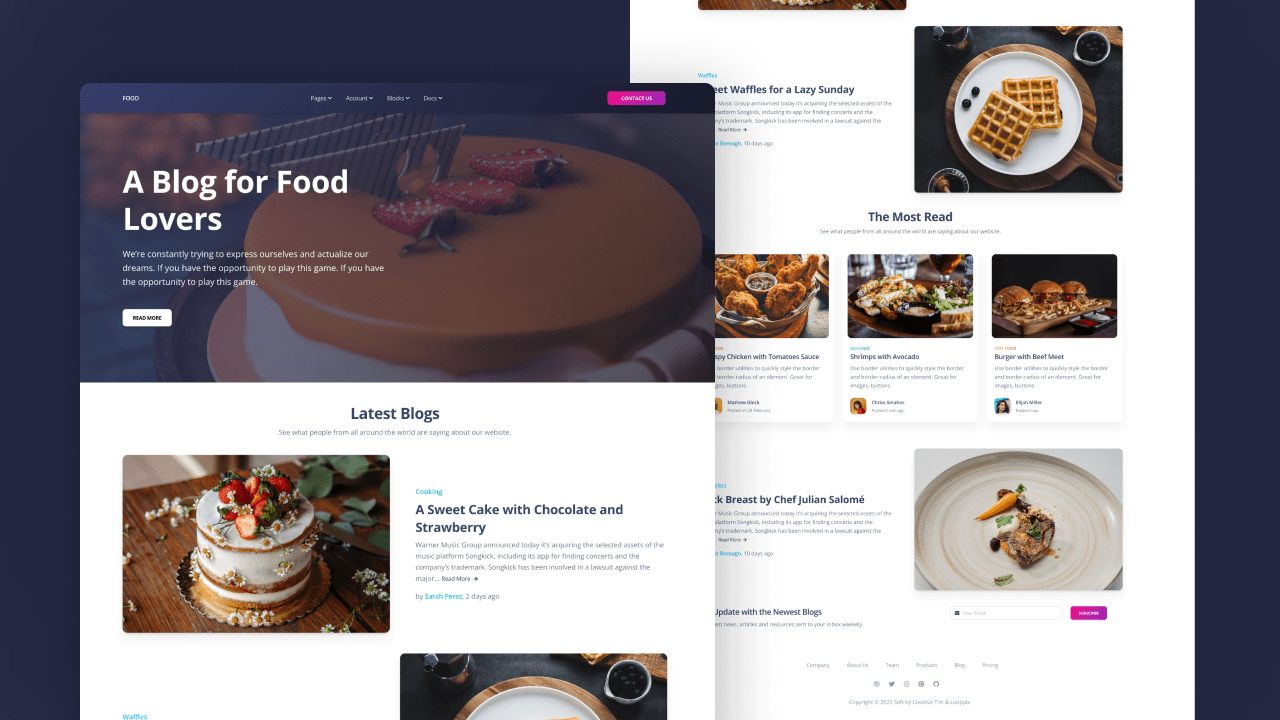
Credit: www.loopple.com

Credit: unbounce.com
Frequently Asked Questions
How To Make A Landing Page On Blogger?
To create a landing page on Blogger, log in, click “Pages,” and select “New Page. ” Design your page using Blogger’s editor, and save it. Customize your URL and layout for a professional look. Publish your page and promote it to drive traffic effectively.
What Is The Best Platform To Build A Landing Page?
Choose platforms like Unbounce, Leadpages, or Wix for building effective landing pages. They offer user-friendly tools, templates, and integrations. Opt for one that suits your needs, budget, and technical expertise. Ensure it supports mobile optimization and analytics to maximize conversion rates.
Test different options to find the best fit for your business.
How Do I Create A Simple Landing Page?
Choose a platform like Wix or WordPress. Select a template. Add compelling headlines, images, and call-to-action buttons. Ensure mobile responsiveness and user-friendly navigation. Optimize for SEO by including keywords and meta tags. Publish and test for functionality.
How To Create A Home Page In Blogger?
To create a home page in Blogger, go to “Pages” in the dashboard. Click “New Page” and design your content. Set it as your home page through “Layout” by editing the “Pages” gadget. Select your new page as the default homepage.
Save changes to finalize your setup.
Conclusion
Building a landing page with Blogger is simple and effective. Start with a clear purpose. Choose a clean design template. Add engaging content that speaks to your audience. Use strong, relevant keywords for better search visibility. Include a call-to-action to guide visitors.
Remember, test your page on different devices. Make sure it loads quickly. A well-crafted landing page can increase engagement. It can also help you achieve your goals. Practice and patience will improve your skills over time. Keep your content fresh and updated.
You’ll see better results. Happy blogging!