
Imagine capturing your audience’s attention and driving them toward action with just one page. That’s the power of a well-crafted landing page with a downloadable PDF.
Whether you’re promoting an eBook, a checklist, or a guide, this strategy can transform curious visitors into engaged users. But how do you create a landing page that truly stands out and compels visitors to click that download button? We’re diving into the essential steps to build a landing page that not only looks good but also performs exceptionally well.
You’ll discover simple techniques to optimize your page for conversions, making sure your downloadable PDF becomes irresistible. We’ll explore how to use clear, concise language, effective visuals, and strategic calls-to-action to guide your visitors toward downloading your content. Plus, we’ll sprinkle in some psychology-backed tips to subtly persuade your audience to take action. Get ready to unlock the secrets of creating a landing page that effectively turns interest into action. Your PDF could be the key to building stronger connections with your audience, so let’s ensure your landing page is up to the challenge.
Planning Your Landing Page
Start by setting clear objectives for your landing page. Decide what you want users to do. Is the goal to download a PDF? Maybe sign up for a newsletter? Write down your goals. Keep them simple and clear. This helps in creating a focused page. Avoid too many actions. Focus on one main objective. This keeps the page clean and user-friendly.
Know your target audience well. Who will visit your page? Think about their age, interests, and needs. Make sure your page speaks to them. Use words they understand. This builds a connection. Helps in better engagement. When people feel understood, they act. They download, sign up, or share. Identifying the right audience is key. It guides the design and content.

Credit: www.youtube.com
Designing The Layout
Start with a simple template. Many options are available online. Pick one that fits your brand. Colors and fonts should match your style. A clean design is best. It helps users focus on the content. Avoid too many elements. They can be distracting. A simple template loads faster too. This is important for user experience.
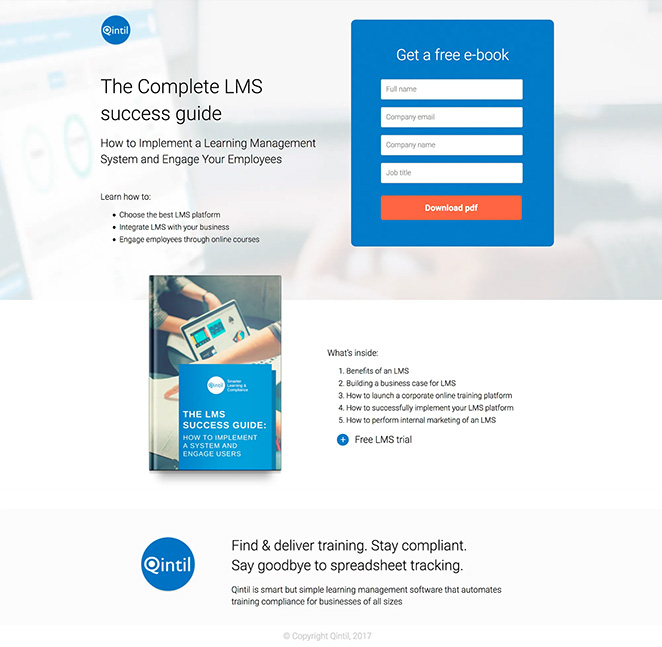
Keep the layout simple. Buttons and links should be easy to find. Use clear labels. This helps users know where to click. Make sure the text is easy to read. Use large fonts. Keep paragraphs short. This makes reading easier. Images and graphics should be relevant. They can guide the user’s eye. Ensure everything works on mobile devices. Many people use phones to browse. A mobile-friendly page is essential.
Crafting Compelling Content
Use simple words to make your message clear. Short sentences help in understanding. Speak directly to your reader. Ask questions like, “Do you want this?” Give answers that they need. Highlight key benefits of your PDF. Explain how it helps. Keep it friendly and inviting. Make them feel they are getting something good.
Pictures grab attention fast. Use bright and clear images. Show what’s inside the PDF. Add arrows or icons to guide eyes. Choose colors that match your brand. They should be easy to look at. Use simple charts to explain ideas. Make sure everything looks neat and tidy. This makes your page look professional.
Credit: www.seedprod.com
Integrating The Downloadable Pdf
Crafting a landing page with a downloadable PDF boosts engagement. Offer valuable information through the PDF to attract visitors. Ensure clear calls-to-action and easy access to enhance user experience.
Preparing The Pdf Document
Begin by creating a high-quality PDF. Make sure it includes all needed information. Use simple fonts for easy reading. Keep images clear and relevant. Save the document in a way that ensures easy access. Make sure the file is not too big. Large files can take longer to download.
Ensuring Seamless Download Process
Set up an easy download link. Ensure the link works correctly. Test the link on different devices. Make sure the download starts quickly. Check that the PDF opens properly after download. Offer help if users face issues. Keep the download process simple and fast.
Optimizing For Seo
Choose keywords that match your audience’s search terms. Use these words in the title and headings. Add them in the first 100 words. This helps search engines find your page. Place keywords naturally. Avoid using too many in a sentence. This can confuse readers.
Fast pages keep users happy. Compress images to make them smaller. Use fewer plug-ins. These can slow down your page. A fast page loads in under three seconds. Use tools to check speed. Make changes as needed. A quick load time improves the user’s experience.
Credit: www.seedprod.com
Testing And Analytics
Conducting A/B Testing helps compare two versions of a landing page. This test shows which version users like more. Use different designs, colors, or buttons for each version. Check which one gets more clicks or downloads. A/B testing gives clear results. It helps to improve the landing page.
Analyzing User Engagement means checking how users interact with the page. Look at how long users stay on the page. Count how many users download the PDF. See which parts of the page get clicks. Use tools like Google Analytics for data. This analysis helps in making the page better. It shows what users like and dislike.
Promoting Your Landing Page
Social media can be a great way to share your landing page. Post about your downloadable PDF on platforms like Facebook, Twitter, and Instagram. Encourage friends and followers to share your post. Use images to make your post stand out. Keep your message short and clear. Include a link to your landing page. This helps people find your PDF quickly.
Email can help you reach people directly. Send an email to your list with a link to your landing page. Tell them about the value of your PDF. Keep your message simple. Use a catchy subject line to grab attention. Highlight why the PDF is useful. Invite them to download it. Personalize your email when possible. This makes it more engaging.
Frequently Asked Questions
How Do I Add A Pdf To A Landing Page?
Upload the PDF to your website server or cloud storage. Generate a link to the file. Embed the link on the landing page using HTML or your site’s editor. Ensure the link is visible and clearly labeled. Test the link to confirm the PDF opens correctly.
Does Google Have A Free Landing Page?
Google offers a free landing page tool called Google Sites. It’s easy to use and customizable. Use it to create simple and effective landing pages without any cost. Suitable for small businesses and personal projects, it integrates well with other Google services.
Can I Create A Landing Page Without A Website?
Yes, you can create a landing page without a website using platforms like Unbounce, Leadpages, or Instapage. These tools offer user-friendly interfaces and templates, making it easy to design a standalone landing page for marketing campaigns or lead generation. No coding skills are required.
How To Create A Landing Page For An Ebook?
Create a captivating headline. Use compelling visuals and a clear call-to-action. Highlight ebook benefits. Optimize for mobile. Include testimonials and reviews for credibility.
Conclusion
Creating a landing page with a downloadable PDF is simple. Start by understanding your audience’s needs. Design the page with clear, engaging content. Include a straightforward call-to-action for downloading. Ensure your PDF adds value to the user. Test the page for usability and effectiveness.
Make adjustments based on feedback and analytics. Keep everything concise and focused. Consistency in design and message is key. With these steps, you create a functional landing page. One that encourages downloads and engagement. Remember, clear communication builds trust and connection.
Your landing page should reflect that simplicity and value.


