
Are you looking to boost your online store’s conversion rates and engage more customers effectively? Creating landing pages in Magento could be your ultimate solution.
Imagine having a dedicated space that speaks directly to your visitors, guiding them seamlessly toward making a purchase. By mastering this skill, you can transform your Magento store into a powerful sales tool. You’ll discover simple steps and tips to create compelling landing pages that captivate your audience and drive sales.
Whether you’re new to Magento or seeking ways to optimize your existing store, this guide will empower you to craft pages that not only look great but work exceptionally well. Let’s dive in and unlock the potential of your Magento store together!

Credit: belvg.com
Setting Up Magento
Begin by downloading the Magento software from the official website. Ensure your server meets all requirements. Use a tool like FileZilla to upload the files to your server. Create a database for Magento. Open your web browser and start the installation wizard. Follow the steps carefully. Fill in details such as database name and admin information. Complete the installation to set up Magento.
Access the Magento Admin Panel. Navigate to Stores and then Configuration. Set your store’s name and address. Choose the default currency. Configure the timezone and language. Save the changes. Visit System and select Cache Management. Refresh caches for changes to appear. Your Magento setup is now complete.
Understanding Landing Pages
Landing pages are like the first door to a store. They greet visitors and guide them. These pages have a special job. They aim to turn visitors into buyers. They help business goals. Focus on clear messages. Keep things simple. Use strong images and text. The goal is to make visitors stay. And buy.
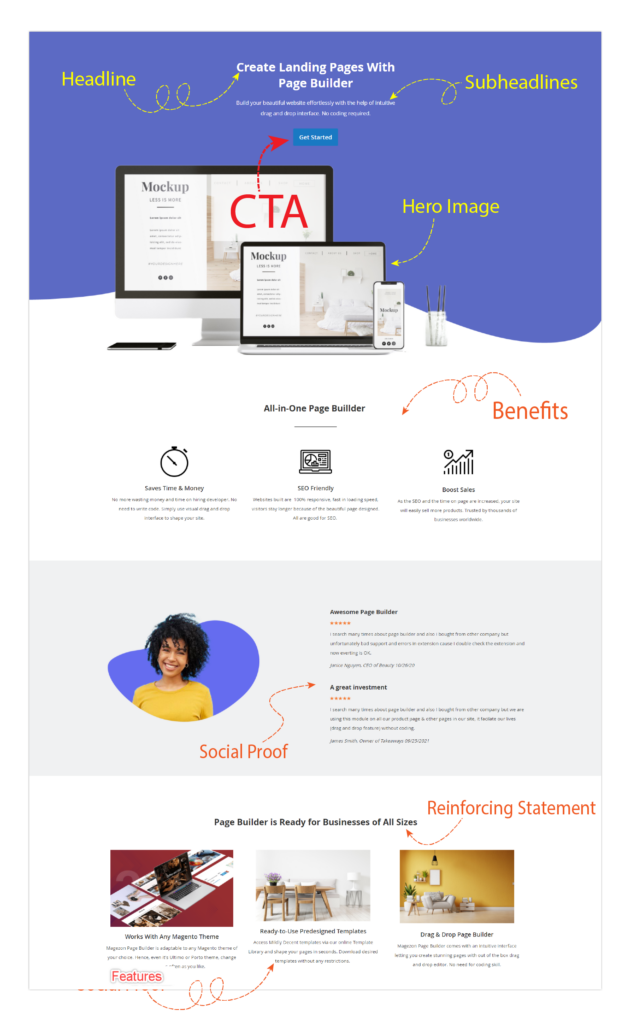
Every good landing page has key elements. First, a clear headline. It tells visitors what to expect. Then, an engaging image. It catches the eye. Next, a call-to-action button. It asks visitors to act now. Make sure each part is easy to see. And easy to understand. Keep the page neat. No clutter. Simple design wins.
Designing Landing Pages
Start by picking a good theme. A theme gives the page its look. Magento offers many choices. Select a theme that matches your brand. A good theme makes your page stand out. It should be clean and clear. This helps visitors find what they need. Templates in Magento help too. They save time. You can change them to fit your needs. Choose a template that fits your goal. With the right theme and template, your page looks great.
Customize the layout to suit your needs. Magento allows changing design easily. Use the tools to move elements around. Make sure important parts are easy to see. Change colors to match your brand. Use fonts that are easy to read. Add images that are clear and bright. A good layout helps users find information fast. Keep the design simple. This makes the page load faster. A fast page keeps visitors happy.
Credit: blog.magezon.com
Creating Content
Crafting engaging copy is vital for landing pages. Use words that grab attention. Short sentences work best. Focus on the benefits. Highlight what users gain. Simple language builds trust. A clear message avoids confusion. Make every word count. Keep ideas straightforward. The goal is clarity and interest.
Visuals enhance landing pages. Pictures speak louder than words. Use bright images. Videos add excitement. Multimedia keeps users engaged. Ensure visuals match the message. Pictures should tell a story. Videos should be easy to watch. Add charts if needed. Graphics make data clearer. Engage users with dynamic content.
Setting Up Navigation
Organize your landing page in Magento by setting up clear navigation. Use intuitive menus to guide users smoothly. Ensure important sections are easy to find, enhancing user experience and engagement.
Menu And Links
Creating a simple menu is very important. It helps visitors find what they need. Start by keeping the menu clear and direct. Use clear words for each link. For example, use “Home” or “Products”. This helps visitors know where they are going.
Add only important links to the menu. Too many links can confuse people. Place the menu at the top. Make sure it is easy to see. It should work on both computers and phones.
Make sure links open fast. Slow links can make visitors leave. Check links often. Fix any broken ones quickly. This helps keep visitors happy and on your page longer.
User Experience Enhancements
Improving user experience is key. Visitors should feel comfortable. Make buttons big and easy to click. Use colors that are soft on the eyes.
Keep the design simple. Too many colors or images can be distracting. Use clear fonts for text. This makes reading easier for all users.
Check how the page works on different devices. It should look good on both small and big screens. A good experience keeps visitors coming back.
Credit: www.mgt-commerce.com
Integrating Seo
SEO is crucial for any landing page. It helps pages rank higher in search results. Use relevant meta tags to describe the page. Keywords should be natural. They must fit the topic well. Title tags are important too. They tell search engines what the page is about. Keep titles clear and concise.
Keywords should match what people search for. Avoid stuffing too many keywords. This can confuse search engines. Use them naturally in sentences. This helps improve readability. Search engines will understand what the page offers. Use alt text for images. This helps in search engine understanding.
Testing And Optimization
Create effective landing pages in Magento by focusing on testing and optimization. Use A/B testing to compare designs and identify the best performing elements. Optimize content for better user engagement and higher conversion rates.
A/b Testing Strategies
A/B testing helps find the best design for landing pages. Create two versions of a page. Each version has small changes. Show these to different groups. Measure which version works better. Changes can be in text, images, or buttons. Keep the winning version. Repeat the process for more improvements. This way, you make sure the page is effective.
Analyzing Performance Metrics
Keep track of important numbers. These numbers show how well a page is doing. Bounce rate tells if visitors leave quickly. Conversion rate shows how many visitors take action. Look at these numbers regularly. Use tools like Google Analytics. Make changes based on what you find. This helps improve the page. Good metrics mean more success.
Launching And Monitoring
Crafting effective landing pages in Magento involves launching and monitoring them for performance insights. Regular checks ensure optimal functionality, helping businesses refine their approach. Adjustments based on user interaction can enhance engagement and conversion rates.
Publishing The Landing Page
Publishing a landing page is easy in Magento. First, check your design. Make sure it is user-friendly. Next, review the content. Confirm it’s clear and engaging. Then, set up your SEO settings. This helps with search engines. Finally, publish the page. Click the publish button. Your page is now live!
Tracking User Engagement
Understanding how users interact is crucial. Use tools to track user actions. Check how long they stay on the page. See which buttons they click. This data helps in improving your page. Look at the bounce rate. A high bounce rate means users leave fast. Adjust your page based on this data. Aim for better engagement.
Frequently Asked Questions
How To Create A Landing Page In Magento?
To create a landing page in Magento, navigate to Content > Pages in the admin panel. Click “Add New Page,” then fill in the title and content. Customize layout and design using widgets and blocks. Save and preview your landing page before publishing.
How To Create A Landing Page Step By Step?
Start by defining your goal and target audience. Choose a simple design layout. Use compelling headlines and concise content. Include strong calls-to-action and visuals. Test and optimize for best performance.
How To Create A Home Page In Magento 2?
Go to CMS > Pages > Add New in Magento 2 admin panel. Enter the title and URL key. Design your homepage using layout updates and widgets. Save the page and set it as default under Stores > Configuration > Web > Default Pages.
Can I Make My Own Landing Page?
Yes, you can create your own landing page using tools like WordPress, Wix, or Squarespace. These platforms offer user-friendly templates, drag-and-drop features, and customization options, making it easy for anyone to design a professional landing page without coding skills.
Conclusion
Creating effective landing pages in Magento is straightforward. Start with clear goals. Design should be clean and user-friendly. Prioritize mobile responsiveness. Always use high-quality images. Keep the messaging simple and direct. Use compelling calls to action. Regularly test and optimize for better performance.
Track metrics to understand visitor behavior. Make adjustments based on data. Engage your audience with relevant content. Crafting these pages can boost your sales. Remember, practice makes perfect. Stay patient and keep improving. Your efforts will pay off with time and dedication.


