
Imagine having the perfect landing page that captures your audience’s attention and drives conversions. You know that a subdirectory in WordPress could be the key to achieving this, but where do you start?
If you’re looking to create a dedicated space for your landing pages without cluttering your main site, you’re in the right place. This guide will show you how to easily set up a subdirectory in WordPress, giving your landing pages the spotlight they deserve.
You’ll discover practical steps that simplify the process, making it easier for you to enhance your site’s structure and boost your marketing efforts. With the right setup, your landing pages can become powerful tools that engage your audience and improve your site’s performance. Are you ready to unlock the potential of your WordPress site and create landing pages that truly convert? Let’s dive in and transform your digital presence!
Benefits Of Using Subdirectories
Using subdirectories helps in organizing your website better. It keeps your landing pages in one place. This makes it easy for users to find them. Search engines like it too. They understand your site structure better. This can help your site rank higher. Subdirectories also help in managing content. It’s easier to update or remove pages. Keeping everything in one directory makes this simple. Security is another benefit. It reduces the risk of errors and hacking. Subdirectories are great for tracking performance. You can see which pages do well. This helps you make better marketing choices. They are easy to set up in WordPress. No need for extra software or tools.
Planning Your Landing Page Strategy
Knowing your audience is key. Understand who will visit your page. Are they kids, adults, or teens? What are their likes? Research their habits and preferences. This helps you design better.
Clear goals are important. Define what you want from your landing page. Is it more visitors, sign-ups, or sales? Write down your objectives clearly. They guide your design and content.
Setting Up A Subdirectory In WordPress
First, log into your hosting account. Use your username and password. Find the control panel. It may be called cPanel or Dashboard. Look for File Manager or Website Files section. Click to open it. This is where all your website files live. You can make changes here. Be careful not to delete any important files. Always back up your data.
Inside the File Manager, find the public_html folder. This is the main folder for your site. Click to open it. Now, create a new folder here. Name it for your landing page. Use a simple name like landingpage. Right-click and select Create New Folder. Type your folder name and hit Enter. Your subdirectory is ready. You can now use it for your landing pages. Place your files here. Keep them organized for easy access.

Credit: coalitiontechnologies.com
Installing WordPress In A Subdirectory
Find WordPress on its website. Click download to get the files. Save them on your computer. Make sure you remember where you saved them. You will need them soon.
Open your web hosting control panel. Locate the file manager. Find the folder for your subdirectory. Upload the WordPress files there. Watch for a progress bar. It shows how the upload is going.
Find the wp-config.php file. Open it with a text editor. Enter your database details. Write your username and password. Save the changes. Your website will connect to the database.
Designing Your Landing Pages
Creating a subdirectory in WordPress is simple. Navigate to your hosting panel and select ‘File Manager’. Add a new folder for your landing pages under ‘public_html’. This structure helps organize content and improves SEO.
Choosing A Suitable Theme
Select a theme that fits your brand. A clean design is important. It makes your page look neat. Themes can change the feel of your site. Colors and fonts should match your brand. This helps your page look professional. Make sure your theme is mobile-friendly. Many people use phones to visit websites. A responsive theme adjusts to different screens. This improves user experience and keeps visitors happy.
Customizing Page Layouts
Page layouts should guide the visitor. Use easy navigation. Buttons and links should be clear. Important information should be at the top. This grabs attention fast. Break content into small sections. This makes it easy to read. Use images to support your text. They should be relevant and high quality. Images can make your page more engaging. Always preview your layout before publishing. Check for errors or misplaced items.
Credit: www.apexure.com
Seo Considerations For Subdirectories
Creating a subdirectory in WordPress boosts SEO for landing pages. Begin by accessing your hosting control panel. Next, create a new folder within the root directory. Then, install WordPress into this folder to manage landing pages effectively. This setup enhances site organization and search engine visibility.
Optimizing Url Structure
A good URL structure makes your pages easy to find. Use short URLs. They are better for search engines. Include keywords in the URL. This helps users and search engines. Avoid using special characters. They confuse search engines. Make URLs readable. This improves user experience.
Implementing Meta Tags
Meta tags help search engines understand your page. Use a clear title tag. Include the page’s main keyword. Write a short meta description. It should explain what the page is about. Use keywords but do not stuff them. Keep it natural. Meta tags are important for SEO. They improve visibility in search results.
Testing And Launching Your Landing Pages
Creating a subdirectory in WordPress for landing pages enhances organization. Navigate to your hosting control panel, create a new folder, and install WordPress in that directory. This setup allows you to manage landing pages separately, improving efficiency and focus.
Conducting Usability Tests
Users should find your landing pages easy to use. Usability tests help you see if they do. Watch how users interact with the page. Ask them what they think. Find out what confuses them. Make changes based on their feedback. Testing shows what works and what doesn’t. It’s important to test with real users. Their opinions matter. Keep improving the page. A good landing page is clear and simple. It should guide users easily.
Final Launch Preparations
Check everything before launching your page. Make sure all links work. Ensure the design looks good on different devices. Review all the text for errors. Test the page speed. A slow page can lose visitors. Confirm all forms collect the right information. Backup your site before changes. Check your analytics settings. You need to track visitor actions. Ensure your page follows SEO best practices. Prepare to monitor the page after launch. Adjust based on visitor behavior.

Credit: www.greengeeks.com
Frequently Asked Questions
What Is The Difference Between A Subdomain And A Subdirectory In WordPress?
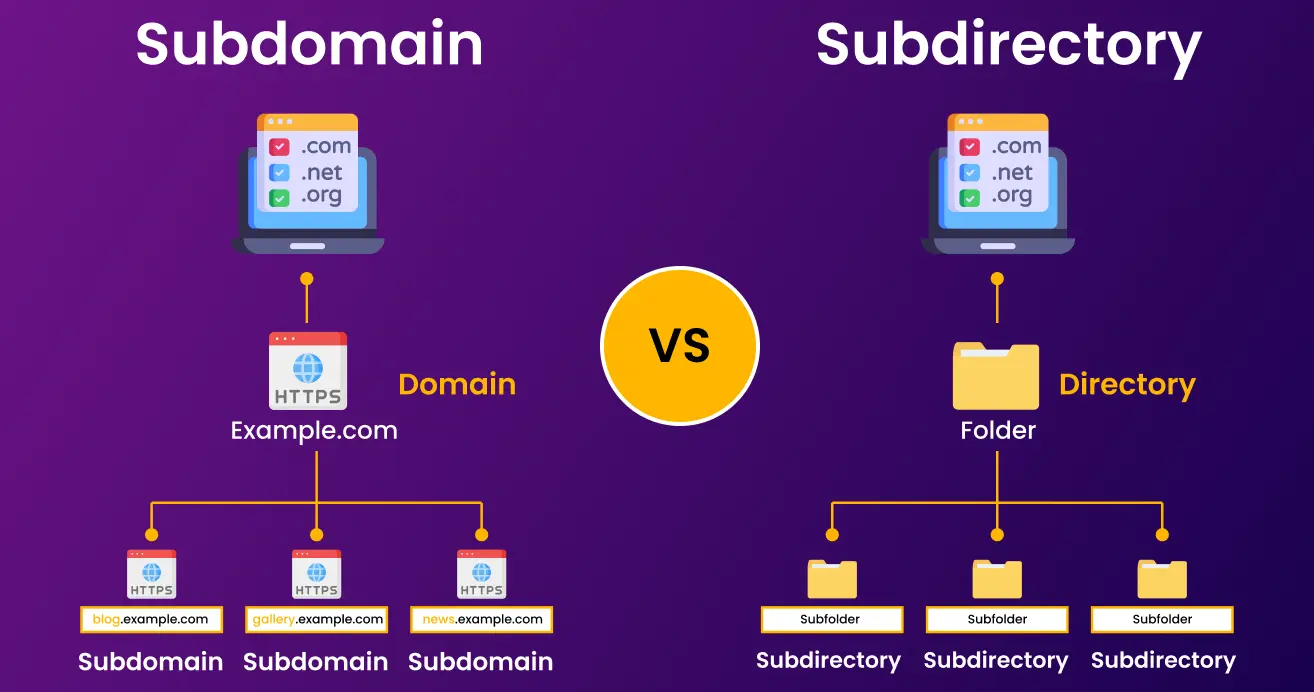
A subdomain is a separate section of your website with its own URL prefix. A subdirectory is a folder within your main domain, sharing the same URL. Subdomains are ideal for distinct content, while subdirectories are used for organizing related pages.
Both impact SEO differently in WordPress.
How To Create A Sub Domain In WordPress?
Log into your hosting account and access the cPanel. Select “Subdomains,” enter the desired name, and choose the main domain. Click “Create” to establish your subdomain. Update WordPress settings to use the new URL. Ensure DNS settings are correct for smooth operation.
How To Create A Sub Directory?
To create a subdirectory, log into your hosting account. Open the file manager and navigate to the desired directory. Click “Create New Directory” or “Add Folder,” name the subdirectory, and save it. Ensure the new directory is correctly set up for your project’s requirements.
How To Setup A WordPress Multisite With Subdirectories?
Enable WordPress multisite in wp-config. php file. Choose subdirectories during setup. Update. htaccess with multisite rules. Access Network Admin from WordPress dashboard. Add new sites using the “Sites” menu. Adjust settings and plugins for each site as needed. Backup regularly to prevent data loss.
Conclusion
Creating a subdirectory in WordPress is straightforward. It helps organize landing pages efficiently. Follow the steps outlined for smooth setup. Ensure your URLs are clear and descriptive. This boosts your site’s visibility and user experience. Test your landing pages for functionality.
Make necessary adjustments to improve performance. Consistent structure aids in better management and SEO. Keep learning and exploring WordPress features. With practice, you’ll enhance your site’s structure. Enjoy building and optimizing your landing pages. Stay updated with WordPress trends. Your efforts will pay off with improved site engagement.


