
Imagine you’re about to launch a Google Ads campaign. You’ve carefully selected your keywords, crafted compelling ad copy, and set your budget.
But there’s one crucial element that can make or break your success: your landing page. It’s where potential customers decide whether to engage with your offering or close the tab. Creating effective landing pages is not just about aesthetics; it’s about psychology.
You want visitors to feel compelled, almost instinctively, to take action. You’ll discover proven techniques to create landing pages that captivate, convert, and bring your Google Ads efforts to life. Whether you’re new to digital marketing or looking to refine your approach, this guide offers insights to help you design landing pages that speak directly to your audience and drive results. Dive in to unlock the secrets of landing page success.

Credit: www.getresponse.com
Crafting Compelling Headlines
Action words make headlines powerful. Start with a strong verb. Use words like “Discover” or “Learn”. This grabs attention fast. Always aim for clarity. Readers should understand quickly. Keep the language simple. Make every word count.
Keywords help search engines find you. Use them wisely. Place them at the start of your headline. This boosts visibility. Always avoid keyword stuffing. It can confuse readers. Keep it natural. Balance is key.
Designing For User Experience
Landing pages must work well on phones. Many people use phones to browse. A mobile-friendly layout helps users find what they need fast. Buttons should be big enough to tap. Text should be easy to read without zooming. Images should load quickly. Always test how your page looks on different devices.
Good design guides the eye. Important details should stand out. Use larger fonts for key points. Colors can highlight important parts. Keep the page clean and simple. This makes it easy to find information.
Optimizing Page Load Speed
Large images slow pages down. Use image compression tools. They reduce file size without losing quality. Smaller files load faster. WebP format is effective. It compresses better than JPEG or PNG. Tools like TinyPNG and CompressJPEG help. They make images smaller and quicker to load. Faster pages improve user experience. Visitors stay longer when pages load fast.
Redirects cause delay. Each redirect adds wait time. Keep them to a minimum. Check links and paths regularly. Avoid unnecessary redirects. Use direct paths to resources. This reduces server requests. Fewer requests mean faster loads. Quick load times keep users happy. Google likes fast pages too. Speed can improve your search ranking.
Credit: www.seedprod.com
Clear Call To Action
Placement Strategies are key to effective CTAs. Place your CTA where eyes naturally go. Top of the page is a great spot. Bottom is also effective after the content. Test different placements to see what works best. Use bright colors to make your CTA stand out. Use large fonts for easy reading. Make sure the CTA is easy to find.
Testing Different CTAs helps find the best one. Try different words and phrases. “Buy Now” or “Sign Up” are common. Test each one to see which gets more clicks. Change the colors and fonts to see what works. A/B testing is helpful. Check results often to see what works best.
Content Relevance And Clarity
It’s crucial to make your landing page fit what users want. Start by knowing your audience’s needs. Tailor your content to answer their questions. Every part of the page should match the user’s search. Use keywords wisely. They help you stay on topic. Always deliver what the user expects. This builds trust and keeps them on your page.
Keep your language simple and clear. Avoid long words and complex sentences. Write as if you are talking to a friend. Short sentences work best. They are easy to read. Use common words that everyone understands. Make sure each sentence is direct and to the point. This helps users find information quickly.
Leveraging Trust Signals
Trust signals boost credibility on Google Ads landing pages. Display testimonials and certifications prominently. Highlight secure payment options and privacy policies to reassure visitors.
Including Testimonials
Testimonials show people trust your product. They are powerful words from real users. New visitors read them and feel safe. They believe in your service. Use testimonials wisely. Place them where they can be seen. They help people decide faster. Add names and pictures. Make them look real and honest.
Displaying Certifications
Certifications are signs of trust. They show your business is qualified. People feel secure seeing them. They tell visitors your service is reliable. Display them clearly. Make them visible on your page. Use logos that people know. They add value to your service. Visitors trust certified businesses more.
A/b Testing For Optimization
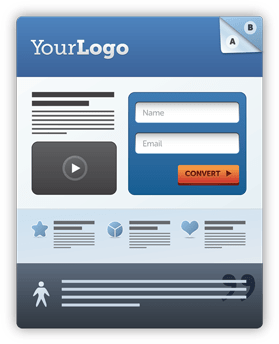
Analyzing user behavior is key to improving landing pages. A/B testing helps find what works best. Change one thing at a time. Use a different headline or image. See how users react. Look at clicks and time spent. These numbers show what people like. Iterative improvements are crucial. Make small changes often. Check results each time. Aim for better engagement. Better engagement means more conversions. Keep the changes simple. Complex pages confuse users. Simple pages are easier to navigate. Create a page that users enjoy. Happy users lead to more sales.
Credit: www.wordstream.com
Tracking And Analytics
Crafting effective landing pages for Google Ads involves understanding tracking and analytics. Use data insights to optimize page elements. Enhance user experience and increase conversion rates with precise measurement tools.
Setting Up Conversion Tracking
Conversion tracking shows how ads work. Begin with a Google Ads account. Click on “Tools,” then “Conversions.” Add a new conversion action. This helps you see actions like sign-ups or purchases. Use the unique tracking code on your landing page. This code collects data on user actions. It is important for measuring success.
Utilizing Google Analytics
Google Analytics offers deep insights into user behavior. Link it to your Google Ads account. This process is quick and simple. It provides detailed reports about visitors. You can see where they come from. Also, know what pages they visit. This data helps improve your landing page. Make changes based on user actions. Better insights lead to better results.
Frequently Asked Questions
What Is A Good Landing Page For Google Ads?
A good landing page for Google Ads is optimized for user experience and conversions. Include clear headlines, engaging visuals, and a strong call-to-action. Ensure fast loading times, mobile responsiveness, and relevant content matching the ad. Use persuasive language and testimonials to build trust and encourage action.
Is $10 A Day Enough For Google Ads?
$10 a day can work for Google Ads if targeting a small audience. Test and optimize regularly for better results. Consider keywords, competition, and ad quality to maximize the budget’s effectiveness. Monitor performance metrics to adjust strategies and improve ROI.
How To Make A Landing Page For An Ad?
Create a clear headline that captures attention. Include relevant keywords for SEO. Add engaging visuals and compelling copy. Ensure a strong call-to-action. Optimize for mobile devices. Use simple navigation and track performance with analytics. Keep the design clean and focused on conversion.
How Can I Create A Landing Page?
Start by choosing a user-friendly landing page builder. Select a template and customize it with your brand elements. Include a compelling headline, clear CTA, and concise content. Optimize for SEO by using relevant keywords. Test and publish your landing page to start capturing leads.
Conclusion
Creating effective landing pages boosts your Google Ads success. Focus on clear and concise messaging. Ensure your content aligns with your ad’s promise. Design for easy navigation and fast loading. Use engaging images and benefit-focused headlines. Always test different elements to see what works best.
With these steps, you can improve user experience and conversion rates. Start optimizing today and see the impact on your campaigns. Success is within reach with the right approach.


