
The best free AI photo editing software is GIMP and Pixlr. Both offer robust features and user-friendly interfaces.
GIMP, or GNU Image Manipulation Program, is a powerful and versatile tool. It provides a wide range of features comparable to those found in paid software. Pixlr stands out for its ease of use and accessibility. It’s perfect for quick edits and supports various file formats.
Both options cater to beginners and professionals, making photo editing more accessible. These tools help enhance images effortlessly, without the need for expensive software. Whether you’re retouching photos, creating graphics, or performing complex edits, GIMP and Pixlr provide excellent capabilities for free.
Introduction To Ai In Photo Editing
Artificial Intelligence (AI) has revolutionized the world of photo editing. Today, AI tools can enhance images with incredible precision. These tools save time and produce stunning results. Understanding AI in photo editing is essential for photographers.
The Rise Of Ai Technology
AI technology has grown rapidly in recent years. It started with simple tasks but now performs complex functions. AI can recognize objects, faces, and even emotions in photos. This growth has made AI photo editing tools more accessible.
Many free AI photo editing software options are available today. These tools use advanced algorithms to enhance images. Some popular tools include:
- PhotoScape X
- GIMP
- Fotor
AI technology continues to evolve. Developers are constantly improving these tools. They aim to make photo editing easier and more efficient.
Impacts On The Photography Industry
The photography industry has changed dramatically because of AI. Professional photographers now rely on AI tools for quick edits. AI reduces the time spent on manual editing. This allows photographers to focus more on creativity.
AI has also leveled the playing field. Beginners can now produce high-quality images without extensive training. Free AI photo editing software has made this possible. Here are some benefits for photographers:
- Time-saving: AI tools automate repetitive tasks.
- Cost-effective: Free tools provide professional results.
- Enhanced creativity: AI tools offer unique effects and filters.
AI has democratized the photography industry. Everyone can now create stunning photos with minimal effort. The future of photo editing looks bright with AI advancements.
Criteria For Top-notch Ai Photo Editors
Choosing the right AI photo editing software can be tricky. Let’s break down the main criteria for selecting the best free AI photo editors. We’ll focus on ease of use, range of features, and quality of results.
Ease Of Use
The best AI photo editors should be easy to use. A simple and clean interface is key. Even beginners should feel comfortable using the software. Look for drag-and-drop functionality. Clear instructions and tutorials are a big plus.
Range Of Features
A top-notch AI photo editor offers a wide range of features. Basic editing tools like cropping and resizing are essential. Advanced features like AI-powered enhancements and filters are important. Some software includes tools for retouching and background removal.
| Feature | Importance |
|---|---|
| Basic Editing | High |
| AI Enhancements | High |
| Filters and Effects | Medium |
| Retouching Tools | Medium |
| Background Removal | Low |
Quality Of Results
The quality of results is the most important factor. The software should produce high-quality images. Edits should look natural and professional. AI tools should enhance photos without making them look fake.
- High-resolution output
- Natural-looking edits
- Consistent performance
By keeping these criteria in mind, you can find the best AI photo editor. Remember to consider ease of use, range of features, and quality of results.
Top Ai Photo Editors You Should Know
Artificial intelligence has changed how we edit photos. Now, editing photos is easier than ever. Many free AI photo editors offer advanced features. Below, you will find some of the best free AI photo editing software.
List Of Popular Free Ai Photo Editing Software
- GIMP – A powerful, open-source editor.
- Photopea – Works in your browser, no download needed.
- Fotor – User-friendly and packed with AI tools.
- Pixlr – Offers a wide range of AI editing options.
- Canva – Known for its simplicity and AI features.
Comparative Analysis
| Software | Key Features | Ease of Use | Platform |
|---|---|---|---|
| GIMP | Advanced editing, layers, plugins | Medium | Windows, Mac, Linux |
| Photopea | Layer support, PSD file editing | Easy | Web-based |
| Fotor | AI filters, batch processing | Very Easy | Windows, Mac, Web |
| Pixlr | AI tools, templates | Easy | Windows, Mac, Web |
| Canva | Drag-and-drop, AI enhancements | Very Easy | Windows, Mac, Web |
Choosing the right AI photo editor can enhance your photo editing experience. Each software offers unique features. Some focus on simplicity, while others provide advanced tools. Pick the one that suits your needs best.

Credit: www.cyberlink.com
Deep Dive: Features To Look For
Choosing the best free AI photo editing software can be tricky. This guide helps you identify the key features to look for. Here are three main features to consider.
Automatic Enhancement Tools
Automatic enhancement tools are essential for quick edits. These tools adjust brightness, contrast, and saturation automatically. This saves time and effort.
Look for software with one-click enhancement options. This feature makes your photos look professional with minimal effort. It’s perfect for beginners.
Some tools also offer AI-based retouching. This helps remove blemishes and smoothens skin tones. It’s great for portrait photos.
Customizable Filters And Effects
Customizable filters and effects let you add a personal touch. They offer various styles, from vintage to modern. This makes your photos unique.
Search for software with a wide range of preset filters. These presets offer quick style changes. Some software allows you to create and save your own filters.
Adjusting filters and effects should be easy. Look for sliders and intuitive controls. This ensures you can fine-tune the look as you like.
Support For Different File Types
Support for different file types is crucial for versatility. It allows you to edit various photo formats. This includes JPEG, PNG, and RAW files.
Ensure the software supports high-resolution images. This is important for professional-quality edits. Some software may even support video files.
File type support ensures compatibility with other tools. This is vital for a smooth workflow. You can easily transfer and edit files across platforms.
Pros And Cons Of Ai-driven Photo Editing
AI-driven photo editing tools have transformed the world of photography. These tools offer many features that make photo editing easier. However, they also have some limitations. Let’s dive into the advantages and considerations of using AI-driven photo editing software.
Advantages Of Using Ai
AI photo editing tools provide many benefits to users. Here are some key advantages:
- Time-Saving: AI can edit photos quickly, saving you valuable time.
- Consistency: AI ensures consistent quality in your photo edits.
- User-Friendly: These tools are often easy to use, even for beginners.
- Advanced Features: AI can detect and correct flaws automatically.
- Creative Filters: AI offers a variety of filters to enhance your photos.
Limitations And Considerations
Despite the many advantages, AI-driven photo editing tools have some limitations. Here are a few considerations:
- Lack of Control: AI may not always edit photos as you like.
- Quality Issues: Sometimes, AI may not produce high-quality results.
- Learning Curve: Understanding AI tools may take some time.
- Dependency: Over-reliance on AI can hinder your editing skills.
- Privacy Concerns: Some AI tools require access to your photos, raising privacy issues.
In summary, AI-driven photo editing tools offer numerous benefits and some drawbacks. Understanding these can help you make an informed choice.
User Experience With Free Ai Photo Editors
The user experience with free AI photo editors can make or break their appeal. Understanding real user reviews and the community support available is vital. Here’s what users are saying about these tools.
Real User Reviews
Users rave about the ease of use and powerful features of free AI photo editors. Many appreciate the intuitive interfaces that don’t require a steep learning curve.
Here are some key points from user reviews:
- Ease of use: Most users find the software simple and quick to navigate.
- Quality of edits: The AI algorithms produce high-quality photos.
- Speed: Edits are processed rapidly, saving time.
- Variety of tools: Users enjoy a wide range of editing tools.
Below is a table summarizing the top free AI photo editors based on user reviews:
| Software | Rating | Top Feature |
|---|---|---|
| Tool A | 4.5/5 | Fast processing |
| Tool B | 4.3/5 | User-friendly interface |
| Tool C | 4.2/5 | High-quality edits |
Community And Support
A strong community and support system enhance the user experience with free AI photo editors. Active forums and helpful support teams can make a big difference.
Key aspects of community and support:
- Active forums: Users get quick solutions to their problems.
- Support teams: Dedicated teams help resolve issues promptly.
- Online tutorials: Video guides and articles help users learn.
The availability of these resources ensures that users maximize their experience. They can edit photos efficiently and creatively.
Tips For Getting The Best Out Of Ai Photo Editing Software
Using AI photo editing software can be fun and easy. This software helps you edit photos quickly. Follow these tips to get the best results.
Enhancing Photo Quality
Enhancing photo quality is important. AI tools can help improve your photos. Follow these steps:
- Auto-enhance: Use the auto-enhance feature to adjust brightness, contrast, and colors.
- Sharpness: Increase sharpness to make your photos clearer.
- Noise reduction: Use noise reduction to remove grainy textures.
- Color correction: Adjust the colors to make them look natural.
These tools make your photos look great. Experiment with each feature to find the best settings.
Creative Editing Techniques
Creative editing techniques let you add a personal touch. Here are some tips:
- Filters: Apply different filters to change the mood of your photo.
- Crop and rotate: Crop or rotate your photo to get the best angle.
- Text and stickers: Add text or stickers to make your photo fun.
- Background change: Use AI to change the background easily.
These techniques help make your photos unique. Try different options to see what you like best.
| Feature | Benefit |
|---|---|
| Auto-enhance | Quickly improves overall photo quality |
| Filters | Changes the mood of your photo |
| Text and stickers | Adds fun elements to your photo |

Credit: www.cyberlink.com
The Future Of Ai In Photo Editing
The future of AI in photo editing looks incredibly promising. AI technology is evolving quickly, transforming how we edit photos. The best free AI photo editing software is becoming more advanced, user-friendly, and accessible. This transformation is making photo editing easier for everyone.
Emerging Trends
AI photo editing software is embracing several emerging trends. These trends are shaping the future of photo editing:
- Automation: AI automates tedious tasks like background removal and color correction.
- Real-time Editing: Instant changes allow for quicker photo enhancements.
- Smart Filters: AI applies filters intelligently based on image content.
- Facial Recognition: Improved facial recognition for better portrait edits.
Predictions For The Next Big Thing In Ai Photo Editing
AI photo editing is set to revolutionize further. Here are some key predictions:
- Voice Commands: Future software may use voice commands for edits.
- 3D Editing: AI might introduce more 3D photo editing features.
- Style Transfer: AI could easily copy styles from one photo to another.
- Enhanced Customization: Users might get more personalized editing options.
The advancements in AI technology promise exciting possibilities. The future of photo editing is bright and innovative!
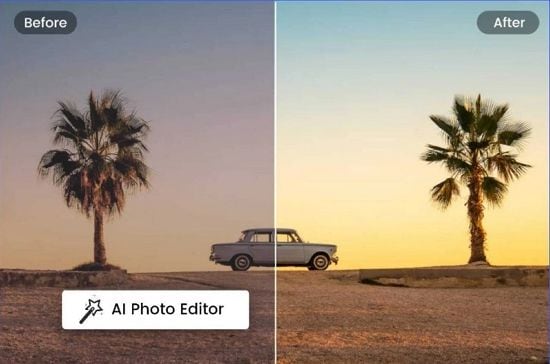
Credit: virbo.wondershare.com
Frequently Asked Questions
How To Edit An Ai Photo For Free?
Use free tools like GIMP, Pixlr, or Fotor to edit AI photos. Upload, adjust, and save your edits easily.
Which Ai App Is Best For Photo Editing?
The best AI app for photo editing is Adobe Photoshop. It offers powerful features and intuitive tools for professional results.
Is Fotor Ai Free?
Fotor AI offers both free and paid plans. The free plan includes basic features, while advanced tools require a subscription.
What Is The Free Ai That Enhance Photos?
A popular free AI for enhancing photos is “Remini. ” It improves image quality and detail quickly.
Conclusion
Choosing the best free AI photo editing software can elevate your photography game. Explore options to find the perfect fit. These tools offer powerful features without the cost. Enhance your images effortlessly and share stunning results. Start experimenting with these free options today and transform your photos like a pro.



