
AI photo editing tools automate and enhance image manipulation. These tools offer precision, efficiency, and creative possibilities.
AI photo editing tools have revolutionized the way we approach image editing. They utilize advanced algorithms to automatically correct colors, remove blemishes, and even add artistic effects. These tools save time and effort, making them ideal for both professionals and amateurs.
With user-friendly interfaces, anyone can achieve professional-quality results. AI photo editors also provide features like background removal, object recognition, and style transfer. This technology continues to evolve, offering new capabilities that push the boundaries of creativity. Embracing AI in photo editing can elevate your work and streamline your workflow, making it a valuable asset in the digital age.
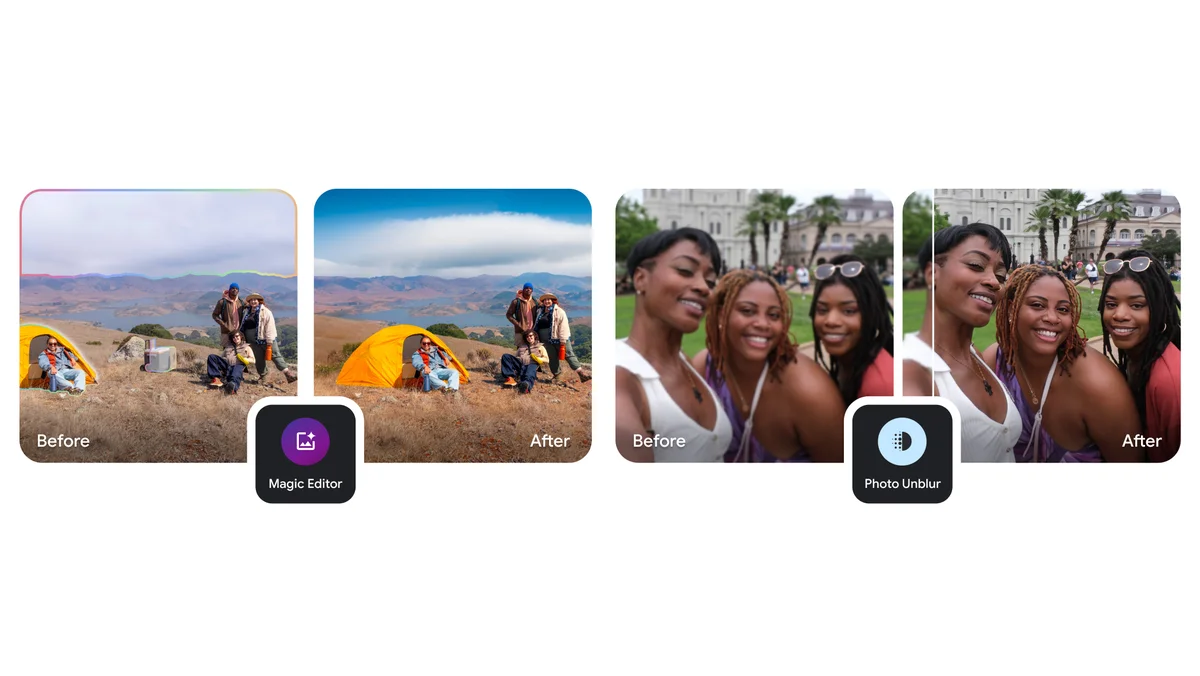
Credit: blog.google
The Rise Of Ai In Photo Editing
Artificial Intelligence has taken the world by storm, and photo editing is no exception. AI photo editing tools have revolutionized how photographers and hobbyists enhance their images. These tools offer both simplicity and complexity, catering to various needs and skill levels.
From Basic Edits To Complex Transformations
Gone are the days when basic edits took hours. AI tools can now handle simple tasks like cropping, resizing, and color correction in seconds. This speed allows users to focus on creativity rather than technical details.
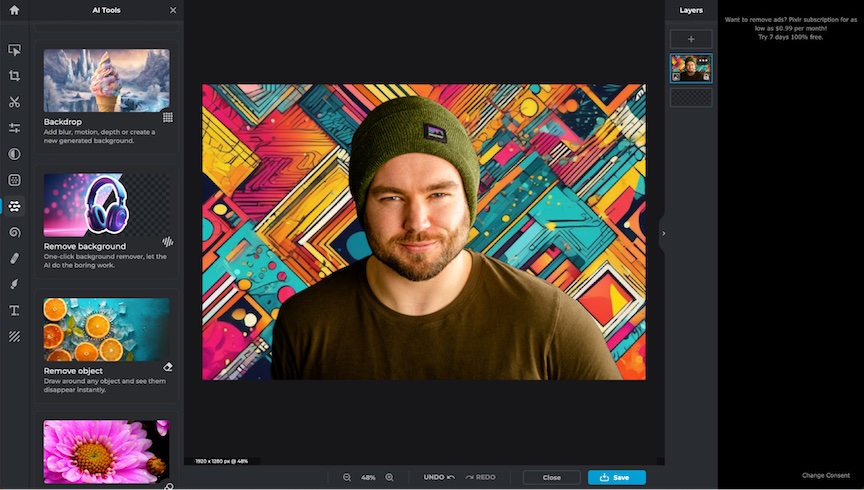
AI photo editing doesn’t stop at basic adjustments. It also enables complex transformations. With AI, you can remove backgrounds, change lighting, and even replace skies. These tools use deep learning to understand and modify images with stunning accuracy.
Consider the following table for a quick comparison of basic and advanced AI photo editing features:
| Basic Edits | Complex Transformations |
|---|---|
| Crop | Background Removal |
| Resize | Sky Replacement |
| Color Correction | Lighting Changes |
Impact On Professional Photography
AI photo editing tools have a significant impact on professional photography. They save time and enhance productivity, allowing photographers to deliver high-quality work faster.
Professional photographers can now focus on capturing the perfect shot. They no longer need to spend hours editing. AI tools handle repetitive tasks, letting photographers concentrate on creativity.
Furthermore, AI makes it easier for professionals to achieve consistent results. This consistency is crucial for maintaining a high standard of work across different projects.
Here are some benefits for professional photographers:
- Time-saving
- Enhanced productivity
- Consistent results
- More focus on creativity
Credit: zapier.com
How Ai Photo Editing Tools Work
AI photo editing tools are revolutionizing the photography industry. They can enhance images with minimal effort. These tools use advanced algorithms to analyze and edit photos. Here, we explain how they work.
The Role Of Machine Learning
Machine learning is crucial in AI photo editing. It enables the software to learn from data. The software improves over time by recognizing patterns. For instance, it can identify colors, shapes, and textures. This allows for more precise edits.
Machine learning models are trained on thousands of images. They understand what a good photo looks like. The software then applies these learnings to new photos. This process helps in tasks like color correction and noise reduction.
Here are some key functions powered by machine learning:
- Auto-enhancement: Automatically improves photo quality.
- Face recognition: Identifies and edits faces in photos.
- Object removal: Easily removes unwanted objects.
Understanding Neural Networks
Neural networks are a type of machine learning. They mimic the human brain to process data. In photo editing, they analyze image pixels. They find patterns to make accurate edits.
A neural network consists of layers. Each layer processes different aspects of the image. The input layer receives the raw image data. Hidden layers transform this data through complex calculations. The output layer provides the final edited image.
Here’s a simple table explaining the neural network layers:
| Layer | Function |
|---|---|
| Input Layer | Receives raw image data. |
| Hidden Layers | Processes data through calculations. |
| Output Layer | Delivers the final edited image. |
Neural networks excel in tasks like:
- Enhancing details: Sharpening images without losing quality.
- Style transfer: Applying artistic effects to photos.
- Super-resolution: Increasing image resolution.
These advanced technologies make AI photo editing tools powerful and efficient.
Popular Ai Photo Editing Tools In The Market
AI photo editing tools have revolutionized the way we enhance images. These tools offer powerful features and capabilities that simplify the editing process. Below, we explore some of the most popular AI photo editing tools in the market today.
Features And Capabilities
AI photo editing tools come with various features and capabilities. Here are some key highlights:
- Automated Enhancements: Tools that automatically adjust brightness, contrast, and color balance.
- Object Removal: Easily remove unwanted objects from photos.
- Face Retouching: Smooth skin, whiten teeth, and enhance facial features.
- Background Replacement: Replace backgrounds with just a few clicks.
- Filters and Effects: Apply artistic filters and effects to images.
- Batch Processing: Edit multiple photos at once for efficiency.
- AI-Powered Suggestions: Smart suggestions for improvements based on image analysis.
Choosing The Right Tool For Your Needs
Choosing the right AI photo editing tool depends on your specific needs. Consider these factors:
| Factor | Considerations |
|---|---|
| Ease of Use | Look for a user-friendly interface. |
| Features | Ensure the tool has the features you need. |
| Cost | Check if the tool fits your budget. |
| Compatibility | Ensure it works with your devices and operating systems. |
| Customer Support | Look for good customer support options. |
Here are some popular AI photo editing tools to consider:
- Adobe Photoshop – Known for advanced editing capabilities.
- Luminar AI – Offers powerful AI features and ease of use.
- Topaz Labs – Specializes in detail enhancement and noise reduction.
- Fotor – Provides a range of filters and effects.
- Canva – Great for quick edits and design work.
Ai And The Future Of Creative Photography
Artificial Intelligence is transforming creative photography. AI photo editing tools offer new ways to enhance images. These tools make editing faster and more intuitive. The future of photography looks exciting with AI.
Enhancing Creativity With Ai
AI tools help photographers unleash their creativity. With AI, you can apply complex filters with ease. AI can suggest edits that improve your photos. This allows you to focus more on your artistic vision.
AI photo editing tools can remove unwanted objects. They can also enhance colors and adjust lighting. These features make your photos look professional. AI makes it easier to create stunning images.
| Feature | Benefit |
|---|---|
| Object Removal | Clean up photos effortlessly |
| Color Enhancement | Make colors pop |
| Lighting Adjustment | Perfect lighting every time |
Ethical Considerations In Ai-enhanced Photography
AI in photography raises ethical questions. One concern is the authenticity of images. AI can change photos to look unrealistic. This can mislead viewers.
Another issue is the privacy of subjects. AI tools can identify people in photos. This can invade their privacy. It’s important to use AI responsibly.
- Ensure photos remain authentic
- Respect the privacy of subjects
- Use AI tools responsibly
Understanding these ethical considerations is crucial. It helps maintain trust in photography. Always aim for honesty in your images.
Comparing Ai Photo Editing Tools With Traditional Software
In the world of photo editing, AI tools are changing the game. Traditional software has been around for years. But AI tools are making photo editing faster and easier. Let’s dive into how these two compare.
Speed And Efficiency
AI photo editing tools are designed for speed. They can edit photos in seconds. Traditional software can take much longer. You need to know how to use it well. AI tools do not need much training. They are user-friendly and quick.
- AI tools: Edit photos in seconds
- Traditional software: Takes longer
- AI tools: User-friendly
- Traditional software: Requires training
| Feature | AI Tools | Traditional Software |
|---|---|---|
| Speed | Fast | Slow |
| Efficiency | High | Moderate |
| User-Friendliness | Very User-Friendly | Requires Training |
Quality Of Output
The quality of output is crucial in photo editing. AI tools use smart algorithms. They can enhance photos with great detail. Traditional software provides more control. Skilled users can achieve amazing results. AI tools are improving fast. They are getting closer to traditional software quality.
- AI tools: Use smart algorithms
- Traditional software: Offers more control
- AI tools: Improving quality rapidly
Both AI tools and traditional software have their strengths. AI tools are fast and easy. Traditional software offers more control. Choosing the right tool depends on your needs.
Practical Applications Of Ai In Photo Editing
AI photo editing tools have revolutionized the way we edit photos. These tools offer practical applications that save time and produce stunning results. Here, we discuss two major uses: restoration of old photographs and automated editing for large batches.
Restoration Of Old Photographs
Old photographs often suffer from damage and wear. AI tools can restore these photos to their former glory. They remove scratches, stains, and fading. This brings old memories back to life.
AI uses advanced algorithms to detect and repair damages. It can even add missing details. This makes the photos look as good as new. It is amazing how AI can revive cherished moments from the past.
Automated Editing For Large Batches
Editing a large number of photos manually is tiring. AI photo editing tools can handle this task swiftly. They can apply consistent edits across a large batch of photos. This saves a lot of time and effort.
- Batch cropping: AI can crop multiple photos to the same size.
- Color correction: It can adjust colors uniformly in all photos.
- Noise reduction: AI removes noise from all photos in one go.
- Resizing: It can resize many photos to the required dimensions.
Using AI for automated editing ensures all photos look professional. This is especially useful for event photographers and businesses.
| Feature | Benefit |
|---|---|
| Batch Cropping | Saves time by cropping many photos at once |
| Color Correction | Ensures uniform color adjustments |
| Noise Reduction | Enhances photo quality by reducing noise |
| Resizing | Prepares photos for various needs |
Learning To Use Ai Photo Editing Tools
AI photo editing tools are transforming the way we edit images. They offer powerful features that can enhance your photos with ease. Whether you are a beginner or an experienced user, these tools can help you achieve professional results.
Resources For Beginners
Starting with AI photo editing tools can be exciting. Here are some resources to get you started:
- Online Tutorials: Many websites offer free tutorials. These can help you understand the basics.
- Video Guides: YouTube channels provide step-by-step guides. These can be very helpful for visual learners.
- Forums and Communities: Join online communities. They can offer tips and answer your questions.
Using these resources can help you learn faster. Take your time to practice and explore the tools.
Advanced Techniques For Experienced Users
Once you master the basics, you can explore advanced techniques. Here are some techniques for experienced users:
- Layer Masking: This technique allows you to edit specific parts of an image. It gives you more control over the final result.
- AI-based Color Correction: Use AI to adjust colors for a more natural look. This can save time and improve consistency.
- Automated Object Removal: Some AI tools can remove unwanted objects. This feature can make your photos look cleaner.
These advanced techniques can take your photo editing skills to the next level. Experiment with different features to see what works best for you.
Credit: zapier.com
Challenges And Limitations Of Ai In Photo Editing
AI photo editing tools are revolutionizing the way we handle images. Despite their potential, they face several challenges and limitations. Understanding these challenges is crucial for anyone using AI for photo editing.
Dealing With Complex Images
AI struggles with complex images. Complex images have intricate details and varied textures. AI may miss subtle nuances in these images. This leads to less accurate edits. For example, AI may fail to differentiate between hair and background. Such errors can ruin the overall quality of the photo.
AI also faces issues with lighting variations. Natural and artificial lights affect image quality. AI tools may not always correct these issues perfectly. This limitation can be a major drawback for professional photographers.
| Challenges | Impact |
|---|---|
| Complex Details | Missed nuances |
| Lighting Variations | Inconsistent corrections |
The Human Touch In Art
AI lacks the human touch in art. Art involves emotions and creativity. AI follows algorithms. It cannot replicate human creativity. This makes AI less effective in artistic edits.
Humans can interpret the mood of an image. They adjust colors and tones to match that mood. AI lacks this ability. This is a significant limitation for artistic projects.
- AI follows rules, not emotions.
- Humans understand and interpret art better.
- AI cannot replicate human creativity.
Frequently Asked Questions
Which Ai Tool Is Best For Photo Editing?
Adobe Photoshop is the best AI tool for photo editing. It offers advanced features and user-friendly interface.
Can I Use Ai To Edit Photos?
Yes, you can use AI to edit photos. AI tools enhance images, remove backgrounds, and apply filters efficiently.
What Is The Ai Photo App Everyone Is Using?
The AI photo app everyone is using is Lensa. It enhances photos with AI-powered filters and editing tools.
What Is The Best Free Photo Ai App?
The best free photo AI app is Adobe Photoshop Express. It offers powerful editing tools, filters, and easy-to-use features.
Conclusion
AI photo editing tools have revolutionized the way we enhance images. They offer efficiency and high-quality results. Embrace these tools to save time and achieve professional-level edits. As technology evolves, these tools will only get better, making photo editing easier for everyone.
Stay updated to make the most of these advancements.



