
The best AI photo editing software for Mac includes Adobe Photoshop, Luminar AI, and Pixelmator Pro. These tools offer advanced features and intuitive interfaces.
Photo editing on Mac has evolved with AI technology, making it easier for users to enhance images. Adobe Photoshop remains a top choice due to its powerful AI tools and vast editing options. Luminar AI stands out for its user-friendly interface and automated enhancements.
Pixelmator Pro offers seamless integration with macOS and advanced AI capabilities. These software options cater to both professionals and hobbyists, providing tools to achieve stunning results. Investing in AI photo editing software can significantly improve your workflow and the quality of your images.
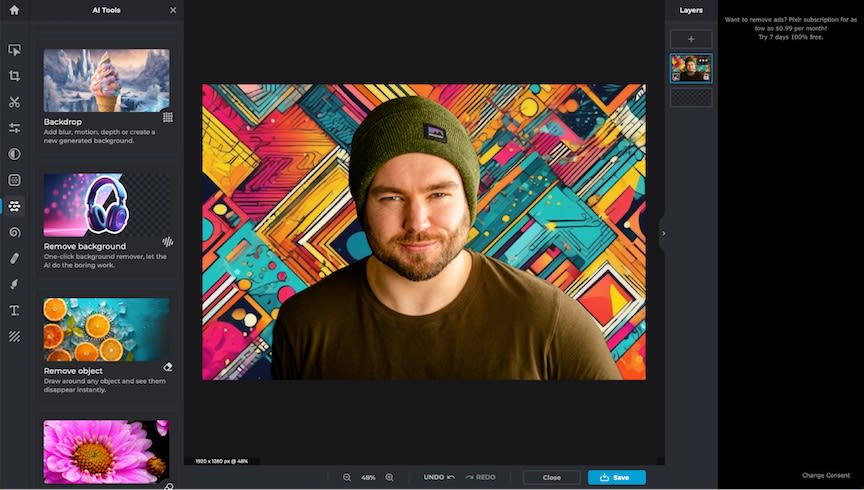
Credit: zapier.com
Introduction To Ai Photo Editing On Mac
The world of photo editing has transformed with AI technology. Mac users now have access to powerful tools that make editing simple and fun. These tools use advanced algorithms to enhance images automatically. This makes the editing process faster and more efficient. Let’s dive into the exciting world of AI photo editing on Mac.
The Rise Of Ai In Photography
AI has revolutionized the photography industry. It has made photo editing more accessible to everyone. AI algorithms can detect patterns and make adjustments that used to take hours. This has leveled the playing field for amateur photographers. They can now create professional-quality images with ease.
- AI can enhance colors and contrast.
- It can remove unwanted objects from photos.
- AI tools can even retouch portraits flawlessly.
These capabilities have changed how we approach photo editing. The rise of AI has made it a must-have tool for photographers.
Why Mac Users Love Ai Editing Tools
Mac users have always had a knack for creativity. AI editing tools on Mac make it easier to bring creative visions to life. These tools are user-friendly and integrate seamlessly with macOS.
Key reasons Mac users love AI editing tools:
- Ease of Use: The tools are intuitive and easy to navigate.
- Speed: AI speeds up the editing process significantly.
- Quality: The results are often indistinguishable from manual edits.
Mac users appreciate how these tools save time without compromising on quality. This allows them to focus more on capturing moments rather than spending hours editing.
| Feature | Benefit |
|---|---|
| Automatic Adjustments | Quickly enhance photos with a single click. |
| Object Removal | Erase unwanted elements seamlessly. |
| Portrait Retouching | Perfect skin tones and remove blemishes. |
With these powerful features, it’s no wonder Mac users are embracing AI photo editing tools. The blend of technology and creativity is a perfect match for the Mac ecosystem.
Key Features To Look For In Ai Photo Editing Software
Choosing the best AI photo editing software for Mac can be daunting. Key features can simplify your decision. Let’s explore the top features you should prioritize.
Automatic Enhancements
Automatic enhancements can save you a lot of time. Look for software that offers:
- Auto Color Correction: Adjusts colors for a natural look.
- Auto Exposure Adjustment: Balances the light in your photos.
- Auto Contrast Adjustment: Enhances the difference between light and dark areas.
Smart Object Removal
Removing unwanted objects can be tricky. AI can make this task easier. Features to look for include:
- Content-Aware Fill: Replaces unwanted objects with background details.
- One-Click Object Removal: Deletes objects with a single click.
- Seamless Blending: Ensures the edited area looks natural.
Ai-powered Retouching
Retouching can enhance your photos significantly. AI tools can make this process effortless. Essential features include:
- Skin Smoothing: Removes blemishes and smooths skin.
- Eye Brightening: Makes eyes look more vivid.
- Teeth Whitening: Whitens teeth for a perfect smile.
| Feature | Description |
|---|---|
| Auto Color Correction | Adjusts colors for a natural look. |
| Content-Aware Fill | Replaces unwanted objects with background details. |
| Skin Smoothing | Removes blemishes and smooths skin. |
Top Ai Photo Editing Software For Mac Users
Discover the best AI photo editing software for Mac users. Enhance your photos with ease using these powerful tools. Let’s explore the top picks.
1. Luminar Ai
Luminar AI is a top choice for photo editing on Mac. It uses artificial intelligence to make your photos look stunning. The user interface is simple and easy to use.
- AI Sky Replacement
- Portrait Enhancer
- Structure AI
These features help you make quick edits. You can achieve professional results with a few clicks. No need for complex adjustments.
2. Adobe Photoshop
Adobe Photoshop is a well-known photo editing software. It offers powerful AI tools for Mac users. It is perfect for both beginners and professionals.
- Content-Aware Fill
- Neural Filters
- Sky Replacement
Photoshop provides a vast array of features. You can create stunning images with its AI capabilities. It is a must-have tool for serious photographers.
3. Pixelmator Pro
Pixelmator Pro is a great AI photo editing software for Mac. It combines powerful tools with an easy-to-use interface.
- ML Enhance
- ML Super Resolution
- ML Match Colors
These AI features make editing quick and fun. Pixelmator Pro helps you create beautiful photos effortlessly.

Credit: www.cyberlink.com
Comparing Performance: Mac Vs. Windows For Ai Editing
AI photo editing software has revolutionized the way we enhance images. Mac and Windows both offer robust platforms for AI tools. But how do they compare? In this section, we’ll explore how each system performs in key areas.
Hardware Compatibility
Mac devices are known for their sleek design and powerful hardware. They come with high-end processors and graphics cards. This makes them excellent for AI photo editing.
Windows PCs offer more variety in hardware configurations. Users can select from numerous brands and specifications. This flexibility allows for custom builds tailored to AI editing needs.
| Feature | Mac | Windows |
|---|---|---|
| Processor | Apple M1/M2 | Intel, AMD |
| Graphics | Integrated, AMD | NVIDIA, AMD |
| RAM | Up to 64GB | Up to 128GB |
Software Optimization
MacOS is optimized for creative software. Apple’s ecosystem ensures seamless integration with AI tools. This provides a smooth and efficient workflow.
Windows OS has a broader range of software compatibility. Many AI editing programs are designed to run efficiently on Windows. This makes it a versatile option for users.
- MacOS: Optimized for creative applications.
- Windows OS: Greater software compatibility.
Both platforms have their strengths. Mac offers seamless integration and powerful hardware. Windows provides flexibility and a wide range of software options.
How To Maximize Your Ai Editing Software On Mac
AI photo editing software on Mac offers many features. These features make editing photos easier and more efficient. To get the best results, you need to know how to use these tools. This section will help you maximize your AI editing software on Mac.
Customizing Settings For Optimal Results
Each AI photo editing software comes with its own settings. Customizing these settings can help you achieve the best results. Here are some tips:
- Adjust Brightness and Contrast: Find the right balance for your photos. Too much brightness or contrast can ruin the image.
- Set Noise Reduction: Use noise reduction to remove unwanted grain. This makes your photos look cleaner.
- Customize Color Settings: Adjust the colors to make your photos pop. Use the software’s color grading tools.
Take time to explore these settings. Experiment to see what works best for your photos.
Leveraging Plugins And Extensions
Plugins and extensions add more power to your AI photo editing software. They offer extra features that the main software might not have. Here’s how to use them effectively:
- Identify Useful Plugins: Look for plugins that meet your needs. Some plugins offer advanced filters, while others provide extra editing tools.
- Install Plugins Safely: Make sure you download plugins from trusted sources. This keeps your Mac safe from malware.
- Integrate Extensions Seamlessly: Use extensions that work well with your software. Check for compatibility before installing.
By leveraging these plugins and extensions, you can enhance your editing capabilities. This will help you create stunning photos with ease.
Creative Possibilities With Ai Photo Editing
AI photo editing software has transformed photo editing. It offers new creative possibilities. With AI, anyone can turn photos into stunning pieces of art. This technology opens doors to creativity never imagined before.
Transforming Ordinary Photos Into Art
Imagine taking a simple photo and making it look extraordinary. AI tools can add amazing effects. They can adjust colors, lighting, and textures. With just a few clicks, your photo looks like a professional’s work. AI can even mimic famous artists’ styles. You can turn your photo into a Van Gogh or Monet painting.
Exploring New Genres With Ai
AI photo editing lets you explore new genres. You can experiment with surrealism, abstract art, or futuristic designs. AI tools offer presets and filters for various genres. This makes it easy to try new styles. You don’t need advanced skills to create something unique. AI makes it simple for everyone to be an artist.
The Future Of Ai Photo Editing On Mac
The world of AI photo editing on Mac is evolving quickly. With new tools and features, photographers have more power than ever. AI is making photo editing faster and easier. Let’s explore what the future holds.
Emerging Trends
New trends in AI photo editing are shaping the future. These trends include:
- Real-time editing with instant feedback.
- Improved object recognition for better background removal.
- Enhanced filters that adapt to photo content.
These trends make photo editing more intuitive and efficient. Real-time editing helps users see changes instantly. Improved object recognition makes background edits seamless. Enhanced filters adjust to the scene, providing perfect results.
What To Expect In Upcoming Versions
The next versions of AI photo editing software will bring exciting features. Expect:
| Feature | Benefit |
|---|---|
| Voice Commands | Control editing with simple voice instructions. |
| Advanced Color Correction | Automatic adjustments for perfect color balance. |
| AI-Powered Suggestions | Smart suggestions to enhance your photos. |
Voice commands will simplify the editing process. Advanced color correction will ensure every photo looks stunning. AI-powered suggestions will guide users to improve their photos effortlessly.
Credit: zapier.com
Choosing The Right Ai Photo Editing Software For Your Needs
Selecting the best AI photo editing software for Mac is crucial. It ensures your photos look stunning. Let’s explore key factors to consider.
Budget Considerations
Your budget impacts your software choice. There are free options available. Paid options often offer more features. Here’s a table to help you decide:
| Software | Price | Key Features |
|---|---|---|
| PhotoDiva | Free | Basic editing, filters |
| Luminar AI | $79/year | Advanced AI tools, sky replacement |
| Adobe Photoshop | $20.99/month | Comprehensive editing, layers, masks |
Skill Level And Learning Curve
Your skill level affects your software choice. Beginners need user-friendly tools. Experts may want more advanced options. Here are some points to consider:
- Beginners: Look for intuitive interfaces and tutorials.
- Intermediate: Choose software with a mix of basic and advanced features.
- Experts: Opt for tools with extensive functionalities.
Some software offers a gentle learning curve. Others may require extensive training. Assess your patience and time for learning.
Frequently Asked Questions
Which Ai App Is Best For Photo Editing?
The best AI app for photo editing is Adobe Photoshop. It offers advanced tools and AI-powered features for stunning results.
What Is The Best Free Ai Photo Enhancer For Mac?
The best free AI photo enhancer for Mac is Luminar AI. It offers powerful tools for enhancing images effortlessly.
What Is The Ai Photo Editor App For Apple?
The AI photo editor app for Apple is “Prisma. ” It uses AI to transform photos into artistic styles. Prisma offers various filters and editing tools.
Is There An Ai Image Editing Tool?
Yes, there are AI image editing tools. Examples include Adobe Photoshop, Canva, and Luminar AI. These tools offer advanced editing features.
Conclusion
Choosing the best AI photo editing software for Mac enhances your creativity and productivity. Each option offers unique features tailored to different needs. Explore these tools to find the perfect match for your photo editing projects. Elevate your photography skills with the right AI software and enjoy seamless editing experiences on your Mac.



