
Are you puzzled by the difference between your bank balance and what you see in QuickBooks? You’re not alone.
Many users face this common issue and find themselves wondering why the numbers just don’t match up. But here’s the thing: understanding this discrepancy is crucial for managing your finances effectively. Imagine having complete control over your financial data, knowing exactly where your money is and how it’s flowing.
Sounds empowering, right? We will unravel the mystery behind these differing balances, providing you with clear insights and practical solutions. Stick with us, and discover how aligning your bank balance with QuickBooks can lead to smarter financial decisions and peace of mind.
Credit: quickbookstutorialblog.stepbystepquickbookstutorial.com
Common Causes Of Discrepancies
When managing your finances, it’s crucial to ensure that your bank balance aligns with the figures in QuickBooks. However, discrepancies often arise, leaving you puzzled. Understanding these common causes can help you pinpoint issues and maintain accurate records. Let’s dive into some frequent culprits that might be affecting your financial harmony.
Data Entry Errors
Have you ever mistakenly typed a number into QuickBooks? You’re not alone. A simple typo can throw off your entire balance. Imagine inputting $5,000 instead of $500; it drastically changes your financial picture. Regularly reviewing entries can help catch these errors early.
It’s easy to overlook details when rushing through tasks. But slowing down and double-checking your entries can prevent these mistakes. Consider setting aside a dedicated time each week to audit your inputs.
Timing Differences
Timing can be tricky. Your bank might process transactions at different speeds compared to QuickBooks. You might have issued a check that’s yet to be cashed, showing a discrepancy between your bank balance and QuickBooks.
Think about transactions made over weekends or holidays. They might not appear in your bank statement immediately. Monitoring these timing gaps can help you understand why balances don’t match.
Missing Transactions
Occasionally, transactions might slip through the cracks. Have you ever forgotten to record a payment or expense in QuickBooks? It happens, especially during busy periods.
Missing transactions can lead to significant discrepancies. Regularly reconciling your accounts ensures that nothing is left out. Keeping a checklist of regular transactions can serve as a helpful reminder.
Are you ready to tackle these common discrepancies? Addressing them can significantly streamline your accounting process. Ensuring accuracy isn’t just about numbers; it’s about peace of mind. How do you plan to improve your bookkeeping habits today?
Identifying Discrepancies
Spot differences between your bank balance and QuickBooks records. Ensure both match to avoid financial errors. Regular checks help maintain accuracy and prevent potential issues.
Identifying DiscrepanciesIf you’re managing finances with QuickBooks, you might notice a difference between your bank balance and what’s recorded in QuickBooks. This discrepancy can be frustrating but is a common issue many face. Understanding these differences is crucial for accurate financial reporting.Reviewing Bank Statements
Start by thoroughly reviewing your bank statements. Compare each transaction against what’s recorded in QuickBooks. Have you accounted for all deposits and withdrawals?Look out for transactions that might have been missed or entered twice. Even a small error can lead to significant discrepancies. Ensure you’re checking bank statements regularly to catch mistakes early.Analyzing Quickbooks Records
Next, analyze your QuickBooks records. Are all transactions entered correctly? Pay attention to transaction dates and amounts.QuickBooks might have automated entries that need adjustment. Review these entries to ensure they match your bank statements.Consider using the reconciliation feature in QuickBooks. This tool helps match your QuickBooks records with your bank statements, making it easier to spot discrepancies.Are there any common mistakes you notice? Addressing these can save you time and frustration in the future.Steps To Resolve Discrepancies
Discrepancies between your bank balance and QuickBooks can be frustrating. Resolving these issues ensures your financial data is accurate. It also helps in making informed decisions. Here are simple steps to fix these discrepancies efficiently.
Reconcile Accounts
Start by reconciling your accounts. This process involves matching your bank statement with QuickBooks transactions. Use the reconciliation tool in QuickBooks. Check each transaction carefully. Ensure everything matches your bank statement. This helps identify missing or duplicate entries. Regular reconciliation keeps your accounts accurate.
Adjust Entries
Sometimes, entries need adjustments. Look for transactions in QuickBooks that differ from your bank statement. Correct any errors you find. These might be wrong amounts or incorrect dates. Adjusting entries fixes discrepancies. Always save changes after adjustments. This maintains the accuracy of your records.
Verify Transaction Details
Verify the details of each transaction. Confirm dates and amounts match your bank statement. Check for any unauthorized transactions. Ensure all details in QuickBooks reflect your bank records. Verify any manual entries for errors. Accurate transaction details help resolve balance discrepancies.

Credit: 5minutebookkeeping.com
Tools And Features In Quickbooks
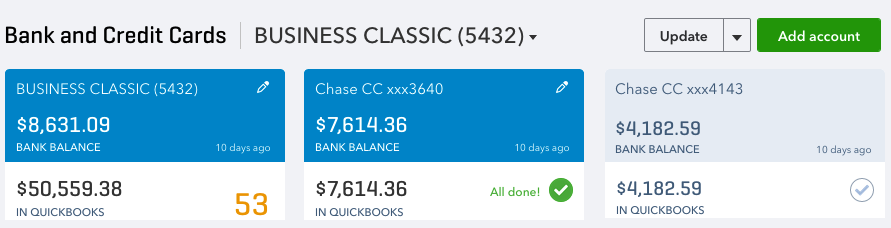
QuickBooks simplifies financial tracking by showing the bank balance alongside your records. This helps spot differences quickly. Regularly checking these balances ensures your accounts stay accurate.
Tools and Features in QuickBooksQuickBooks offers a range of tools and features that simplify financial management for businesses of all sizes. These features are designed to streamline processes, reduce errors, and provide clear insights into your financial health. Whether you’re managing a small startup or a larger enterprise, understanding these tools can greatly enhance your efficiency and accuracy.Bank Reconciliation Tool
The Bank Reconciliation Tool in QuickBooks is a game-changer for maintaining accurate records. It helps you match your bank statements with your QuickBooks records, ensuring that every transaction is accounted for. This tool reduces the stress of month-end balancing by spotting discrepancies early.Imagine effortlessly identifying a forgotten transaction that could have thrown off your entire balance. This tool makes it possible. Have you ever considered how much time you could save by catching errors early instead of at year-end?Audit Trail Feature
The Audit Trail Feature is a powerful component for tracking changes within your QuickBooks account. It records every transaction modification, providing a clear history of who changed what and when. This is especially crucial in multi-user environments where accountability is key.Picture yourself investigating an unexpected change in your financial records. With the audit trail, you can quickly pinpoint the source and rectify any issues. How much more confident would you feel knowing you have a transparent log of all activities?These tools are not just about managing numbers; they’re about giving you control and peace of mind. They empower you to make informed decisions, ensuring your financial data is always accurate and reliable. What other features in QuickBooks have you found invaluable in your financial journey?Preventing Future Discrepancies
Keep bank balance and QuickBooks aligned by regularly reconciling accounts. This practice helps catch errors early. Regular checks ensure financial accuracy and prevent future discrepancies.
Preventing future discrepancies between your bank balance and QuickBooks is crucial for maintaining financial accuracy and peace of mind. It’s easier to prevent these issues than to deal with them after they arise. A few proactive steps can make a world of difference in ensuring your financial records align perfectly.Regular Account Reconciliation
Regular account reconciliation is your first line of defense. Make it a habit to check your bank statements against QuickBooks at least once a month. This practice helps catch errors early, saving you from bigger headaches down the line.Think of it as your monthly financial health check-up. You wouldn’t skip a doctor’s appointment, would you? Similarly, don’t skip this critical step to keep your finances in top shape.Implementing Internal Controls
Establishing strong internal controls can safeguard your finances. Assign specific financial roles to prevent unauthorized access or entries in QuickBooks. This way, you ensure that only trained personnel handle financial data.Consider setting up approval processes for transactions. Even a simple double-check can catch mistakes before they become significant issues.Training For Accurate Data Entry
Investing in training for accurate data entry can save you from future discrepancies. Employees should understand how to enter data correctly in QuickBooks to prevent errors.A personal experience taught me this invaluable lesson. After a costly mistake, I realized training was the missing link in our process.Ask yourself: Are your team members confident in their QuickBooks skills? If not, a small training session could be the key to flawless financial records.Seeking Professional Help
Understanding the difference between bank balance and QuickBooks balance can be tricky. Many business owners find themselves puzzled by discrepancies. This confusion may lead to errors in financial records. Seeking professional help is often the best choice. Experts can provide clarity and ensure accuracy. Professional guidance can ease the stress of managing financial data. Let’s explore two ways to get professional help.
Consulting Quickbooks Experts
QuickBooks experts specialize in navigating the software’s complexities. They can identify why your balances don’t match. Experts offer personalized advice tailored to your business needs. They help set up accounts correctly to avoid future issues. With their experience, experts can troubleshoot and resolve errors swiftly. Consulting an expert ensures your QuickBooks data remains accurate and reliable.
Hiring Accounting Professionals
Accounting professionals bring a wealth of knowledge to your business. They can review both bank and QuickBooks records. Their insights can reveal discrepancies you might miss. Accountants ensure compliance with financial regulations. They can also advise on best practices for financial management. Hiring an accountant gives you peace of mind. You know your financial information is in capable hands.

Credit: quickbooks.intuit.com
Frequently Asked Questions
Should Bank Balance And Quickbooks Balance Match?
Bank balance and QuickBooks balance should ideally match. Discrepancies may occur due to pending transactions or errors. Regular reconciliation helps ensure accuracy, keeping your financial records consistent and reliable. Always review any differences promptly to maintain financial integrity.
Why Is My Balance In Quickbooks Different Than My Bank Balance?
Your QuickBooks balance may differ from your bank balance due to outstanding transactions, data entry errors, or timing differences. Regularly reconcile accounts and review transactions to identify discrepancies. This ensures your QuickBooks records accurately reflect your actual bank balance.
Why Would The Bank Balance Be Different Than The Ledger Balance?
Bank balance differs due to unrecorded transactions, pending deposits, or checks. Timing discrepancies and bank fees can also affect it. Always reconcile both balances regularly to identify mismatches. Ensure all transactions are documented to maintain consistency between bank and ledger balances.
Use online banking for real-time updates.
Conclusion
Understanding bank balance vs QuickBooks is crucial for accurate accounting. QuickBooks simplifies financial tracking but can show discrepancies. Regular checks ensure your data aligns with bank records. Always reconcile monthly for best results. This prevents errors and keeps your finances clear.
Use QuickBooks reports to spot differences early. Staying proactive helps maintain financial health. Resolve any issues quickly to avoid bigger problems later. Clear and concise monitoring aids in successful business management. Remember, careful attention to details keeps your finances in check.
Effective financial management supports business growth. Keep your records consistent for peace of mind.


