Are you struggling to keep your email marketing campaigns organized and effective? Notion might just be the tool you need to transform your approach.
Imagine having a centralized hub where you can plan, track, and optimize every aspect of your email marketing strategy. Sounds appealing, right? By using Notion, you can streamline your processes, enhance collaboration, and boost productivity—all in one place. You’ll discover practical ways to leverage Notion for email marketing, making your campaigns more efficient and impactful.
Prepare to dive into actionable tips and strategies that will help you take your email marketing to the next level. Don’t miss out on learning how this versatile tool can revolutionize the way you manage your campaigns!
Getting Started With Notion
Getting started with Notion for email marketing is simple and effective. Notion offers a flexible platform that can streamline your marketing efforts. With its unique features, organizing your email campaigns becomes easier.
Setting Up Your Workspace
Begin by creating a workspace tailored to your needs. Open Notion and set up a new workspace. Name it to match your email marketing goals. Add necessary pages for different tasks. You may want to create pages for campaign planning, tracking, and analytics. Organize pages logically for easy access.
Invite team members to collaborate. Use the share feature to grant access. This allows real-time collaboration. Everyone can contribute to the workspace. It keeps all updates in one place. Communication becomes seamless.
Customizing Templates For Email Marketing
Notion provides templates that you can customize. Start by selecting a template suitable for email marketing. Modify the template to fit your specific needs. Customize fields for campaign details, target audience, and scheduling. Adjust the layout to enhance readability.
Add sections for draft emails and feedback. This helps in organizing and refining content. Use tags for better categorization. Tags improve searchability within the workspace. This makes finding specific campaigns easy.
Regularly update templates based on campaign success. Analyze what works and adjust accordingly. This keeps your strategy fresh and effective. Notion’s flexibility allows constant improvement.
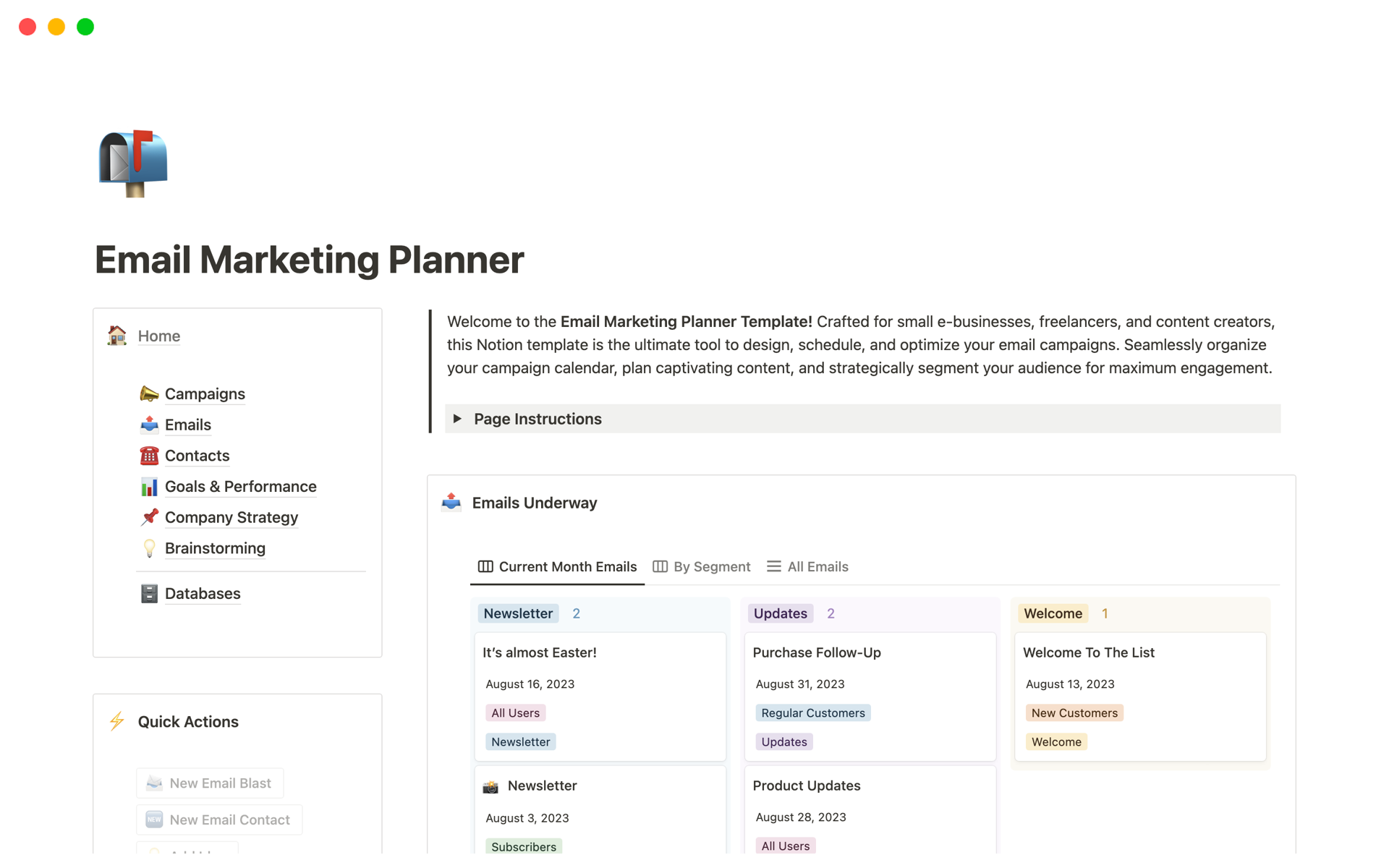
Credit: www.notion.com
Building Your Email Marketing Strategy
Building your email marketing strategy with Notion can streamline your process. Notion offers a customizable workspace to manage campaigns efficiently. From strategy planning to execution, it keeps everything organized. Here’s how you can leverage Notion to create a winning strategy.
Identifying Your Target Audience
Understanding your audience is crucial in email marketing. Notion provides tools to segment your audience effectively. Create databases to categorize customers based on preferences. Use these insights to tailor your messages accordingly.
Build profiles for different audience segments. Include details like age, interests, and purchase history. This helps in crafting personalized emails that resonate.
Crafting Compelling Content
Content is the backbone of your email strategy. With Notion, brainstorm and organize your ideas in one place. Create templates for different types of emails. This ensures consistency and saves time.
Write engaging subject lines to grab attention. Keep your content concise and relevant. Use bullet points for clarity and easy reading.
Notion lets you collaborate with your team seamlessly. Share content drafts for feedback and revisions. This enhances the quality of your email content.
Organizing Campaigns In Notion
Notion serves as an effective tool for organizing email marketing campaigns. Create structured templates to track campaign progress and manage tasks efficiently. Collaborate with team members and streamline workflows in one place.
Organizing campaigns can feel like juggling flaming torches—exciting but potentially overwhelming. Notion offers a fantastic solution to keep your email marketing campaigns in check. It acts as a digital command center, helping you streamline efforts and maintain focus. Imagine having a single workspace where every campaign detail is neatly categorized and easily accessible.Creating Campaign Calendars
Start by creating a campaign calendar in Notion to keep track of all your email marketing activities. Use a table or calendar view to outline your campaign schedules, deadlines, and important milestones. You can color-code different campaigns, making it visually appealing and easy to navigate.Add reminders for each task to ensure nothing slips through the cracks. This organization helps you anticipate upcoming tasks and allocate resources efficiently. Once you experience the ease of a well-organized campaign calendar, you’ll wonder how you ever managed without it.Tracking Progress And Metrics
Tracking progress is crucial to understanding your campaign’s success. In Notion, you can build a dashboard that pulls in relevant metrics for each campaign. Use a table with columns for key performance indicators like open rates, click-through rates, and conversions.Update these metrics regularly to monitor your campaign’s effectiveness. This real-time insight allows you to make informed decisions and adjust strategies promptly. Have you ever tried tweaking a campaign based on data and seen immediate results? Notion makes this process seamless, putting essential information at your fingertips.Organizing campaigns in Notion not only declutters your workflow but also enhances your strategic approach. Dive into using these features and watch your email marketing efforts thrive.Collaborating With Your Team
Effective collaboration enhances productivity in email marketing campaigns. Notion offers tools to facilitate teamwork. Streamline your process. Ensure everyone is on the same page. Empower your team with shared insights and responsibilities.
Sharing Workspaces
Notion allows you to share workspaces easily. Invite team members to view or edit. Customize access levels for each member. This ensures everyone gets the right information. Real-time updates keep everyone aligned. No more outdated documents or miscommunications.
Assigning Tasks And Deadlines
Organize tasks efficiently with Notion. Assign specific tasks to team members. Set clear deadlines for each task. This ensures accountability. Use Notion’s reminders to keep tasks on track. Monitor progress seamlessly. Celebrate task completion with your team.
Integrating Tools And Automation
Integrating tools and automation can transform your email marketing game by streamlining processes and enhancing efficiency. Notion, known for its versatility, can be the perfect ally in this. With the right integrations and a few clicks, you can automate tasks that would otherwise consume hours of your time.
Connecting Email Platforms
To get started, connect your preferred email platform, like Mailchimp or ConvertKit, with Notion. This integration allows you to manage your email lists and campaigns directly from Notion. Once connected, you can track open rates, click-through rates, and other essential metrics without switching between apps.
Using platforms like Zapier or Automate.io can facilitate this process. They act as bridges, allowing seamless data flow between Notion and your email service. Imagine updating your email list in Notion and having it automatically sync with your email platform—saving you time and reducing errors.
Utilizing Automation Features
Automation can be a game-changer for your email marketing strategy. With Notion, you can set up templates for recurring tasks, like weekly newsletters or promotional emails. This ensures consistency and saves time, so you can focus on creating engaging content.
Consider setting up a calendar within Notion to schedule your email campaigns. Automate reminders to alert you when it’s time to draft or send a newsletter. This proactive approach keeps your marketing efforts organized and ensures you never miss a deadline.
Have you ever wondered how much more you could achieve with the hours saved from manual tasks? Automation allows you to spend more time analyzing data and refining strategies, leading to better outcomes. It’s not just about doing things faster—it’s about doing them smarter.
Personal experience has shown me the power of automation. By setting up automated workflows, I’ve managed to cut my email campaign preparation time in half. This efficiency gave me more bandwidth to focus on creative strategies and audience engagement.
Analyzing Performance
Discover how Notion can streamline your email marketing by tracking campaign performance efficiently. Organize data, analyze trends, and improve strategies with easy-to-use templates and tools. Enhance engagement by understanding what works best for your audience.
Analyzing performance is a crucial part of refining your email marketing efforts. Notion makes this process seamless by offering tools that allow you to track and analyze your campaign results. By understanding how your emails are performing, you can make informed decisions that enhance your strategy and boost engagement.###Reviewing Analytics
Notion provides a structured way to review your email analytics. Start by setting up a dedicated space within Notion to log metrics like open rates, click-through rates, and conversion rates. A simple table can help you organize this data effectively.Every time you send out a campaign, update your Notion table with the latest analytics. Look for patterns—are certain subject lines performing better? Is there a particular day or time that yields higher engagement? By consistently reviewing this data, you can pinpoint what works and what needs improvement.###Adjusting Strategies
Once you have a clear view of your analytics, it’s time to adjust your strategies accordingly. If you notice that emails sent on Thursdays have higher open rates, consider scheduling your campaigns on that day.Use the insights from your Notion dashboard to tweak your content. If a particular topic garners more clicks, perhaps your audience is interested in that subject.Don’t be afraid to experiment. Test different elements such as subject lines, email designs, and call-to-action buttons. Track these changes in Notion and evaluate their impact. What small change could you make today that might lead to a big improvement tomorrow?By using Notion to analyze your email marketing performance, you can turn raw data into actionable insights, ultimately driving better results for your campaigns.Maintaining Consistency
Maintaining consistency in email marketing is key for brand recognition. Notion is a powerful tool for this purpose. It helps organize and schedule your email campaigns efficiently. When using Notion, consistency means regular updates and routine checks. This ensures your audience gets fresh and relevant content. A structured approach reduces errors and keeps your campaigns aligned with your goals.
Setting Up Routine Checks
Regular checks are essential for successful email marketing. Use Notion to create a checklist for each campaign. Include tasks like proofreading, image verification, and link testing. Schedule these checks weekly or monthly. This routine keeps your email content polished and accurate. Ensure every detail matches your brand voice and message.
Updating Content Regularly
Fresh content keeps your audience engaged. Use Notion to plan and track content updates. Create a content calendar within Notion. Mark important dates for new launches or seasonal promotions. Regular updates show your audience you care. It helps in building trust and maintaining interest.
Update email templates and designs periodically. Notion can store design inspiration and templates. Keep your emails visually appealing and functional. Regular updates ensure your content stays relevant and exciting.

Credit: www.landmarklabs.co

Credit: www.notion.com
Frequently Asked Questions
Does Notion Do Email Marketing?
Notion does not offer built-in email marketing features. It focuses on organizing and managing information. Use integrations or third-party tools for email marketing needs. Notion is ideal for productivity and collaboration, not marketing automation. Consider Mailchimp or Constant Contact for comprehensive email marketing solutions.
Can You Send Emails Through Notion?
Notion doesn’t directly support sending emails. You can integrate third-party tools or use Notion’s API for email functionality. Various integrations might help streamline communication without leaving the platform. For more advanced email options, consider using external services alongside Notion.
Can You Link Emails In Notion?
Yes, you can link emails in Notion. Simply paste the email address, and it auto-links. Use “mailto:” for custom links. This feature helps streamline email access within your Notion workspace.
Conclusion
Notion simplifies email marketing tasks. Organize campaigns with ease. Track progress efficiently. Collaborate with your team seamlessly. Utilize templates for quick setups. Customize to suit your brand’s needs. Stay on top of deadlines effortlessly. Keep all information in one place.
Increase productivity with minimal effort. Make the most of Notion’s features. Enhance your marketing strategy today. Implement these tips for better results. Improve communication with your audience. Enjoy the benefits of streamlined workflows. Notion brings clarity to your marketing tasks.
Start using Notion for effective email marketing now.