
Image editing software allows users to alter and enhance digital images. It offers tools for cropping, resizing, and color correction.
Image editing software is essential for photographers, designers, and marketers. It enables precise adjustments to improve photo quality and visual appeal. Popular programs like Adobe Photoshop and GIMP offer extensive features for professional use. These tools can correct flaws, add effects, and create graphics from scratch.
Users can also remove unwanted elements and optimize images for web use. Many software options provide user-friendly interfaces, making them accessible to beginners. Investing time in learning these tools can significantly enhance one’s ability to produce high-quality visual content.
Introduction To Image Editing Software
Image editing software allows users to modify digital images. This software helps transform simple pictures into stunning visuals. Artists and photographers use these tools every day. Let’s dive into the world of image editing software.
The Evolution Of Digital Imaging
Digital imaging has a rich history. It started with basic tools like MS Paint. These early tools offered limited features. Users could only draw and color. Over time, technology advanced. New software emerged with advanced features. Adobe Photoshop became a game-changer in the 1990s. It offered layers, filters, and more. Now, there are many image editing tools available. Each offers unique features for different needs.
Essential Tool For Creatives
For creatives, image editing software is essential. It helps bring ideas to life. Graphic designers use it for creating logos. Photographers use it for retouching photos. Illustrators use it for drawing and painting. Here are some key features:
- Layers for organizing elements
- Filters for enhancing images
- Brushes for drawing and painting
- Text tools for adding captions
- Color correction for adjusting hues
These features make the software versatile. It suits many creative projects. Below is a table of popular image editing tools:
| Software | Main Features |
|---|---|
| Adobe Photoshop | Layers, Filters, Brushes |
| CorelDRAW | Vector Graphics, Text Tools |
| GIMP | Free, Open Source, Layers |
Choosing the right software depends on your needs. Each tool offers different benefits. Consider your project type before selecting software. This ensures you have the right tools for your work.
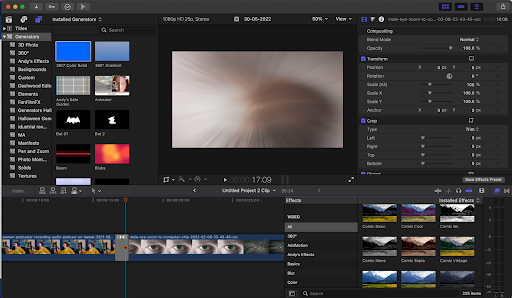
Credit: fxhome.com
Core Features Of Image Editing Tools
Image editing software has essential features. These tools help improve pictures. The core features make editing easy and fun. Let’s explore these features.
Layers And Masks
Layers help organize different parts of an image. Each layer can hold text, shapes, or adjustments. You can edit layers without affecting the whole image. This makes experimenting easy.
Masks allow you to hide or reveal parts of a layer. Masks help in creating smooth transitions between layers. They are perfect for blending images together. Masks offer precision and control.
Color Correction Capabilities
Color Correction is vital for improving image quality. It involves adjusting colors, brightness, and contrast. Here are some common color correction tools:
- Hue/Saturation: Changes the overall color tone.
- Brightness/Contrast: Adjusts light and dark areas.
- Curves: Provides control over brightness and contrast.
- Color Balance: Adjusts the color balance of shadows, midtones, and highlights.
These tools ensure your images look vibrant and natural.
Popular Image Editing Software In The Market
Image editing software helps users enhance and manipulate photos. It is essential for photographers, designers, and hobbyists. There are many options available in the market. Below are some popular image editing software choices.
Professional-grade Solutions
Professional-grade image editing software provides advanced tools. These tools help in creating high-quality images. Here are some top choices:
- Adobe Photoshop: Known for its vast features and versatility. Suitable for professionals and beginners.
- CorelDRAW: Excellent for vector graphics and illustration. Offers a user-friendly interface.
- Affinity Photo: A cost-effective alternative to Photoshop. Delivers powerful editing capabilities.
- Capture One: Preferred by professional photographers. Offers excellent color grading and tethering features.
Free And Open-source Alternatives
Not everyone wants to spend money on software. Free and open-source options are available. These tools also offer great features:
- GIMP: An open-source alternative to Photoshop. Provides a range of powerful editing tools.
- Paint.NET: Simple and easy to use. Suitable for basic image editing tasks.
- Inkscape: Excellent for vector graphics. Offers professional-grade features for free.
- Krita: Designed for digital painting. Used by artists for its robust tools and features.

Credit: www.pcmag.com
Formats And Compatibility
Image editing software is essential for creative projects. But understanding file formats and compatibility is crucial for effective use. This section will guide you through these critical aspects.
Understanding File Formats
Different image editing software supports various file formats. Here is a table showing common file formats and their uses:
| File Format | Description | Use Case |
|---|---|---|
| JPEG | Compressed format, small size | Web images, email attachments |
| PNG | Lossless compression, supports transparency | Web graphics, logos |
| GIF | Supports animation, limited colors | Short animations, simple graphics |
| TIFF | High-quality, large file size | Print graphics, professional photos |
| PSD | Adobe Photoshop file, retains layers | Advanced editing, professional projects |
Cross-platform Use And Integration
Image editing software needs to work across different platforms. Compatibility ensures smooth workflow whether you use Windows, macOS, or Linux.
Here are some key points to consider:
- Windows: Most software supports Windows.
- macOS: Popular with designers; supports many tools.
- Linux: Open-source options available.
Cross-platform compatibility is essential for teamwork. It ensures everyone can access and edit files.
Integration with other tools also matters. Many image editors integrate with cloud storage, making file sharing easy.
Some also support plugins. Plugins add extra features, enhancing your editing experience.
In summary, understanding formats and compatibility helps you choose the right software. It ensures your projects run smoothly across all platforms.
Advanced Editing Techniques
Advanced editing techniques take image editing to the next level. These methods allow for more precise and creative modifications. Here, we delve into some of the most common advanced techniques used in image editing software.
Retouching And Restoration
Retouching and restoration are key aspects of advanced image editing. They involve fixing flaws and restoring old photos.
- Spot Healing: This tool removes blemishes and spots.
- Clone Stamp: It copies parts of an image to cover up flaws.
- Frequency Separation: Separates texture and color for detailed edits.
These techniques help improve image quality and fix damage.
Composite Imaging And Manipulation
Composite imaging and manipulation involve combining multiple images. This creates a single, seamless picture.
- Layer Masks: Allows for selective adjustments on different parts.
- Blending Modes: Mix multiple layers for unique effects.
- Smart Objects: Non-destructive editing of elements.
These techniques enable the creation of stunning and imaginative visuals.
Learning Curve And Tutorials
Image editing software can seem complex at first. But with the right resources, you can master it. Tutorials and guides make learning easier. Here’s how you can get started.
Community And Online Resources
Many online communities support image editing enthusiasts. These communities offer tips, tricks, and solutions. Forums, social media groups, and websites are great resources.
Here are some popular online resources:
- Reddit – Subreddits like r/photoshop and r/gimp
- YouTube – Channels dedicated to image editing tutorials
- Online Forums – Sites like Stack Exchange and Adobe Community
- Blogs – Many blogs offer step-by-step guides
Workshops And Courses
For a more structured approach, consider workshops and courses. These can be online or in-person. They offer hands-on experience and direct feedback.
Some popular platforms include:
| Platform | Type of Course | Features |
|---|---|---|
| Udemy | Online Courses | Wide variety, affordable, self-paced |
| Coursera | Online Courses | Accredited, flexible, expert instructors |
| Local Colleges | In-Person Workshops | Hands-on learning, direct feedback |
Choose the method that suits your learning style. Both community resources and formal courses can help you become proficient.
Impact On Photography And Graphic Design
Image editing software has transformed the world of photography and graphic design. These tools allow artists to enhance their work, making it more appealing and unique. Let’s explore its profound impact.
Shaping Visual Arts
Image editing software is a game-changer in visual arts. Artists can now create stunning visuals with ease. These tools offer features like color correction, cropping, and layering.
Graphic designers use these tools to craft eye-catching designs. Photographers enhance their photos to make them look perfect. This software helps in creating visuals that stand out.
Some popular image editing software includes:
- Adobe Photoshop
- GIMP
- CorelDRAW
Ethics And The Authenticity Debate
The rise of image editing software has sparked an ethics debate. Some argue it distorts reality. Others believe it enhances artistic expression.
Editing tools can make photos look unreal. This raises questions about the authenticity of edited images. Are we seeing the real picture or a modified version?
Graphic designers also face this dilemma. They must balance creativity with honesty. The ethical use of these tools is essential.
Here is a table summarizing the pros and cons:
| Pros | Cons |
|---|---|
| Enhances visual appeal | Can distort reality |
| Boosts creativity | Raises ethical questions |
| Improves photo quality | May mislead viewers |

Credit: elements.envato.com
Future Trends In Image Editing
As we move forward, the future trends in image editing are evolving rapidly. Innovations in technology are transforming how we edit and use images.
Ai And Machine Learning
AI and machine learning are changing the landscape of image editing. These technologies make editing faster and more precise.
AI can now identify objects in photos. This helps in automatic background removal and color corrections.
Machine learning tools can improve image quality. They can even enhance old, low-resolution photos.
Here are some benefits of AI and machine learning in image editing:
- Automatic adjustments
- Enhanced filters and effects
- Quick object recognition
- Improved image restoration
Integration With Other Media Forms
Image editing software is now integrating with other media forms. This makes it easier to work with different types of content.
Video editing tools are merging with image editors. This allows for seamless transitions between photos and videos.
Animation features are also being added. This helps in creating engaging multimedia content.
Here is a table showing the integration benefits:
| Media Form | Integration Benefit |
|---|---|
| Video | Smoother transitions |
| Animation | Enhanced creativity |
| 3D Modeling | Realistic effects |
These integrations make it easier to create rich, interactive content.
Frequently Asked Questions
What Is The Image Editing Software?
Image editing software allows users to modify, enhance, and manipulate digital photos. Popular options include Adobe Photoshop, GIMP, and Lightroom. These tools offer features like cropping, color correction, and special effects. They are essential for photographers, graphic designers, and digital artists.
What Is An Image Editor With An Example?
An image editor is software for modifying and enhancing images. Photoshop is a popular example.
What Is An Example Of A Photo Editing Software?
Adobe Photoshop is a popular photo editing software. It offers tools for image manipulation, retouching, and graphic design.
Is Photoshop Is An Image Editing Software?
Yes, Photoshop is a popular image editing software. It offers powerful tools for photo manipulation and graphic design.
Conclusion
Image editing software transforms your photos into stunning visuals. It offers tools for both beginners and professionals. With various features, it enhances creativity and productivity. Choosing the right software depends on your needs and skill level. Explore, experiment, and elevate your images to new heights with the perfect editing tools.



