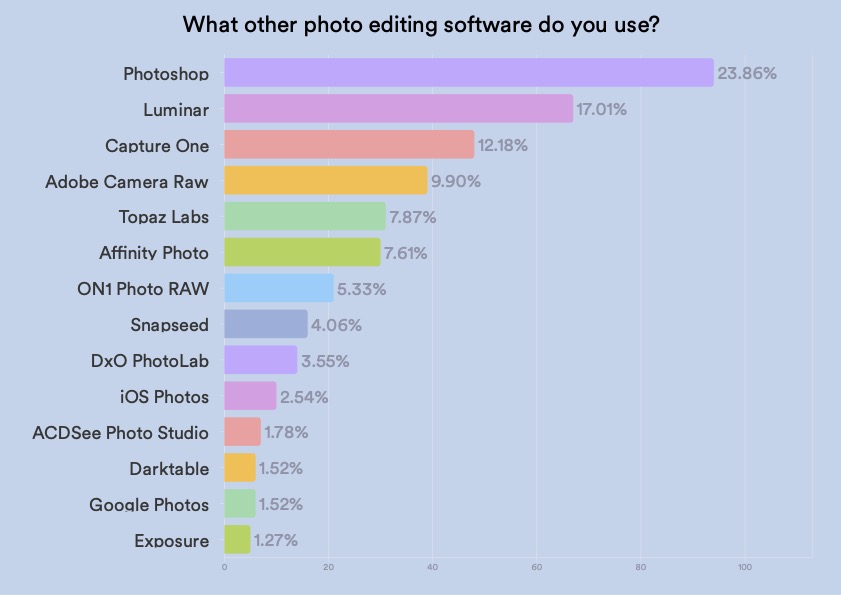
Photographers often use Adobe Lightroom and Photoshop to edit photos. These tools provide advanced features for professional photo editing.
Editing software plays a crucial role in the photography industry. Photographers rely on powerful tools to enhance and perfect their images. Adobe Lightroom and Photoshop are the most popular choices due to their extensive features and capabilities. Lightroom excels in managing and editing large batches of photos efficiently.
Photoshop offers advanced editing techniques for more detailed enhancements. Both programs are essential for achieving high-quality results. Other notable software includes Capture One, known for its color grading, and Affinity Photo, a cost-effective alternative to Photoshop. These tools empower photographers to bring their creative vision to life, ensuring stunning visual content.
The Digital Darkroom: Tools Of Modern Photography
Photographers use many tools to edit their photos. These tools make pictures look amazing. The digital darkroom is where magic happens. Let’s explore the best software for photo editing.
Choosing The Right Software
There are many options available. Choosing the right software can be tough. Here are some popular choices:
- Adobe Photoshop – Known for advanced editing.
- Adobe Lightroom – Great for organizing photos.
- Capture One – Preferred by professionals.
- Affinity Photo – Budget-friendly and powerful.
- GIMP – Free and open-source.
Features That Matter
Different software comes with various features. Here are some important ones:
| Feature | Description |
|---|---|
| Layer Editing | Allows complex edits by stacking changes. |
| Raw Processing | Handles raw files for better quality edits. |
| Batch Processing | Edits multiple photos at once. |
| Presets and Filters | Quickly apply styles to photos. |
| Retouching Tools | Fix imperfections in photos. |
| Export Options | Various formats and sizes for sharing. |

Credit: www.christataylorphotography.com
Adobe Photoshop: The Industry Standard
Adobe Photoshop has been the go-to software for photographers. Its powerful tools and features make it indispensable for photo editing. Whether you are a beginner or a pro, Photoshop offers a robust platform.
Key Features
- Layer Management: Organize and edit images using multiple layers.
- Retouching Tools: Use tools like Clone Stamp and Healing Brush for precise edits.
- Filters and Effects: Apply a wide range of filters and effects to enhance photos.
- Smart Objects: Make non-destructive edits with smart objects.
- Color Correction: Adjust colors using Curves, Levels, and Color Balance.
Learning Curve And Resources
Photoshop has a steep learning curve but offers many resources. Beginners can find tutorials on Adobe’s website and YouTube. Many online courses and books also help in mastering Photoshop.
| Resource | Type | Link |
|---|---|---|
| Adobe Tutorials | Video | Visit Site |
| Photoshop User Guide | Documentation | Visit Site |
| Online Courses | Course | Visit Site |
Lightroom: The Photographer’s Workflow Solution
Adobe Lightroom is a popular tool for photographers. It offers powerful features to manage and edit photos. Designed for both beginners and professionals, Lightroom simplifies the editing process.
Organizing And Editing
Lightroom helps photographers organize their photos. You can import, sort, and categorize images with ease. Use collections and tags to keep everything in order.
Editing is straightforward in Lightroom. Adjust exposure, contrast, and color with simple sliders. The non-destructive editing ensures your original photo stays untouched. You can always revert to the original image.
| Feature | Description |
|---|---|
| Library Module | Organizes and sorts images |
| Develop Module | Offers advanced editing tools |
| Map Module | Geotags your photos |
Presets And Profiles
Lightroom offers presets to speed up your workflow. Presets are predefined settings that apply a specific look to your photos. You can create your own presets or download them online.
Profiles are another powerful feature. They change the way colors and tones are rendered. Using profiles, you can quickly achieve a desired style.
- Black & White Presets
- Vintage Presets
- Landscape Presets
- Import your photo
- Select a preset
- Adjust settings as needed
These features make Lightroom a complete solution for photographers. It simplifies the process from start to finish.
Credit: shotkit.com
Capture One: The Professional’s Choice
Capture One is a top choice for professional photographers. Its robust features and powerful tools make it stand out. Capture One offers high-quality tethering and color accuracy. The software also provides extensive customization options.
Tethering And Color Accuracy
Capture One excels in tethering capabilities. Photographers can connect their cameras directly to their computers. This allows for instant viewing of images. The real-time feedback helps in making quick adjustments.
Color accuracy is another strength of Capture One. The software uses advanced algorithms for precise color correction. This ensures that your photos look true to life. Capture One also supports a wide range of camera profiles.
Customization Options
Capture One offers extensive customization options. Users can create their own workspace layouts. This makes the editing process more efficient.
The software allows for personalized keyboard shortcuts. This helps in speeding up repetitive tasks. Capture One also supports custom tool tabs. Photographers can organize their tools in a way that suits them best.
| Feature | Description |
|---|---|
| Tethering | Connects camera directly to computer for instant photo viewing |
| Color Accuracy | Advanced algorithms for precise color correction |
| Workspace Layouts | Create custom layouts for efficient editing |
| Keyboard Shortcuts | Personalize shortcuts for quick actions |
| Tool Tabs | Organize tools in a customizable manner |
Capture One is designed for professional use. Its features cater to the needs of serious photographers. The software’s flexibility and precision make it an excellent choice.
Affinity Photo: A Cost-effective Alternative
Many photographers seek affordable yet powerful editing tools. Affinity Photo offers a great solution. It combines advanced features with a user-friendly experience. Let’s explore why this software is a fantastic choice for photographers.
User Interface
The user interface of Affinity Photo is simple. Photographers find it intuitive. Tools are easy to locate and use. The layout is clean and modern. It helps users focus on editing. The learning curve is minimal. Both beginners and experts appreciate its design.
Performance On A Budget
Performance is crucial for photo editing. Affinity Photo delivers excellent performance. It runs smoothly on most computers. The software is optimized for speed. Edits are applied quickly without lag. This makes it ideal for photographers on a budget.
Here is a comparison table of Affinity Photo’s key features:
| Feature | Description |
|---|---|
| Layers | Supports unlimited layers for complex edits. |
| Tools | Includes a wide range of editing tools. |
| Filters | Offers various filters for creative effects. |
| Formats | Supports multiple file formats including RAW. |
| Price | One-time payment, no subscription needed. |
Photographers enjoy Affinity Photo’s cost-effective features. It offers powerful tools at an affordable price. This makes it a great choice for many.
Credit: enviragallery.com
Open-source Alternatives: Gimp And Darktable
For photographers, finding the right editing software is crucial. While many rely on paid solutions, there are powerful open-source alternatives. GIMP and Darktable are two of the best free tools available. They offer robust features for photo editing without the hefty price tag.
Community And Flexibility
One of the biggest strengths of GIMP and Darktable is their active community support. GIMP has a large user base, with many tutorials and forums. This makes it easy to learn and troubleshoot. Darktable also boasts a strong community, sharing tips and improvements.
Both software offer incredible flexibility. GIMP is highly customizable. You can add plugins to extend its functionality. Darktable is designed for non-destructive editing. It allows you to experiment without altering the original image. These features make both tools adaptable to various editing styles.
When To Consider Open Source
Consider open-source software if you’re on a budget. GIMP and Darktable provide professional-level tools at no cost. They are perfect for students or hobbyists.
If you prefer customizable software, GIMP and Darktable are ideal. They allow you to tailor the tools to your needs. This level of customization is often not available in paid software.
Lastly, choose open-source if you value community support. The active user base ensures you have access to a wealth of resources. From tutorials to plugins, the community-driven nature of GIMP and Darktable enhances your editing experience.
Mobile Editing Apps: Snapseed And Lightroom Mobile
Photographers often need to edit photos on the go. Mobile editing apps make this possible. Snapseed and Lightroom Mobile are two popular choices. They offer powerful tools for photo editing. They are available on both iOS and Android platforms.
Editing On The Go
Mobile editing apps are handy for quick edits. Snapseed is a free app with many features. It is user-friendly and offers precise control. Lightroom Mobile is part of the Adobe suite. It syncs with the desktop version for seamless editing.
Both apps support RAW file editing. This allows for high-quality adjustments. Photographers can use these apps anywhere. They can edit photos while traveling or at events. This flexibility is valuable for busy photographers.
Comparing Features With Desktop Versions
Snapseed and Lightroom Mobile have robust tools. But they differ from their desktop versions. Snapseed offers features like:
- Selective adjustments
- Healing brush
- Perspective correction
Lightroom Mobile includes:
- Advanced color grading
- Lens corrections
- Cloud sync with Lightroom desktop
Here is a comparison table:
| Feature | Snapseed | Lightroom Mobile | Lightroom Desktop |
|---|---|---|---|
| RAW Editing | Yes | Yes | Yes |
| Selective Adjustments | Yes | Yes | Yes |
| Healing Brush | Yes | Yes | Yes |
| Cloud Sync | No | Yes | Yes |
| Advanced Color Grading | No | Yes | Yes |
Desktop versions have more advanced features. They are better for detailed editing. Mobile apps are great for quick edits and previews. Both options have their own strengths.
From Software To Art: Finalizing Your Vision
Editing software helps photographers turn their vision into art. Each tool serves a unique purpose in the editing process. From adjusting colors to adding effects, these steps are crucial. Let’s dive into some key aspects.
Color Grading And Effects
Color grading is the process of enhancing the colors in your photos. It can make a dull photo look vibrant. Photographers often use Adobe Lightroom or Adobe Photoshop for this task.
- Lightroom offers easy-to-use sliders.
- Photoshop provides more advanced options.
Adding effects can give your photos a unique touch. Software like Capture One and DxO PhotoLab are great for this. They offer a range of filters and presets.
Exporting For Print And Web
After editing, you need to export your photos. This step ensures your photos look good on different platforms. Export settings vary for print and web.
| Platform | Format | Resolution |
|---|---|---|
| TIFF or JPEG | 300 DPI | |
| Web | JPEG or PNG | 72 DPI |
For print, a high resolution is needed. For web, a lower resolution is enough. Adobe Photoshop and Lightroom have easy export options. You can choose the format, size, and resolution.
Frequently Asked Questions
What Photo Editing Software Do Most Professional Photographers Use?
Most professional photographers use Adobe Photoshop and Lightroom for photo editing. These tools offer powerful features and flexibility.
What Do Professionals Use For Photo Editing?
Professionals use Adobe Photoshop and Lightroom for photo editing. These tools offer advanced features and flexibility. Other popular options include Capture One and GIMP.
Do Professional Photographers Use Lightroom Or Photoshop?
Professional photographers use both Lightroom and Photoshop. Lightroom is ideal for managing and editing large photo libraries. Photoshop excels in detailed image manipulation and retouching. Both tools complement each other, enhancing the photographer’s workflow.
How Do You Edit A Photo Like A Professional Photographer?
Use a high-quality editing software. Adjust lighting, contrast, and saturation. Sharpen details and remove blemishes. Crop for better composition. Apply filters sparingly.
Conclusion
Choosing the right software is crucial for photographers. Popular options include Adobe Lightroom, Photoshop, and Capture One. Each tool offers unique features. Experiment with different software to find what best suits your needs. With the right tools, your photos will truly stand out.
Happy editing!



