
Are you looking to boost your business without spending a fortune on marketing tools? Imagine reaching out to potential customers directly through their inboxes, all from a platform you’re already familiar with.
That’s right—Gmail isn’t just for personal emails; it can be a powerful tool for your marketing strategy. You’ll discover how to send effective marketing emails using Gmail. We’ll guide you through simple steps to transform your everyday email into a marketing powerhouse.
Get ready to engage your audience, improve open rates, and drive more sales, all with the simplicity and ease of Gmail. Keep reading to unlock the secrets of successful email marketing without the need for expensive software.
Setting Up Gmail For Marketing
Sending marketing emails from Gmail is straightforward. Start by creating a professional-looking email template. Add your mailing list and personalize your message to engage recipients effectively.
Setting up Gmail for marketing is an excellent strategy for small businesses and entrepreneurs. Gmail offers a user-friendly interface and a robust set of features, making it an ideal platform for sending marketing emails. You can easily configure Gmail to fit your marketing needs, whether you’re promoting a new product or maintaining customer relationships. Let’s dive into the steps to make your Gmail account ready for professional marketing emails.Creating A Professional Email Address
Your email address is the first impression recipients get. Make it count. Avoid using personal email addresses like johndoe123@gmail.com. Instead, opt for something that reflects your business. A professional email like info@yourbusiness.com is more credible and memorable.Consider using Google Workspace to create a custom email domain. It not only looks professional but also adds authenticity to your communication. A custom domain is an investment in your brand’s reputation.Having a professional email address makes your business appear more established. Would you trust a company with a generic email or one with its own domain? The choice is clear.Configuring Gmail Settings
Proper configuration of Gmail settings is crucial for smooth marketing operations. Start by organizing your inbox with labels and folders. This helps you keep track of different marketing campaigns and customer inquiries.Enable the “Canned Responses” feature in Gmail Labs. It’s a lifesaver for sending quick replies to common queries. You can customize templates for various scenarios, saving time and ensuring consistency.Don’t forget to set up email signatures. A well-crafted signature with your name, title, and contact details adds professionalism. Include social media links for easy access to your profiles.Optimize your settings for maximum efficiency. What settings do you rely on to streamline your email process? Share your tips below!Building Your Email List
Send marketing emails using Gmail by creating a professional email template. Customize your message with engaging content. Organize your contacts into groups for targeted campaigns.
Building your email list is crucial for successful marketing. A well-curated list ensures your messages reach interested audiences. This increases engagement and potential conversions. Focus on quality over quantity. Choose people who genuinely want to hear from you. Let’s explore some effective strategies to build your email list using Gmail.Collecting Subscriber Information
Start by gathering email addresses from your current customers. Offer a sign-up form on your website. Encourage visitors to subscribe by offering valuable content. You might share exclusive discounts or informative newsletters. Ensure your form is simple and easy to fill out. Ask for only essential information. Name and email address are often enough. Too many fields can discourage sign-ups.Using Google Contacts For Organization
Once you have a list, organize it using Google Contacts. Create labels for different groups of subscribers. This helps in segmenting your audience for targeted emails. For example, separate customers from potential leads. This allows you to tailor your messages. Keep your contacts updated regularly. Remove inactive emails to keep your list fresh. This ensures better deliverability and engagement rates.Crafting Effective Marketing Emails
Gmail makes sending marketing emails simple and efficient. Create a new message, add your recipient list, and craft an engaging subject line. Customize content with images or links, then hit send. Keep emails concise and relevant for better reader engagement.
Crafting effective marketing emails is crucial to grabbing your audience’s attention and driving action. Whether you’re a small business owner or part of a large team, creating emails that stand out in crowded inboxes is a skill worth mastering. Let’s dive into some key elements of crafting emails that truly resonate with your audience.Writing Compelling Subject Lines
Subject lines are your first impression. They determine if your email is opened or ignored. Consider this: would you open an email titled “Our Latest Updates” or “Exclusive Offer Just for You”? The latter taps into curiosity and personalization.Experiment with different approaches. Use questions, urgency, or a touch of mystery. Ask yourself what would make you click. A well-crafted subject line is like a sneak peek, drawing the reader in without giving everything away.Designing Engaging Content
Once your email is opened, your content must hold the reader’s attention. Keep it concise and visually appealing. Use bold text for key points and break up paragraphs with images or bullet points.Imagine receiving an email that’s a wall of text. Daunting, right? Instead, aim for clear, digestible content. Ask yourself if each sentence serves a purpose. Include a strong call-to-action that encourages your readers to take the next step.Crafting effective marketing emails isn’t about being overly salesy. It’s about creating a connection and providing value. What do you want your readers to feel or do after reading your email? Keep this in mind as you compose each message.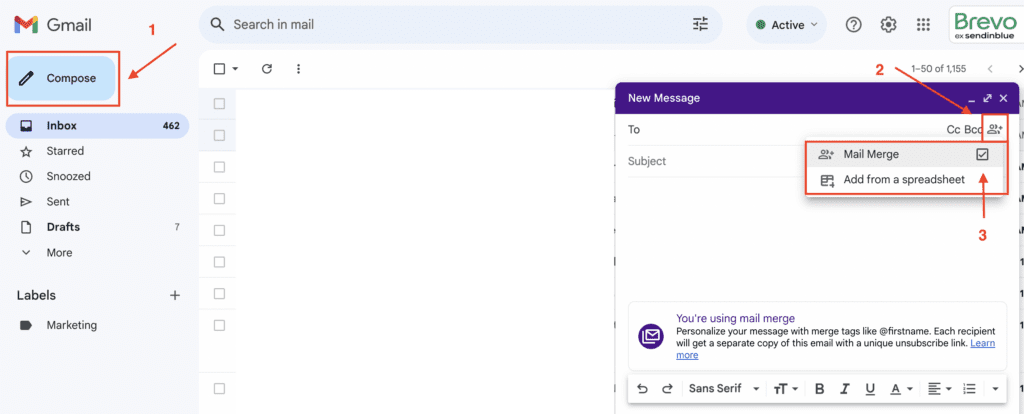
Credit: www.brevo.com
Utilizing Gmail Features
Gmail is a powerful tool for sending marketing emails. It offers many features to streamline your email campaigns. By leveraging these features, you can enhance productivity and organization. This section will explore some key Gmail features for email marketing.
Using Labels And Filters
Labels help categorize your emails. They act like folders. You can create labels for different campaigns. This keeps your inbox organized. Filters automatically sort emails into these labels. Set filters to manage incoming responses. It saves time and reduces clutter. This way, you focus on important tasks. Use labels and filters together for better organization.
Scheduling Emails With Gmail
Gmail offers a scheduling feature. You can plan emails ahead of time. Choose a date and time to send your emails. This ensures timely delivery to your audience. It’s useful for reaching different time zones. Schedule emails to suit your marketing strategy. This helps you maintain a consistent communication flow. Use Gmail’s scheduler to keep your campaigns on track.
Incorporating Email Tracking Tools
Boost your marketing emails by using email tracking tools with Gmail. These tools help you know if emails are opened. Enhance your strategy with data insights for better results.
Incorporating email tracking tools can elevate your marketing efforts. Tracking tools help monitor how recipients interact with your emails. They reveal insights about open rates, click-throughs, and engagement. Implementing these tools in Gmail can enhance your strategy. You gain clear understanding of what resonates with your audience. This knowledge empowers you to tailor future campaigns effectively.Choosing The Right Tracking Tool
Selecting a suitable tracking tool is essential. It should integrate seamlessly with Gmail. Look for tools offering real-time tracking. This allows immediate access to performance data. Consider tools with user-friendly interfaces. Simple dashboards facilitate easy navigation and understanding. Also, ensure the tool supports detailed reporting. Comprehensive reports aid in making informed decisions. Cost-effectiveness is another factor to consider. Balance between functionality and budget.Analyzing Email Performance Metrics
Understanding email performance metrics is crucial. Start with open rates. They show how compelling your subject lines are. Next, evaluate click-through rates. They indicate the effectiveness of your email content. Low rates may suggest content needs improvement. Track bounce rates too. High bounces can harm your sender reputation. Monitor unsubscribe rates for feedback on audience interest. Consistent analysis helps refine your email strategy.Maintaining Compliance
Sending marketing emails from Gmail requires attention to compliance. Follow regulations to avoid penalties. Use clear opt-out options and respect privacy rules.
Sending marketing emails through Gmail is an efficient way to engage your audience. However, it’s crucial to maintain compliance with legal standards to protect your business and respect your subscribers. Failing to comply can lead to hefty fines and damage your brand’s reputation. Let’s dive into key areas you need to focus on to keep your email marketing efforts on the right side of the law.Understanding Email Marketing Regulations
Email marketing is governed by specific regulations like the CAN-SPAM Act in the United States and GDPR in Europe. These laws ensure that recipients have control over the emails they receive. They require you to clearly identify your emails as advertisements, include your physical address, and avoid misleading subject lines.Think about how your inbox looks. Would you trust an email that hides its purpose or sender? Respect your subscribers by being transparent. This builds trust and helps you maintain compliance effortlessly.Incorporating Unsubscribe Options
Every marketing email you send must have a clear and simple way for recipients to opt-out. This is not just a courtesy but a legal requirement. By including an easy-to-find unsubscribe link, you show respect for your audience’s preferences.Imagine receiving emails you no longer find useful. Having an unsubscribe option gives you control. Ensure your unsubscribe process is straightforward and immediate. This keeps your list clean and filled with engaged readers.Regularly update your mailing list by removing those who have unsubscribed. This prevents any compliance issues and keeps your engagement metrics healthy.How often do you review your email compliance strategy? Regular check-ups can save you from potential pitfalls. Stay informed about changes in regulations to keep your marketing efforts compliant and effective.Managing Feedback And Responses
Managing feedback and responses is crucial in email marketing. It helps refine your approach and understand your audience better. By effectively handling replies and leveraging feedback, you can enhance your marketing strategies. This ensures that your future campaigns are more successful.
Handling Replies Efficiently
Respond to emails promptly. This shows you value their input. Use Gmail labels to organize responses. This helps in prioritizing urgent queries. Set up filters to manage different types of feedback. Automation tools can aid in sorting and responding to common questions.
Using Feedback For Improvement
Gather insights from feedback to improve your emails. Identify common suggestions or complaints. Use these insights to tweak your content strategy. Regularly update your email templates based on feedback. This ensures your content stays relevant and engaging.
Conduct surveys to understand your audience’s preferences. Adjust your marketing approach based on survey results. This continuous refinement leads to better engagement and conversion rates.
Credit: www.youtube.com
Credit: workspace.google.com
Frequently Asked Questions
How Do I Send A Marketing Email From Gmail?
Use Gmail’s “Compose” button to start your email. Add a catchy subject line and personalized content. Include an engaging call-to-action. Use labels or contact groups for bulk sending. Avoid spammy language to prevent filtering.
Can Gmail Be Used For Email Marketing?
Gmail isn’t ideal for email marketing due to limitations on bulk sending and lack of marketing features. Consider using specialized email marketing platforms for efficient campaigns. These tools offer analytics, templates, and compliance with anti-spam regulations, enhancing your marketing efforts.
How Do I Send A Business Email From Gmail?
Open Gmail and click “Compose” to start a new email. Enter the recipient’s address, subject, and message. Format your email professionally. Click “Send” to deliver your business email.
Conclusion
Sending marketing emails through Gmail can be simple and effective. Use clear subject lines. Personalize your messages. Keep your content engaging and relevant. Avoid spammy words to pass filters. Build a consistent schedule for sending emails. Monitor your email performance closely.
Make adjustments based on feedback and results. Gmail’s platform offers flexibility and ease. It suits small businesses and beginners well. Remember, successful email marketing needs patience and practice. Always strive to improve your strategies. Stay updated with email marketing trends.
Your efforts can greatly enhance communication with your audience.


