
You know the feeling: your inbox is overflowing with marketing emails, each promising deals, updates, and special offers. But instead of excitement, all you feel is overwhelmed.
It’s time to take control and declutter your digital space. Imagine opening your inbox to find only the emails that truly matter to you. How much more productive and peaceful could your day become? You’ll discover simple, effective steps to unsubscribe from those pesky marketing emails and regain control over your inbox.
No more distractions, no more clutter—just a streamlined email experience tailored to your needs. Are you ready to transform your email inbox? Let’s get started.
Credit: contentmarketinginstitute.com
Identify Unwanted Emails
Unwanted marketing emails can clutter your inbox, making it difficult to find the important messages. Identifying these emails is the first step to regaining control. By pinpointing persistent senders and categorizing email types, you can streamline your inbox and reduce distractions.
Recognize Persistent Senders
Some marketers are relentless, sending multiple emails a week. Have you noticed certain brands that seem to pop up every other day? These are the persistent senders you need to identify. Is there a particular company whose emails you never read, yet they keep appearing? Spotting these frequent flyers can help you prioritize which subscriptions to cut.
Think about your own inbox. Which emails do you consistently ignore? Reflecting on your habits can reveal patterns. You might realize a particular sender is more active than you’d thought. Recognizing these patterns is key to managing your email overload.
Categorize Email Types
Once you’ve identified persistent senders, focus on categorizing the types of emails you receive. Are they promotional, informational, or newsletters? Each type serves a different purpose. Promotional emails often clutter your inbox with sales and discounts. Newsletters might be informative but not always relevant to you.
Consider making a list. What categories do most of your unwanted emails fall into? Categorizing helps you see which ones add value and which ones don’t. It’s a simple yet powerful method to assess what deserves your attention.
Ask yourself: which types of emails align with your interests and needs? This reflection can guide your unsubscribing decisions. You might find that informational emails from certain senders hold value, while others do not.
Credit: leavemealone.com
Locate Unsubscribe Link
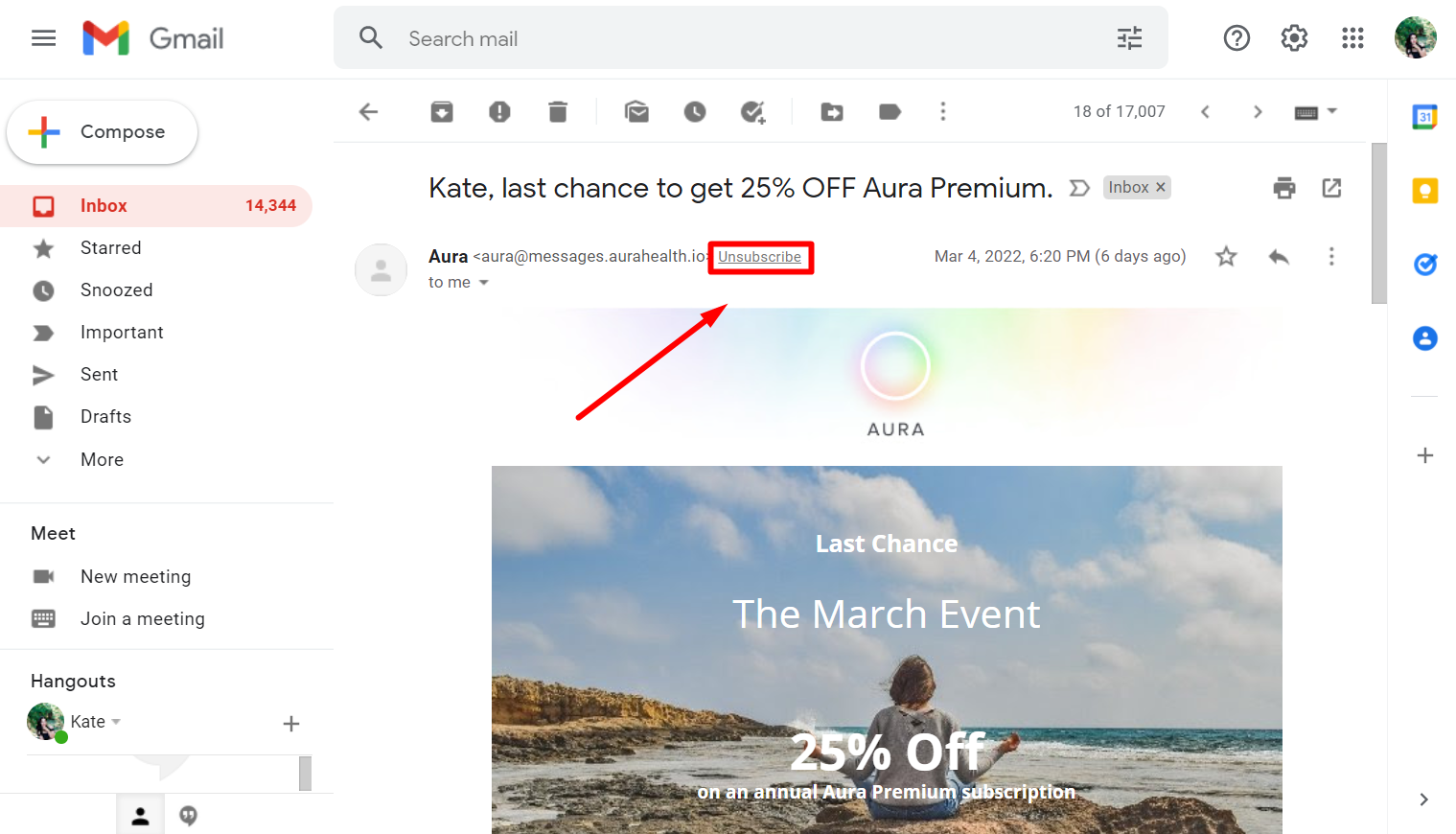
Finding the unsubscribe link is key to stopping marketing emails. Usually located at the bottom of emails, this link allows easy removal from mailing lists. Ensure to check both the top and bottom sections of the email.
Unsubscribing from marketing emails can be a relief if your inbox is overflowing with messages you never signed up for. The first step in reclaiming your inbox is locating the unsubscribe link. This link is your ticket to fewer distractions and more productivity.Common Placement In Emails
Most marketing emails include an unsubscribe link, often due to legal requirements. You’ll typically find it at the bottom of the email. It’s usually in smaller text, nestled among other details like contact information or privacy policies.Look for phrases like “Unsubscribe,” “Manage Preferences,” or “Opt-out.” Sometimes, it’s a simple hyperlink, while other times, it may be a button. If you can’t find it right away, don’t worry. It might be hiding in plain sight.Spotting Hidden Links
Some marketers cleverly disguise unsubscribe links to keep you on their mailing list. They might use lighter fonts or place them within a block of text. To spot these hidden links, skim through the email carefully.If the unsubscribe link is not immediately visible, try searching for it by pressing “Ctrl + F” (or “Command + F” on a Mac) and typing “unsubscribe” in the search box. This method highlights all instances of the word, leading you right to the link.Have you ever wondered why some companies make it so hard to unsubscribe? It can feel like a game of hide and seek, but persistence pays off. Once you find that elusive link, you’re one step closer to a cleaner inbox.Do you have any tips for spotting unsubscribe links quickly? Share your thoughts in the comments below!Follow Unsubscribe Instructions
Unsubscribing from marketing emails can feel like a victory. You finally reclaim your inbox from unwanted clutter. But how do you ensure you actually stop receiving those pesky emails? The key lies in following unsubscribe instructions carefully. These instructions are typically straightforward, but missing a step can leave you stuck with unwanted messages. Let’s dive into how you can effectively follow these instructions to free your inbox.
Clicking The Unsubscribe Button
First, locate the unsubscribe button within the email. It’s usually hidden at the bottom in small print. Once you find it, click the button. It might redirect you to a new page or ask for confirmation. This step is crucial—missing it could mean you’ll continue receiving those emails.
Did you know some marketers use tricky tactics to keep you subscribed? Sometimes, they make the unsubscribe button hard to spot or require multiple clicks to confirm. If you find yourself clicking endlessly, don’t give up. Staying persistent will eventually pay off.
Manual Steps For Unsubscription
If the unsubscribe button doesn’t seem to work, manual steps might be necessary. You may need to log into your account on the marketer’s website. Head to the settings or preferences section. There, you can opt-out from receiving emails.
Ever wondered why some companies make it so challenging to unsubscribe? They rely on passive subscribers to boost their numbers. But you have the power to break free. Taking the time to manually adjust your preferences can save you from future frustrations.
Consider this: how often do you check your spam folder for missed unsubscribe instructions? Sometimes, important steps land there unnoticed. Being thorough in your search can make all the difference.
So, how will you tackle the next wave of marketing emails? Equipped with these strategies, you’re ready to take control of your inbox. Remember, your digital space deserves respect and clarity. Embrace these tactics and enjoy a clutter-free experience.
Use Email Filters
Many people receive countless marketing emails daily. It can be overwhelming. Using email filters can help manage your inbox. Filters can sort emails automatically. They keep your inbox organized and less cluttered. You can choose how to filter these emails. This approach saves time and reduces stress.
Set Up Automatic Filtering
Email filters can automatically sort incoming messages. Most email services offer this feature. You can set rules for emails to follow. For example, move all marketing emails to a specific folder. This keeps your primary inbox clean. Setting up filters is simple. Check your email settings for the filter option. Create a new rule to organize emails. This helps manage unwanted messages easily.
Block Specific Senders
Blocking specific senders is another useful feature. Some marketing emails can be persistent. Blocking stops future emails from that sender. Most email services have this option. Find the sender’s email address. Use the block or spam option in your email settings. This will prevent their emails from reaching you. It’s effective for reducing unwanted messages. Blocking is a quick way to control your email flow.
Utilize Third-party Tools
Third-party tools help unsubscribe from marketing emails quickly. These tools identify unwanted emails and remove you from lists. They save time and keep your inbox clean.
Unsubscribing from marketing emails can sometimes feel like a never-ending task. You might wonder if there’s an easier way to clear your inbox from promotional clutter. That’s where third-party tools come into play. These tools can streamline the process, saving you time and frustration.###Popular Unsubscription Services
Several services offer help in managing your email overload. Unroll.me is one such service that scans your inbox and provides a list of all subscription emails. You can then choose which ones to keep, unsubscribe from, or combine into a single daily digest.Another popular option is Clean Email, which not only helps you unsubscribe but also organizes your emails into easy-to-manage bundles. It’s like having a personal assistant for your inbox. Leave Me Alone is a newer service that focuses on privacy, ensuring your data stays safe while helping you unsubscribe.###Pros And Cons Of Tools
Third-party tools can be lifesavers when you’re overwhelmed with emails. They can quickly identify and unsubscribe you from unwanted lists, saving you the hassle of doing it manually. Additionally, some tools offer features like email organization and privacy protection.However, these tools aren’t perfect. They often need access to your email account, which may raise privacy concerns. Plus, not every email can be unsubscribed from through these services, meaning you might still have to do some work yourself.Before you start using one of these tools, think about what’s most important to you. Is it speed, privacy, or ease of use? Each tool has its strengths and weaknesses, so choosing the right one can make all the difference.Have you tried any of these tools before? If so, did they meet your expectations, or did you find yourself back at square one? Your experience could help others make the best choice for their needs.Manage Email Preferences
Managing email preferences is essential in today’s digital age. Many people receive numerous marketing emails daily. This can feel overwhelming. Managing these preferences helps control what lands in your inbox. It also reduces clutter and stress. Taking charge of your email subscriptions is easier than it seems.
Update Subscription Settings
Many companies offer options to update email preferences. Look for a link at the bottom of marketing emails. This often leads to a subscription management page. On this page, you can select which emails you want to receive. Some people prefer to get only important updates. Others might want newsletters or promotional offers. Adjusting these settings helps tailor the content you receive. This way, you receive only the emails that interest you.
Opt-out Of Marketing Lists
Unsubscribing from marketing lists is often straightforward. Find the unsubscribe link in any marketing email. It’s usually located at the bottom. Clicking this link will guide you through the opt-out process. Some companies might ask for feedback. They want to know why you are leaving. Provide feedback if you wish. Opting out stops unwanted emails from cluttering your inbox. This gives you more control over your digital life.
Monitor For Compliance
After unsubscribing from marketing emails, ensure that companies respect your choice. Monitoring compliance is crucial. It helps you maintain a clutter-free inbox. Companies must adhere to unsubscribe requests promptly. This practice keeps your inbox clean and respects your preferences. It also ensures businesses follow the law. Below are steps to help you monitor compliance effectively.
Check For Continued Emails
Keep an eye on your inbox. Watch for emails from companies you unsubscribed from. It’s essential to stay alert for any continued emails. If you spot emails, document them. Take screenshots or note the dates. This evidence is useful if you need to report non-compliance. It also helps you track which companies ignore unsubscribe requests.
Understand Legal Rights
Know your rights regarding marketing emails. Laws like GDPR and CAN-SPAM protect consumers. They require companies to respect unsubscribe requests. Understanding these laws empowers you. It ensures companies follow rules regarding your personal data. If companies continue emailing, you can report them. Use the relevant authority to hold them accountable.

Credit: marketingsherpa.com
Frequently Asked Questions
How Do I Unsubscribe From All Marketing Emails?
To unsubscribe, click the “unsubscribe” link at the email’s bottom. Follow the instructions provided. Adjust your preferences in the account settings if needed. Check for confirmation to ensure you’re unsubscribed. Contact customer support if issues persist.
How Do I Remove An Email From My Marketing List?
Log into your marketing platform. Locate the contact list section. Select the email to remove. Click “delete” or “unsubscribe. ” Confirm the action. Ensure compliance with privacy regulations. Use this method to maintain a clean and accurate marketing list.
How Do I Unsubscribe From Marketing Messages?
To unsubscribe from marketing messages, click the “unsubscribe” link at the email’s bottom. Follow the instructions to confirm your choice. Check your spam folder for any missed emails. Contact customer support if you continue receiving unwanted messages.
Conclusion
Unsubscribing from marketing emails is simple. Start by finding the unsubscribe link. It’s usually at the bottom of the email. Click it. Follow the instructions. This helps reduce unwanted emails. Also, consider marking emails as spam. It improves your inbox cleanliness.
Regularly check your subscriptions. Stay organized. Protect your privacy. Keep your inbox clutter-free. Feel more in control of your email space. Enjoy a cleaner digital life. Make these changes today. Your peace of mind matters. Simplify your online experience. Enjoy fewer distractions.
Stay focused and productive.


