
Imagine this: you’ve crafted the perfect email campaign on Mailchimp, filled with offers and updates that your subscribers will love. But when you hit send, some emails don’t make it to their destination—they’re marked as “cleaned.”
If you’re wondering what “cleaned” means in Mailchimp and how it affects your email marketing strategy, you’re in the right place. Understanding the concept of cleaned emails is crucial for maintaining a healthy email list and ensuring your messages reach the right audience.
By getting to grips with this term, you can enhance your email marketing efforts, boost engagement, and ultimately drive better results for your business. Dive into this article to unravel the mystery of cleaned emails and learn how to optimize your campaigns for success.
Credit: www.duckduckchimp.com
Email Marketing Basics
Mailchimp’s “cleaned” status refers to invalid or undeliverable email addresses removed from your list. This helps maintain a healthy email list by ensuring that messages only go to valid addresses, improving deliverability and engagement rates. Keeping your list clean is essential for effective email marketing campaigns.
Email marketing is a powerful tool for reaching audiences. It helps businesses connect directly with their customers. Sending newsletters, promotions, and updates becomes easier. But success depends on understanding email marketing basics. One key factor is managing your email lists effectively. This ensures messages reach the right people.Role Of Email Lists
Email lists are crucial in email marketing. They are collections of email addresses gathered from subscribers. These lists represent your audience. A well-managed list improves engagement. It boosts your campaign’s success. Each email address is a potential customer. So, maintaining an updated list is vital.Importance Of Clean Data
Clean data means accurate and up-to-date information. In email marketing, clean data is essential. It ensures your messages reach active users. Mailchimp helps by marking bounced emails as “cleaned.” This prevents future errors. Keeping data clean reduces costs and improves deliverability. Your campaigns become more effective and efficient. “`Mailchimp Overview
Mailchimp is a powerful tool for email marketing that allows businesses to connect with their audience in a meaningful way. It’s designed to make creating and sending emails easy, even for those who aren’t tech-savvy. But what makes Mailchimp stand out, and how does it help manage your email lists effectively?
Features And Benefits
Mailchimp offers a variety of features that cater to different marketing needs. You can create automated email campaigns, segment your audience, and analyze detailed reports to understand your subscribers better. The platform’s robust analytics help you track open rates, click-through rates, and overall campaign performance, providing valuable insights into your audience’s behavior.
One of the greatest benefits of Mailchimp is its scalability. Whether you’re a small business owner or a large corporation, you can tailor Mailchimp’s features to suit your needs. The tools provided are intuitive, allowing you to focus on crafting engaging content rather than worrying about technical details.
User Interface And Experience
The user interface of Mailchimp is designed with simplicity and efficiency in mind. When you log in, you’ll find a clean and organized dashboard that guides you through the process of creating and managing campaigns. Even if you’re new to email marketing, you can quickly get the hang of it thanks to the helpful tutorials and resources available.
Have you ever wondered why some platforms feel overwhelming while others just click? Mailchimp’s straightforward design ensures you spend less time figuring out the platform and more time engaging with your audience. This ease of use can significantly enhance your productivity and creativity.
Imagine crafting a beautiful email without needing a graphic designer or a tech expert. Mailchimp’s drag-and-drop editor lets you do just that. You can add images, text, and buttons with ease, ensuring your emails look professional and appealing.
Think about the last time you received an email that stood out. With Mailchimp’s customizable templates and design tools, you can create emails that not only capture attention but also encourage engagement. These tools are not just about aesthetics; they are about building a connection with your readers.
In a world where first impressions matter, how you communicate with your audience can make a big difference. With Mailchimp, you have the tools to ensure your emails not only reach the inbox but also inspire action. So, have you considered how you can enhance your email marketing strategy with Mailchimp today?
Meaning Of Cleaned In Mailchimp
Email marketing is a powerful tool for businesses. Mailchimp helps manage email lists efficiently. Understanding the term “Cleaned” is crucial for effective email marketing. It impacts how campaigns perform and reach their audience.
Definition Of Cleaned Status
The “Cleaned” status in Mailchimp refers to invalid email addresses. These addresses have bounced back in past campaigns. Mailchimp automatically marks them as cleaned. This helps prevent sending emails to non-existent addresses. It keeps your email list healthy and efficient.
Impact On Email Campaigns
Cleaned email addresses can affect your campaign’s success. Sending emails to invalid addresses increases bounce rates. High bounce rates can hurt your sender reputation. A good reputation ensures your emails reach the inbox. Avoiding cleaned emails improves deliverability. It also saves resources by targeting real subscribers.
Credit: www.clairewitz.co.uk
Reasons For Email Cleaning
Email cleaning in Mailchimp means removing invalid or bounced addresses. This helps improve deliverability and engagement. It ensures your emails reach active subscribers, keeping your list healthy and efficient.
When managing your email marketing list in Mailchimp, understanding the concept of “cleaned emails” can significantly enhance your campaign’s effectiveness. Cleaning your email list helps you maintain a healthy sender reputation, improve open rates, and ensure your messages reach the intended audience. But why exactly is email cleaning necessary?Bounced Emails
Bounced emails are one of the primary reasons for email cleaning. A bounce occurs when an email cannot be delivered to an address. This could be due to a full inbox, a non-existent email address, or a temporary server issue.Imagine sending a party invite to a friend’s old address. It will never reach them, and you’ll miss out on their company. Similarly, sending emails to addresses that bounce back reduces your campaign’s reach and effectiveness. Cleaning these emails from your list ensures you only target recipients who can actually receive your messages.Unsubscribed Contacts
Another critical aspect of email cleaning is removing unsubscribed contacts. When someone opts out of your mailing list, they are signaling a lack of interest in your content. Continuing to email these contacts can annoy them and potentially lead to spam complaints.Think of it as continuing to invite someone to events they have no interest in attending. It’s not only a waste of resources but also tarnishes your brand’s image. By regularly cleaning unsubscribed contacts, you respect your audience’s preferences and focus your efforts on engaged subscribers.Regular email cleaning is not just about tidying up. It’s about optimizing your communication strategy and respecting your audience. Have you ever wondered how much more effective your campaigns could be with a cleaner, more engaged list? Start cleaning your list today and see the difference it makes in your email marketing success.Managing Cleaned Emails
Email marketing cleaned in Mailchimp refers to removing invalid or undeliverable email addresses. This helps maintain a healthy contact list. Ensures that messages reach active and engaged subscribers. Properly managing cleaned emails improves campaign performance. Reduces bounce rates and enhances overall email marketing effectiveness.
Managing Cleaned Emails in Mailchimp is crucial for maintaining a healthy and effective email marketing strategy. If you’ve ever found yourself wondering why certain contacts get flagged as ‘cleaned’, you’re not alone. These cleaned contacts are essentially email addresses that have bounced back emails repeatedly, indicating they might be invalid or inactive. Handling these cleaned emails properly ensures your campaigns reach active recipients and keeps your email deliverability rates high. Let’s delve into the specifics of managing these contacts to keep your mailing list in top shape.Identifying Cleaned Contacts
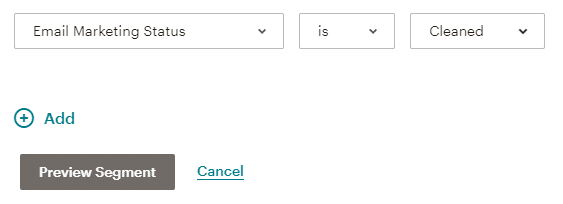
Recognizing cleaned contacts in Mailchimp is straightforward. In your audience dashboard, these contacts are marked as ‘cleaned’. This status means that emails sent to these addresses have bounced back consistently.Have you ever noticed your email open rates dropping? Cleaned contacts could be the reason. By identifying them, you can focus on engaging those who are genuinely interested in your content.Mailchimp automatically filters these contacts, saving you time. This ensures your campaigns are sent only to valid email addresses, enhancing the chances of successful delivery.Steps To Maintain A Healthy List
Maintaining a healthy email list involves regular cleaning. Consider setting a schedule to review and update your list. This prevents accumulation of inactive or invalid addresses.Engage with your audience frequently. Ask them to update their preferences or confirm their subscription. This helps in keeping your list fresh and active.Use Mailchimp’s tools to segment your audience. Focus on those who interact with your emails, and remove those who don’t. It’s like pruning a garden for better growth.Have you considered the impact of cleaned contacts on your campaign metrics? A cleaner list usually translates to better engagement rates and more accurate insights.Remember, a healthy list is the backbone of successful email marketing. What steps will you take today to ensure your list stays vibrant and responsive?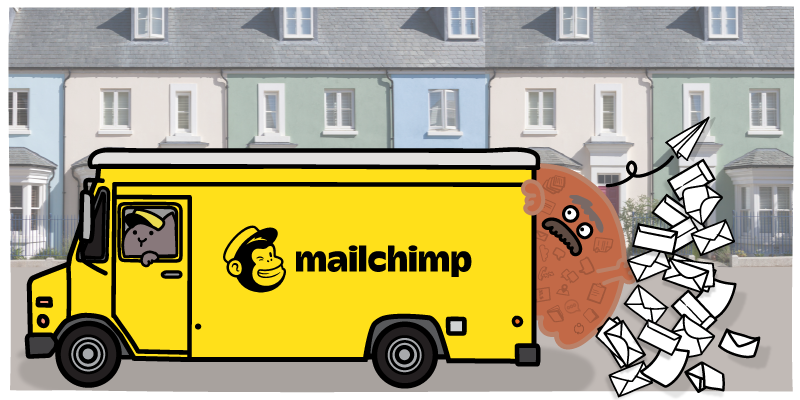
Credit: blog.insycle.com
Benefits Of Regular Email Cleaning
Regular email cleaning in Mailchimp improves campaign results by removing inactive addresses. It enhances deliverability, reduces bounce rates, and ensures accurate data. A clean list boosts engagement and increases the chances of reaching the target audience effectively.
Are you aware of the hidden gem in your email marketing strategy? Regular email cleaning might just be that secret weapon. Ensuring your mailing list is fresh and relevant can lead to a host of benefits. By removing inactive or incorrect email addresses, you enhance the overall health and effectiveness of your campaigns. Let’s delve into why regular email cleaning is crucial, focusing on improved deliverability and higher engagement rates.Improved Deliverability
Imagine sending out a big announcement, only to find that a significant portion of your emails bounced back. That’s frustrating, isn’t it? Regular email cleaning helps prevent this by removing invalid addresses. When you maintain a clean list, your emails are more likely to reach your recipients’ inboxes rather than getting marked as spam.A clean list also boosts your sender reputation. Email providers monitor how often your emails bounce or are marked as spam. By reducing these instances, you improve your chances of landing in the primary inbox, not the dreaded spam folder.Higher Engagement Rates
Have you ever considered how many of your subscribers are truly interested in your content? Cleaning your list ensures you’re speaking to an audience that cares. When you remove inactive subscribers, your open and click-through rates naturally improve.Higher engagement rates can lead to better customer relationships. You’re more likely to convert engaged subscribers into loyal customers. Plus, an active audience provides valuable feedback and insights, helping you tailor your content to their needs.Regular email cleaning might seem like a tedious task. But the benefits it brings can significantly enhance your email marketing efforts. Isn’t it worth the effort to ensure your message reaches those who truly want to hear it?Best Practices For Email Hygiene
Email marketing cleaned in Mailchimp means removing outdated or invalid addresses. It helps maintain a healthy email list. This ensures better deliverability and engagement with active subscribers.
Ensuring your email list is clean and healthy is crucial for successful email marketing campaigns. A well-maintained list improves deliverability rates, reduces bounce rates, and keeps your audience engaged. But what does it mean to have a “cleaned” email list in Mailchimp? It involves a set of best practices that help maintain email hygiene. Let’s dive into some actionable strategies.Regular List Maintenance
Regular list maintenance is key to keeping your email list clean. Think of it as tidying up your digital workspace. Removing inactive subscribers and correcting invalid email addresses can significantly improve your campaign performance.Schedule routine check-ups for your list. Consider doing this monthly or quarterly. Use Mailchimp’s built-in tools to identify and remove hard bounces and unsubscribes.Engage with your subscribers regularly to identify those who are genuinely interested. If someone hasn’t opened your emails in months, it might be time to say goodbye. It’s like cleaning out your closet; sometimes, less is more.Using Double Opt-in
Double opt-in is a powerful tool for maintaining email hygiene. It ensures that subscribers genuinely want to receive your emails. When someone signs up, they receive a confirmation email to verify their subscription.This extra step might seem like a hurdle, but it enhances the quality of your list. You’re more likely to engage with users who took the time to confirm their interest.Consider your own experiences. Have you ever signed up for something accidentally or out of curiosity, only to regret it later? Double opt-in prevents this and protects your brand’s reputation.Regularly review your opt-in process to ensure it’s user-friendly. A seamless experience encourages genuine sign-ups. Remember, quality trumps quantity in email marketing.Maintaining email hygiene is not just a technical task but a strategic one. Are you ready to give your email list the care it deserves?Common Mistakes To Avoid
Email marketing is powerful, but mistakes can harm your efforts. Understanding cleaned contacts in Mailchimp is essential. Let’s explore common mistakes that can hinder your email campaigns.
Ignoring Cleaned Contacts
Ignoring cleaned contacts can affect your email list health. Cleaned contacts are those that bounce back and don’t reach recipients. Regularly checking and updating your email list is crucial. Neglecting this can lead to wasted resources. Use Mailchimp’s tools to identify and remove these contacts.
Failure To Segment Lists
Failure to segment lists can reduce engagement rates. Different subscribers have different interests and needs. Sending generic emails to everyone may not be effective. Segmenting allows tailored messages to specific groups. This improves open rates and customer satisfaction. Use Mailchimp’s segmentation features to organize your audience.
Frequently Asked Questions
What Does It Mean When Mailchimp Says Cleaned Emails?
Mailchimp marks emails as “cleaned” when they bounce or can’t be delivered. These addresses are removed from your active list to maintain deliverability and improve campaign performance. This ensures you only send emails to valid, responsive addresses, optimizing your marketing efforts efficiently.
Can I Resubscribe A Cleaned Email In Mailchimp?
You can’t directly resubscribe a cleaned email in Mailchimp. Ask the contact to rejoin via your signup form. Ensure the email address is correct to avoid future cleaning. This keeps your list healthy and compliant with email marketing best practices.
Do Cleaned Contacts Count Towards Billing In Mailchimp?
Cleaned contacts do not count towards billing in Mailchimp. They are removed from your audience list, helping maintain accurate billing and ensuring you only pay for active contacts. Keep your list updated to optimize costs and improve email marketing performance.
How To Remove Cleaned And Unsubscribed Contacts From Mailchimp?
To remove cleaned and unsubscribed contacts from Mailchimp, go to the “Audience” dashboard. Select “Manage Contacts” then “Data Management Tool. ” Choose contacts to delete. Confirm deletion to remove them permanently from your list.
Conclusion
Understanding cleaned email addresses in Mailchimp is vital. It helps maintain a healthy list. Cleaned emails mean the addresses are invalid or bounced. Keeping a clean list boosts deliverability rates. It reduces the risk of spam complaints. Review your cleaned list regularly.
This ensures your campaigns reach real people. Avoid sending emails to inactive addresses. This saves time and resources. Focus on engaging your active subscribers. They are more likely to respond positively. A well-maintained list leads to better results. Better results mean successful email marketing efforts.
Keep your list clean for optimal performance.


