
Have you ever wondered how to create a landing page quickly and effectively? You’re in the right place.
Imagine having a tool that helps you design stunning pages without the hassle of starting from scratch. That’s where landing page templates come in. They offer a straightforward way to showcase your brand, capture leads, and drive conversions. By the end of this guide, you’ll know exactly how to harness the power of templates to craft a landing page that speaks to your audience.
We’ll break down the process into easy steps, ensuring you can follow along effortlessly. Whether you’re a seasoned marketer or just starting out, this article promises insights that could transform the way you connect with your visitors. Ready to elevate your online presence and make your landing pages work harder for you? Let’s dive in and unlock the secrets to a seamless and effective landing page creation process.

Credit: www.wix.com
Choosing The Right Template
Start with clear goals. Know what you want from the page. Is it to sell a product? Or collect emails? Goals guide the template choice. They help create focus. A template must fit your needs. It should match the purpose of the landing page. A clear goal leads to success.
Templates come with features. Some have forms. Others have galleries. Choose the right features. Look for easy navigation. Check for mobile-friendly designs. Features should support your goals. They must add value. Each feature should be useful. They should not confuse visitors.
Design matters a lot. Colors should match your brand. Fonts must be easy to read. Aesthetics create the first impression. They make the page attractive. Simple designs work best. Avoid clutter. Clean designs keep visitors happy. They help in understanding the message clearly.
Customizing The Template
Changing the layout makes the page fit your needs. Move sections around for better flow. Make sure the structure is easy to follow. Simple layouts help visitors find information fast. Use headers and subheaders wisely. They guide users through the content. Test different setups to see what works best.
Add your logo to the page. Choose colors that match your brand. Use fonts that reflect your style. Make sure everything feels connected. Your brand should stand out on the page. Small elements like colors make a big impact. Keep branding consistent for trust.
Pages should load fast. Slow pages lose visitors. Make buttons and links easy to find. Use short sentences and clear words. Guide users through actions. Simple designs make experiences better. Check the page on different devices. Make sure it works well everywhere.
Adding Content Effectively
A strong headline grabs attention. It should be short and clear. Use words that make people curious. A good headline makes people want to read more. Always keep it simple and direct.
Images and videos can make your page look interesting. They help explain ideas quickly. Choose visuals that match your message. Ensure they are high quality. This makes your page look professional.
A call-to-action tells what to do next. It should be easy to find. Use words like “Buy Now” or “Learn More”. Make it stand out with bright colors. A good call-to-action guides the visitor.
Integrating Functional Elements
Crafting a landing page with a template involves seamlessly integrating functional elements. Utilize buttons, forms, and images to guide visitors towards the desired action. Tailor the layout for clarity, ensuring each component serves a specific purpose in the user journey.
Setting Up Lead Capture Forms
Lead capture forms are essential. They grab visitor information. Keep forms simple. Ask only for necessary details. Name and email are enough. Use clear labels for each field. Make the submit button stand out. Ensure the form is easy to fill. Avoid asking too much. Respect privacy. Give assurance of data safety.
Incorporating Social Proof
Social proof builds trust. Add testimonials from happy users. Use reviews from customers. Display logos of known brands. Show the number of users. Highlight awards or recognitions. Keep it genuine. People believe what others say. Make sure social proof is visible. It should be easy to find on the page.
Enabling Analytics And Tracking
Analytics helps understand user behavior. Integrate tools like Google Analytics. Track visitor clicks and time spent. Monitor conversion rates. Use tracking to improve the page. Find out what works best. Learn which elements attract users. Adjust based on data. Analyze regularly. Make sure the code is correctly placed.
Testing And Optimization
Crafting a landing page using templates involves testing and optimization. Select a template that suits your brand. Modify design elements for clarity and focus. Regularly analyze user interactions to improve effectiveness.
Conducting A/b Testing
A/B testing helps find the best version of your landing page. Create two versions of the page. Show each version to different people. Compare which version works better. This helps improve user experience and boosts conversions. Small changes can make a big difference. Test one thing at a time for clear results.
Analyzing User Behavior
Understand how visitors use your page. Use tools to track clicks and scrolls. Identify what users like and what they ignore. Find out where they leave the page. This data helps improve the design and content. Make sure important information is easy to find.
Making Iterative Improvements
Keep making small changes to your page. Use feedback from tests and analysis. Fix problems and add new features. Each change should make the page better. This process never ends. Always look for ways to improve.
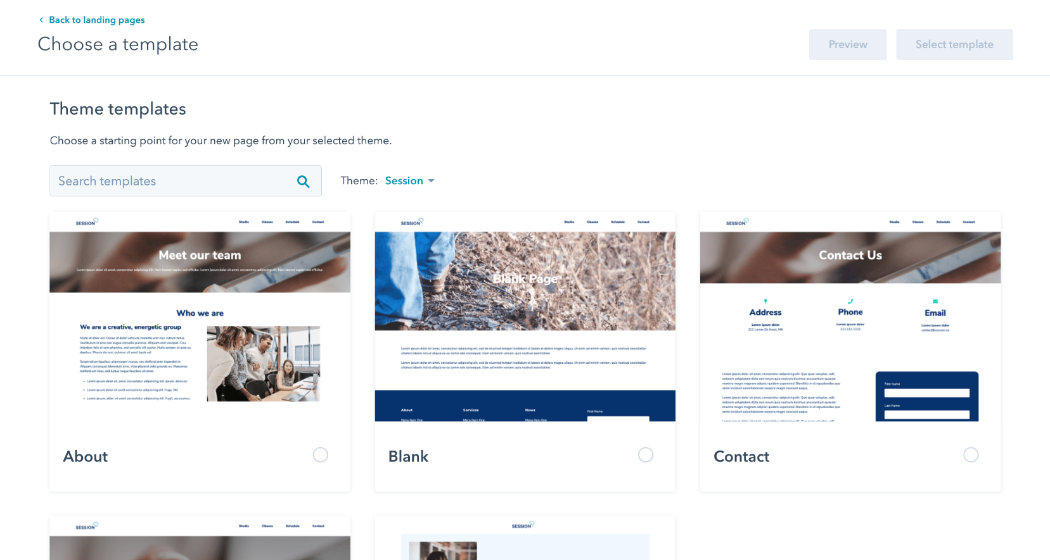
Credit: www.hubspot.com
Launching The Landing Page
Preparing for Live Deployment is an exciting step. Check all links and images. Make sure everything works well. A broken link can confuse visitors. Test the page on different devices. This helps catch any errors. Make sure your page loads fast. A slow page can lose visitors.
Ensuring Mobile Compatibility is vital. Many people use phones to browse. Check how your page looks on a mobile screen. Adjust fonts and buttons if needed. Make them easy to read and click. Mobile users are important. They should have a good experience.
Promoting across channels is key. Share your page on social media. Tell friends and family about it. Use email to reach more people. Each share can bring new visitors. Promotion helps grow your audience. Use simple words to describe your page.

Credit: www.convertflow.com
Frequently Asked Questions
What Is The Best Platform To Create A Landing Page?
Choose platforms like Unbounce, Leadpages, or Wix for creating effective landing pages. They offer user-friendly interfaces, customizable templates, and robust analytics. Optimize for conversions with tools like A/B testing and integrations. These platforms help build professional, engaging landing pages quickly, attracting more visitors and boosting your conversion rates.
Can I Create A Landing Page Using Canva?
Yes, you can create a landing page using Canva. It offers customizable templates, easy drag-and-drop features, and design elements. Sign up, choose a template, and start designing. Once done, download or publish your landing page directly through Canva. It’s user-friendly and efficient for non-designers.
How Do I Upload A Landing Page Template?
To upload a landing page template, log into your website builder. Navigate to the “Templates” section, click “Upload”, and select your template file. Confirm the upload, then customize your landing page as needed. Save changes to publish your template. Ensure compatibility with your platform before uploading.
Does WordPress Have Landing Page Templates?
Yes, WordPress offers landing page templates. You can find them in themes or plugins. They help create effective landing pages quickly. Customization options vary based on the theme or plugin. Explore the WordPress library for diverse designs to suit your needs.
Conclusion
Creating a landing page with a template simplifies the process. Templates offer a solid starting point. Customize colors, text, and images to fit your brand. Focus on clear, concise messaging. Make the call-to-action button stand out. Ensure the page is mobile-friendly for wider reach.
Test the page to check its effectiveness. Analyze visitor data for improvements. With practice, your landing pages will improve over time. Keep learning and refining your skills. A well-designed landing page can boost engagement and conversions. Remember, simplicity and clarity are key to success.
Happy designing!


