
Are you ready to transform your website into a lead-generating machine? Creating a compelling landing page is the key to capturing your audience’s attention and driving conversions.
With Elementor, you have the power to design stunning, high-converting landing pages without needing any technical expertise. Imagine having a visually appealing page that not only captures interest but also guides visitors towards taking the desired action. As you dive into the art of crafting landing pages in Elementor, you’ll discover the perfect blend of aesthetics and functionality.
This isn’t just about design; it’s about strategically guiding your visitors’ journey. Curious to learn how to make every click count and turn visitors into loyal customers? Keep reading to unlock the secrets of creating an impactful landing page in Elementor. Your website’s success is just a few steps away!
Credit: wpmet.com
Getting Started With Elementor
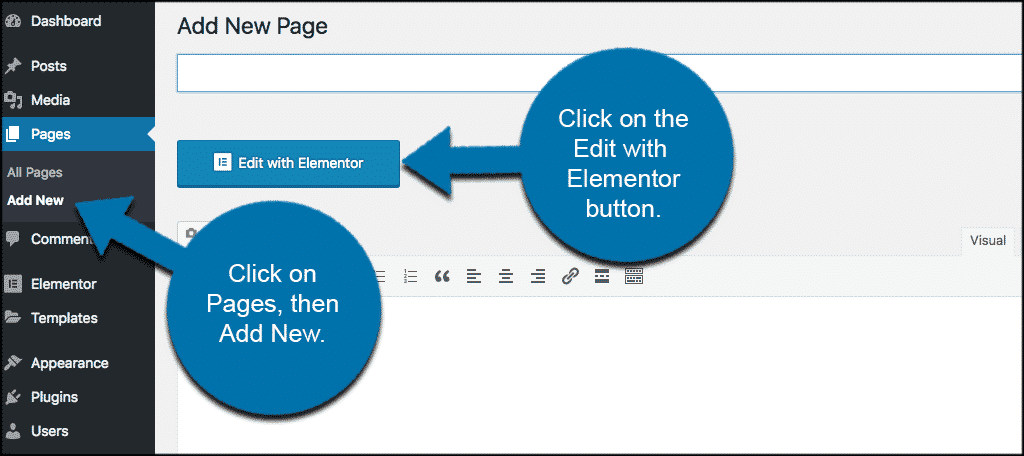
First, install the Elementor plugin on your WordPress site. Go to your dashboard and find “Plugins.” Click “Add New” and search for Elementor. Install and activate it. This will set up your workspace for building pages. Ensure your theme is compatible with Elementor. This helps avoid issues later.
Choose a simple theme that works well. Elementor’s Hello Theme is a good choice. It offers a clean slate for your designs. After setting up, you are ready to start creating. A well-prepared workspace makes designing easy and fun.
Elementor’s interface is easy to learn. The main area is the editing screen. This is where you add and edit content. On the left, find the widgets panel. Drag and drop widgets to the editing screen.
The panel has tools like text, images, and buttons. Each widget has settings you can adjust. Try changing colors or sizes. See how your page looks as you edit. The live preview helps you make quick changes. Understanding these tools helps in designing stunning pages.
Design Principles For Landing Pages
A strong headline grabs attention. It tells visitors what to expect. Use simple and clear words. Make it short but meaningful. A headline should highlight the main benefit of your page. Visitors should know why they should stay. Use action words to create interest. This keeps them curious and wanting to read more.
Arrange information by importance. Place key details at the top. Use larger fonts for important text. Bold text for emphasis. Colors can guide the eye. Keep layouts clean and uncluttered. Too many elements can confuse. Use white space to separate sections. This makes content easier to read. Align elements for a tidy look.
Building The Structure
Sections are the main parts of your landing page. They hold everything together. Each section can have one or more columns. Columns help in organizing content. They make your page look neat. Drag and drop sections to create your design. Add columns inside sections to split content. Adjust column widths easily. This helps in creating different layouts. Add text, images, and buttons to columns. Rearrange them to fit your style.
Start with a clear headline. It’s the first thing people see. Add a call to action. Make it simple and direct. Use images to tell your story. They should relate to your message. Include a contact form for easy reach. People can fill it out to contact you. Testimonials build trust. Add them to show real user experiences. Use icons to highlight features. They make information easy to understand.
Credit: elementor.com
Enhancing User Experience
Mobile devices are small. Pages must fit well on these screens. Responsive design is key. It helps pages look good everywhere. Use Elementor to adjust layouts. Make text easy to read. Buttons should be big. Clickable. This helps users a lot.
Pages that load fast make users happy. Fast loading keeps visitors on your page. Compress images to save space. Reduce file sizes. Use fewer plugins. This helps the page load quicker. Clean up old or unused content. It takes time but helps speed.
Integrating Multimedia
Creating a landing page in Elementor involves integrating multimedia elements. Utilize images, videos, and interactive features to engage visitors effectively. Enhance user experience by ensuring content is visually appealing and easy to navigate.
Adding Images And Videos
Images make a page look nice. Videos tell a story fast. Both catch the eye. Use high-quality images to impress viewers. Add videos to show action. Keep videos short for easy watching. Use captions for images. Add titles for videos. This helps understanding. Make sure images and videos load quickly. This keeps visitors happy. Use the right size for images. This makes pages quick to load.
Using Interactive Elements
Interactive elements keep people on your page. Buttons let visitors click and explore. Use sliders to show many images in one space. Accordions hide and show text. This saves space. Forms let visitors contact you. Use simple forms. This makes it easy to reach you. Add quizzes for fun. Quizzes keep visitors engaged. Use polls to learn about your visitors. Polls show what people like. Make sure interactive elements work well. Test them before publishing.
Call To Action Strategies
Buttons should be bright and easy to see. Use colors that stand out. Make sure they are big enough to click. Simple words work best. “Buy Now” or “Learn More” are good examples. Keep the message clear and direct.
Place CTAs where eyes naturally go. Top of the page or center works well. People should not search for them. Easy to find is important. Repeat CTAs if necessary. Use them after important info. This helps remind people.
Testing And Analytics
A/B testing helps find the best version of a page. Create two versions of a landing page. Show each version to different users. Measure which version performs better. Track clicks, sign-ups, and sales for each version. Use this data to make decisions. A/B testing is a simple way to improve your page.
Tracking user engagement shows how users interact. Watch where users click and scroll. Analyze time spent on the page. Use tools like Google Analytics for tracking. It shows user behavior clearly. High engagement means a successful page. Adjust the page to improve engagement.
Credit: www.greengeeks.com
Frequently Asked Questions
How Do I Create A Landing Page In Elementor?
Open Elementor, choose a template or create a new page. Drag and drop widgets to design. Adjust settings for style and functionality. Add text, images, and buttons. Optimize for SEO by including keywords. Save and publish your landing page when satisfied with the design.
Is Elementor Good For Landing Pages?
Elementor is excellent for creating landing pages. Its drag-and-drop builder simplifies design. Users enjoy customizable templates and fast setup. It integrates seamlessly with WordPress, enhancing functionality. Responsive design ensures mobile compatibility. Elementor supports SEO, boosting visibility. It’s user-friendly, making it ideal for beginners and advanced users alike.
How To Create A Landing Page Step By Step?
To create a landing page, choose a platform, design a layout, write compelling copy, add visuals, and optimize for conversions. Test and refine the page for better results. Ensure mobile compatibility and fast loading times. Use clear calls-to-action to guide visitors effectively.
How Do I Make My WordPress Homepage A Landing Page?
Go to your WordPress dashboard. Select “Settings” > “Reading. ” Set “Homepage” to “A static page” and choose your desired page. Save changes. Use a page builder plugin for customization.
Conclusion
Creating a landing page with Elementor is straightforward. Follow the steps outlined, and you’ll have a great page. Start by choosing a template. Customize it to fit your brand and message. Add engaging images and clear call-to-action buttons. Keep the design clean and focused.
Always check mobile responsiveness. Test your page before publishing. With practice, creating stunning pages becomes easier. Remember, a well-designed landing page boosts conversions. Use these tips, and you’ll see results. Happy designing!


