
Imagine logging into SharePoint and being greeted by a landing page that not only captures your attention but also enhances your productivity. It’s like stepping into a well-organized workspace where everything you need is right at your fingertips.
Designing an effective SharePoint landing page doesn’t have to be a daunting task. In fact, it can be a rewarding experience that transforms the way you and your team interact with information. You might be wondering how you can create a landing page that does all this while looking sleek and professional.
The key is understanding the elements that make a SharePoint page not just functional, but also engaging. Whether you’re setting it up for your own use or for your entire organization, a well-designed page can streamline operations and boost efficiency. Your landing page should serve as the central hub of information, guiding users effortlessly to the resources they need. You’ll discover the essential steps and tips to craft a SharePoint landing page that is not only visually appealing but also highly functional. By the end of this guide, you’ll have the insights you need to design a page that stands out and meets all your organizational needs. Stick around, and let’s unlock the potential of your SharePoint experience together.
Planning Your Sharepoint Landing Page
Start with clear goals for your SharePoint landing page. Decide what you want to achieve. This helps you stay focused. Think about your main purpose. Is it to share news, files, or tools? Knowing your objectives is important. It guides your design choices and makes the page effective.
Understand who will use the page. Are they students, workers, or managers? Knowing your audience helps you pick the right content. Make the page easy for them to use. Think about their needs and what they want to find. This makes your page more helpful and user-friendly.
Plan the content you will include. This could be text, images, or links. Arrange it in a way that makes sense. Keep it simple and clear. Use headings to break up the text. This makes the page easier to read. A good content strategy keeps users engaged and informed.
Layout And Structure
Picking a template is the first step. Templates help organize the page. Some have a clean look. Others are colorful. Choose one that matches your needs. Think about what you want to show. Some templates are for pictures. Others are for text. Templates save time. Use them to make your page look good.
Content needs a place. Use sections for different topics. Keep related things together. Make it easy to find stuff. Use headings to break up text. Headings help people know what they are reading. Use bullets for lists. They make information clear. Content should be easy to read. Use short sentences.
Navigation helps people move around the page. Keep it simple. Use clear labels. Make it easy to find things. Navigation should be at the top or side. People should see it right away. Use links to important pages. Keep menus short. Navigation is like a map. It guides people.
Visual Design Elements
Crafting a SharePoint landing page requires attention to visual design elements like color, typography, and layout. A clean, organized interface enhances user experience, guiding visitors effectively. Incorporate intuitive navigation to ensure users find content effortlessly.
Color Schemes
Bright colors grab attention. Soft colors feel calm. Choose three main colors. Use them for backgrounds, text, and buttons. Colors should match your brand. Avoid too many colors. This can confuse users.
Typography Choices
Fonts should be clear. Avoid fancy styles. Use two or three fonts. One for headings. Another for body text. Keep sizes readable. Big text is easy to see. Small text can be hard to read.
Imagery And Icons
Pictures speak louder than words. Use high-quality images. They should be relevant. Icons help guide users. Use them for buttons or features. Avoid clutter. Too many images can be distracting. Keep the layout neat.
Adding Functional Components
Web parts make the page come alive. Text and image web parts are essential. They help users understand the content better. Document web parts let users view files directly. This saves time and clicks.
Interactive features engage users. Buttons and links guide them around the page. They make navigation simple and fast. Users like to click and explore. Video and audio can also be added. This makes the page more engaging.
Search functionality is crucial. Users find what they need quickly. A search box should be easy to spot. It helps users locate documents fast. Results must be clear and organized.
Customization And Branding
Use your company’s logo and colors for the SharePoint page. This helps everyone recognize it. A familiar look makes users feel at home. Keep it simple and clean. Too many colors can confuse people. Stick to your main brand colors.
CSS is a tool to change how your page looks. You can make text bold or change its color. This makes the page unique. Add some custom styles to fit your needs. But don’t use too much. It can make the page slow.
Each person can see what they need. Personalization shows important content to the right people. Add sections for news, tasks, or events. This helps everyone stay informed. Keep the layout simple. Users should find things easily.
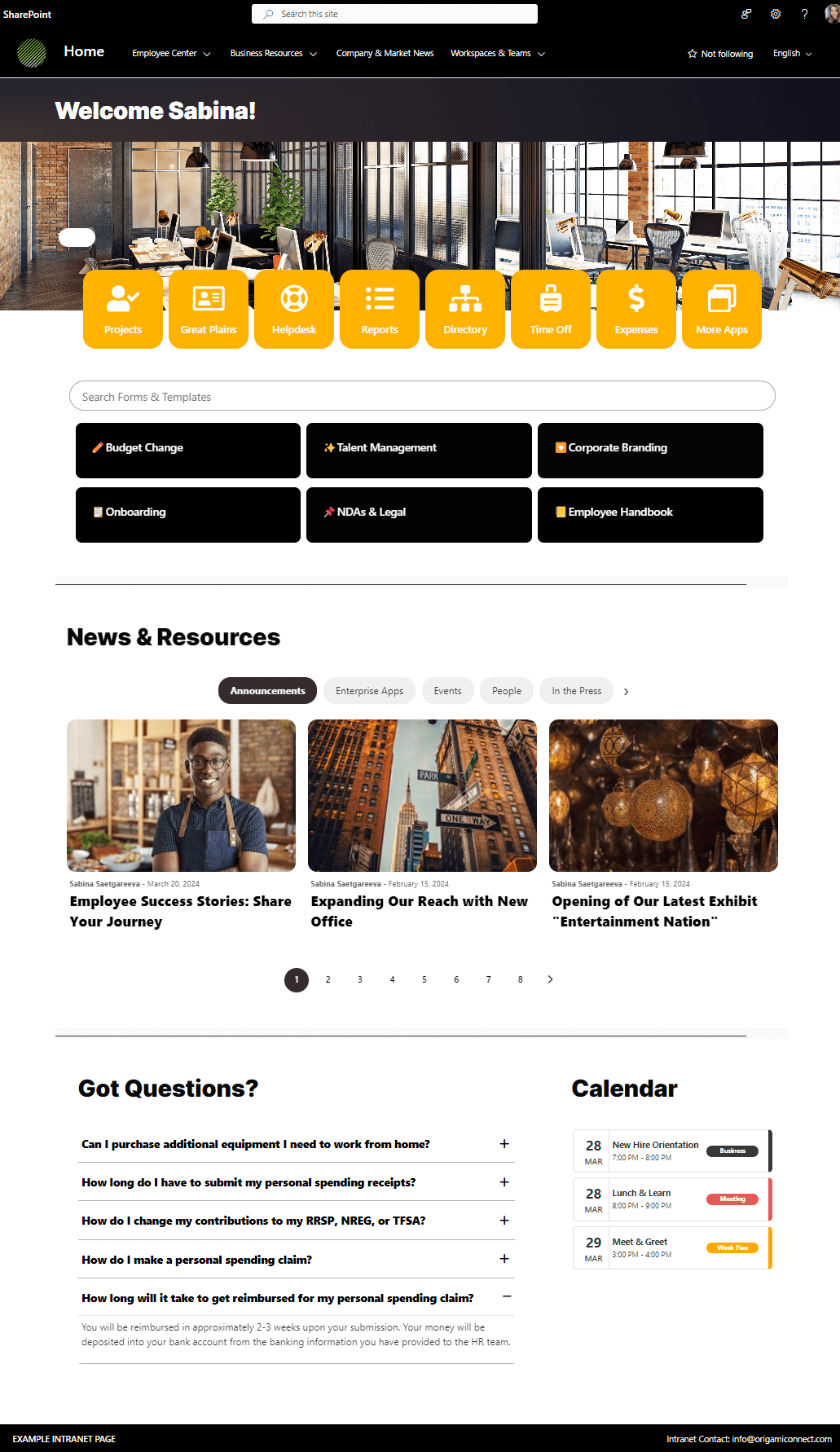
Credit: www.origamiconnect.com
Testing And Feedback
User Testing Techniques are key to a great SharePoint page. Start with simple tests. Ask friends to use the page. Watch how they move around. Take notes on any problems they find. This helps in understanding what users need.
Gathering Feedback is important. Create a feedback form. Ask simple questions like “What did you like?” or “What was hard to use?”. Use this feedback to make changes. Listen to what users say. It makes the page better.
Iterative Improvements mean making small changes often. Start with one change. Test it again. Gather more feedback. Keep improving. Small steps lead to big success. This process is ongoing. Your page will keep getting better.
Maintenance And Updates
Regular content reviews keep your landing page fresh. Update old info. Check links. Fix broken ones. This helps users find what they need.
Performance monitoring is crucial. Check page speed. Slow pages annoy users. Use tools to track this. Make fixes as needed. Happy users stay longer.
Adapting to user needs is vital. Listen to feedback. Change things if needed. Add new features. Remove unused ones. Keep users engaged.

Credit: mydigitalworkplace.wordpress.com

Credit: mydigitalworkplace.wordpress.com
Frequently Asked Questions
Can You Create A Landing Page In Sharepoint?
Yes, SharePoint allows you to create landing pages using its customizable templates. Enhance your page with web parts, images, and text. Utilize SharePoint’s design tools to ensure your landing page is visually appealing and meets your specific needs. SharePoint makes it easy to engage users through dynamic and interactive content.
How To Make A Sharepoint Page The Home Page?
Go to the SharePoint site settings. Click “Site Contents,” then “Pages. ” Select the desired page. Click “Make Homepage” under the “Page” tab. Save changes.
How To Layout A Sharepoint Page?
To layout a SharePoint page, choose a template, add web parts, and customize using drag-and-drop tools. Adjust sections to fit content needs. Ensure page is accessible and mobile-friendly. Save and publish changes for users.
How Do I Make A Beautiful Sharepoint Page?
Create a beautiful SharePoint page by choosing a modern layout, adding engaging visuals, and optimizing for mobile. Use web parts effectively, maintain consistency in design, and ensure content is relevant and clear. Regularly update the page to keep it fresh and engaging for users.
Conclusion
Designing a SharePoint landing page? Easier than you think. Follow these steps. Choose a clean layout. Use intuitive navigation. Add engaging visuals. Keep content concise. Customize with your branding. Test for mobile responsiveness. Regularly update information. Engage with your users.
Gather feedback for improvements. A well-designed page boosts productivity. Enhances user experience. Makes information accessible. You can create an effective SharePoint landing page. Just focus on simplicity and functionality. Your efforts will pay off. Users will appreciate the seamless experience.
Start designing today. See the positive impact on your organization.


