Are you trying to figure out whether QuickBooks or Excel is the better option for managing your finances? Both tools have their strengths, but choosing the right one can make all the difference in how efficiently you run your business.
You might be looking for something user-friendly, or perhaps you need more complex data management capabilities. Whatever your needs, understanding the differences between QuickBooks and Excel can save you time and stress. Dive into this comparison, and discover which tool can streamline your financial processes, enhance your productivity, and help you make smarter decisions.
Keep reading to uncover the features, advantages, and limitations that could impact your choice.
Features Comparison
Choosing the right financial tool can be a tough decision. QuickBooks and Excel are popular choices for managing finances. Both have unique features that cater to different needs. Understanding their capabilities helps make an informed decision.
Accounting Capabilities
QuickBooks offers robust accounting features. It automates invoicing, tracks expenses, and manages payroll. It also provides tax support and generates detailed financial reports. This makes it suitable for businesses of all sizes.
Excel is versatile but lacks dedicated accounting features. It excels in creating custom spreadsheets and charts. Users can perform calculations and create financial models. But manual input is required for complex accounting tasks.
Data Management
QuickBooks simplifies data management with cloud-based storage. Users can access financial data anytime, from anywhere. It ensures data security and provides automatic backups. This feature reduces the risk of data loss.
Excel requires manual data entry and local storage. It offers flexibility in organizing data. However, managing large datasets can be challenging. Users must ensure data accuracy and consistency manually.
Credit: fitsmallbusiness.com
Ease Of Use
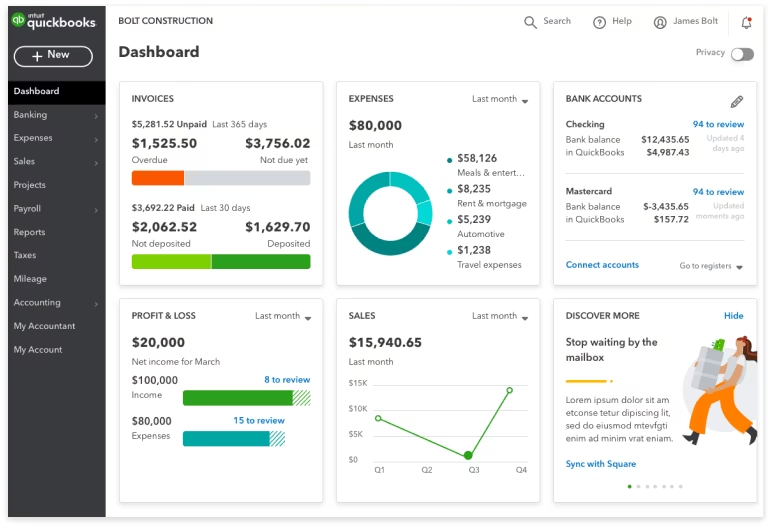
QuickBooks offers a user-friendly interface, ideal for those new to accounting software. Excel, while powerful, requires more technical skills to manage data effectively. Both tools serve different needs, making QuickBooks easier for small business accounting and Excel suitable for detailed data analysis.
When choosing between QuickBooks and Excel for managing your finances, understanding the ease of use can be crucial. You might be wondering which tool will make your life easier and help you get things done faster. Let’s dive into how each option handles user experience, learning, and daily operations.User Interface
QuickBooks offers a user-friendly interface designed specifically for accounting tasks. You’ll find menus and features tailored to financial management, making it easy to navigate through invoices, expenses, and reports. On the other hand, Excel provides a more generic interface that is highly customizable but requires you to set up your own accounting system.In my experience, QuickBooks gives you a head start with its intuitive layout. You’ll appreciate its straightforward navigation, especially if you’re new to accounting. Excel demands more setup and familiarity with spreadsheet functions, which can be daunting if you’re not spreadsheet savvy.Learning Curve
QuickBooks is designed to minimize the learning curve for accounting novices. With guided tutorials and a community of users, you can quickly get the hang of managing your books. Excel, however, requires you to learn more about formulas and functions to effectively use it for accounting.When I first started using QuickBooks, I was up and running in a day. It felt like having a guide by my side, leading me through every step. With Excel, I had to spend more time watching tutorials and practicing, which might not be ideal if you’re short on time.Have you considered how much time you’re willing to dedicate to learning a new system? Choosing the right tool depends on your comfort level with technology and the specific tasks you need to accomplish.Cost Analysis
Choosing the right tool for managing finances can impact costs. Quickbooks and Excel are popular choices, each with different pricing structures. Understanding their cost implications is crucial for informed decision-making.
Pricing Plans
Quickbooks offers various pricing plans tailored for different needs. Subscriptions can range from basic to advanced features. Monthly fees provide access to updates and support. Excel requires a one-time purchase or subscription via Microsoft 365. The cost depends on the chosen package.
Long-term Investment
Quickbooks often involves ongoing costs due to subscriptions. It provides regular updates and customer support. Excel, with its one-time purchase, can be more economical. Users pay upfront but may need to upgrade over time. Consider the long-term financial impact when choosing between these tools.
Customization Options
Choosing the right accounting tool means considering customization options. Both QuickBooks and Excel offer unique ways to personalize your work. This section explores how each tool allows you to tailor your experience. Understanding these differences can help you make an informed decision.
Template Design
QuickBooks offers pre-designed templates for invoices, reports, and receipts. You can customize colors, logos, and fonts to match your brand. Excel provides more flexibility in creating templates from scratch. Design spreadsheets that fit your unique needs. Excel’s freedom requires more time and skills, though.
Add-ons And Integrations
QuickBooks supports a wide range of add-ons and integrations. Connect with payment processors, CRM systems, and tax software. This expands its functionality without much effort. Excel integrates well with Microsoft Office tools. Add-ons like Power Query enhance data processing. Excel’s integration options are less diverse than QuickBooks.
Scalability
Choosing the right accounting software is crucial for business growth. QuickBooks and Excel both offer unique features. Scalability is vital as your business expands. Understanding scalability helps you make informed choices.
Small Business Needs
Small businesses need tools that are easy to manage. Excel is familiar to many. It offers basic functions for accounting tasks. QuickBooks, designed for accounting, provides automated features. These features simplify payroll and invoicing.
Excel requires manual updates. QuickBooks automates many processes. This saves time and reduces errors. QuickBooks supports multiple users. Excel is best for solo users or small teams.
Growth Potential
As businesses grow, their needs change. QuickBooks offers scalable solutions. It can handle more transactions and users. Excel struggles with large data sets. QuickBooks adapts to complex business structures.
QuickBooks integrates with other software. This makes expansion smoother. Excel requires more manual efforts for integration. QuickBooks provides advanced reporting tools. Businesses can make better decisions with detailed insights.
Credit: www.method.me
Security Measures
Ensuring the security of financial data is crucial for businesses today. Both Quickbooks and Excel offer distinct security measures to protect sensitive information. Understanding these measures helps in choosing the right tool for your business needs.
Data Protection
Quickbooks provides automatic backups to safeguard data from loss. It encrypts financial information, ensuring it remains private. Excel offers password protection for files, but encryption must be manually set up.
Quickbooks uses industry-standard encryption protocols. This keeps data safe from unauthorized access. Excel relies on user-defined settings for data protection. It requires more manual effort to maintain security.
Access Control
Quickbooks allows users to assign different roles. This controls who can access specific information. It ensures only authorized personnel can view sensitive data.
Excel’s access control is less sophisticated. Users can protect worksheets with passwords. This method is not as robust as Quickbooks’ role-based access.
Quickbooks’ centralized user management enhances security. It provides a comprehensive access control system. Excel relies on individual file settings, making access control more complex.
Support And Resources
Choosing between QuickBooks and Excel involves understanding their support and resources. Both tools offer different levels of assistance. Knowing what’s available can help users make informed decisions.
Customer Service
QuickBooks offers dedicated customer support. They have live chat, phone, and email options. Users can get assistance with technical issues. QuickBooks also provides step-by-step guidance. This support is ideal for resolving issues quickly.
Excel, by contrast, relies on Microsoft’s broader support network. Users access help through forums and community discussions. Microsoft offers extensive online documentation. They also provide support through their website. Direct personal support is less frequent.
Training Materials
QuickBooks offers a variety of training resources. These include webinars, tutorials, and video guides. Users can learn at their own pace. They also have access to certified QuickBooks ProAdvisors. These experts provide personalized training sessions.
Excel provides extensive online tutorials. Microsoft offers learning modules on their website. Users can find guides on various features. Video tutorials are available on platforms like YouTube. Independent courses also offer training in Excel.
Industry Preferences
Choosing between QuickBooks and Excel often depends on industry preferences. Different sectors have unique needs that sway their choice of financial management tools. Understanding these preferences can help you make an informed decision that best suits your business.
Sector-specific Advantages
In the retail industry, QuickBooks is often favored for its robust inventory management features. Retailers benefit from QuickBooks’ ability to track sales and stock levels in real-time. This capability can save time and reduce errors.
On the other hand, sectors like research or academia might lean towards Excel. Excel’s flexibility in handling large datasets and performing complex calculations can be invaluable. It allows for custom data manipulation that is essential in these fields.
Have you ever wondered why some industries gravitate towards one tool over the other? It often boils down to the specific features that align with their operational needs.
Popular Use Cases
Small businesses frequently use QuickBooks for its ease of use and comprehensive reporting. It simplifies tasks like invoicing, payroll, and tax preparation. Many users appreciate how it reduces the workload of day-to-day accounting.
Excel shines in scenarios where customization is key. Financial analysts often rely on Excel for its powerful formula capabilities. It allows them to build tailored financial models and conduct what-if analyses with ease.
Imagine being able to seamlessly track your expenses and income or create a detailed financial projection. These are just a few of the ways these tools are used in various industries.
Which tool aligns with your business needs? Consider your industry’s common practices to make the best choice for your operations.
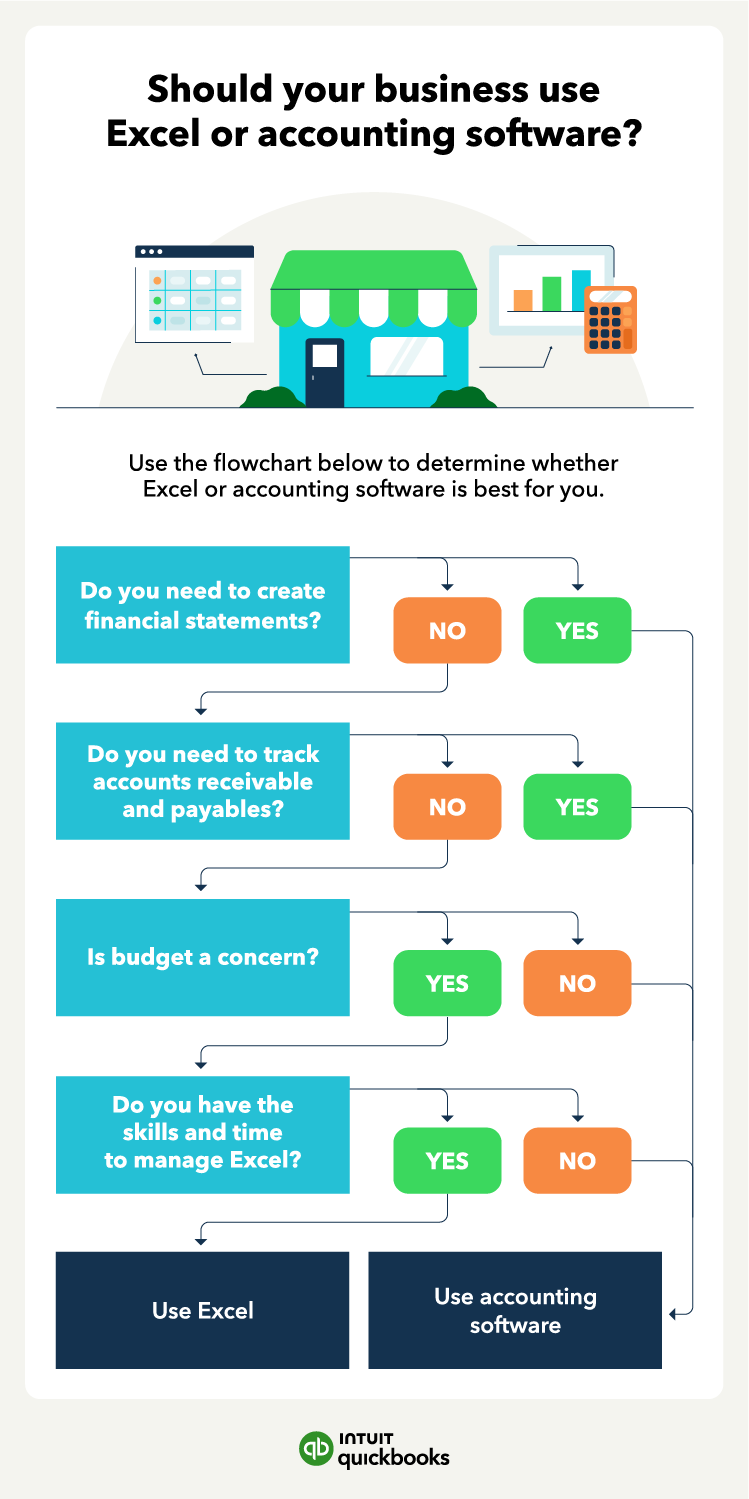
Credit: quickbooks.intuit.com
Frequently Asked Questions
Is Excel As Good As Quickbooks?
Excel is versatile for data management but lacks QuickBooks’ specialized accounting features. QuickBooks simplifies bookkeeping with automated reports and financial tracking. Choose Excel for basic tasks; select QuickBooks for comprehensive accounting needs.
What Can Quickbooks Do That Excel Can’t?
QuickBooks automates accounting tasks, offers real-time financial reporting, and manages payroll seamlessly. It integrates with banks and tracks expenses efficiently.
Do Accountants Use Quickbooks Or Excel?
Accountants commonly use QuickBooks and Excel for financial management. QuickBooks simplifies bookkeeping tasks, while Excel offers flexible data analysis. Both tools complement each other in accounting practices. QuickBooks automates entries, whereas Excel allows for detailed custom reporting. Choosing between them depends on specific business needs and complexity.
Conclusion
Choosing between QuickBooks and Excel depends on your needs. QuickBooks offers automation and ease. Ideal for small businesses. Excel provides flexibility and customization. Great for detailed analysis. Both have strengths and weaknesses. Consider your business size and goals. QuickBooks saves time with accounting tasks.
Excel excels in data manipulation. Evaluate your budget and resources. Decide based on what suits you best. Remember, the right tool simplifies work. Aim for efficiency and accuracy. Your decision impacts your financial management. Make an informed choice.