Are you struggling to choose between QuickBooks and Jobber for managing your business finances and operations? You’re not alone.
Picking the right software can feel like a daunting task, but it doesn’t have to be. Imagine having a tool that seamlessly handles your invoicing, payments, and scheduling while boosting your productivity. Sounds ideal, right? We’ll dive deep into QuickBooks and Jobber, comparing their features, benefits, and drawbacks.
By the end, you’ll have a clear understanding of which software aligns with your business needs. Let’s get started on simplifying your decision-making process.
Overview Of Quickbooks
When it comes to managing finances, QuickBooks is a name that stands out for its reliability and effectiveness. This accounting software has been a staple for businesses of all sizes due to its comprehensive features and user-friendly interface. Whether you’re a small business owner or managing a larger enterprise, QuickBooks offers tools that help streamline financial tasks efficiently.
Key Features Of Quickbooks
QuickBooks offers a suite of features that cater to various accounting needs. One standout feature is its invoicing capabilities, allowing you to create and send professional invoices effortlessly. This can be a game changer when managing cash flow and ensuring timely payments.
Another noteworthy feature is expense tracking. QuickBooks allows you to link your bank accounts and credit cards, making it easy to monitor your spending. This feature provides real-time insights into your financial health, which can be crucial for budgeting and forecasting.
Additionally, QuickBooks provides payroll management. It simplifies paying employees and managing taxes, which can save you time and reduce errors. The system updates tax rates automatically, ensuring compliance with the latest regulations.
Pricing And Plans For Quickbooks
QuickBooks offers various pricing plans, each designed to meet different business needs. The Simple Start plan is perfect for freelancers and small businesses, offering essential features like income and expense tracking. It starts at an affordable monthly rate.
For growing businesses, the Essentials plan includes additional tools like bill management and time tracking. It offers more comprehensive solutions for those with more complex needs.
The Plus plan is suitable for medium-sized businesses, providing project tracking and inventory management. It offers advanced features that cater to businesses with a larger scale of operations.
User Experience With Quickbooks
Many users find QuickBooks intuitive and straightforward. The software’s clean interface makes navigation seamless, even for those without a strong accounting background. This ease of use can significantly reduce the learning curve for new users.
QuickBooks also offers excellent customer support. Whether through tutorials, forums, or direct support, users have access to resources that help them resolve issues quickly. This level of support can be reassuring, especially when dealing with critical financial data.
Have you ever found yourself overwhelmed by accounting tasks? QuickBooks’ automation features can alleviate that stress. By automating repetitive tasks, you can focus on growing your business instead of getting bogged down in bookkeeping.
Overall, QuickBooks provides a robust solution for businesses looking to manage their finances effectively. With its range of features, pricing plans, and user-friendly experience, it remains a top choice for many entrepreneurs and financial professionals alike.
Overview Of Jobber
Jobber is a robust software designed for service businesses. It helps manage daily operations efficiently. From scheduling to billing, Jobber covers many tasks. It simplifies processes and improves productivity. Businesses find it useful for smooth operations.
Key Features Of Jobber
Jobber offers a range of features to support service businesses. It includes scheduling tools for easy appointment management. The software provides invoicing and payment collection features. Jobber also offers a client hub for customer interactions. It integrates with other platforms for seamless workflow. Time tracking and expense management are additional features.
Pricing And Plans For Jobber
Jobber offers flexible pricing plans to suit different needs. The Core plan provides essential features. It is affordable and suitable for small teams. The Connect plan includes advanced features like automation. It is ideal for growing businesses. The Grow plan offers full features and unlimited users. It fits larger teams seeking comprehensive solutions. Jobber also offers a 14-day free trial.
User Experience With Jobber
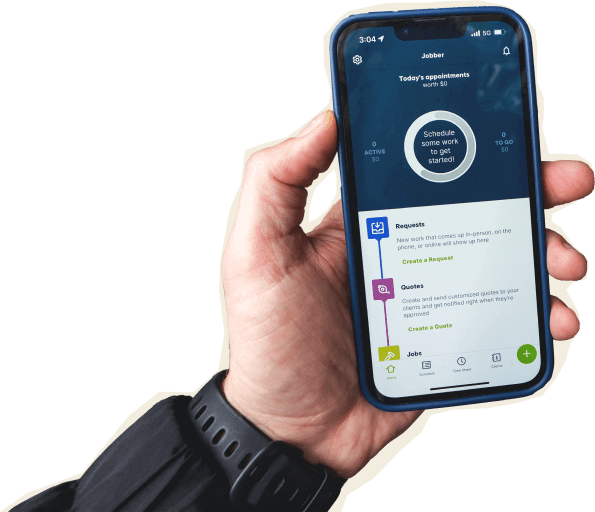
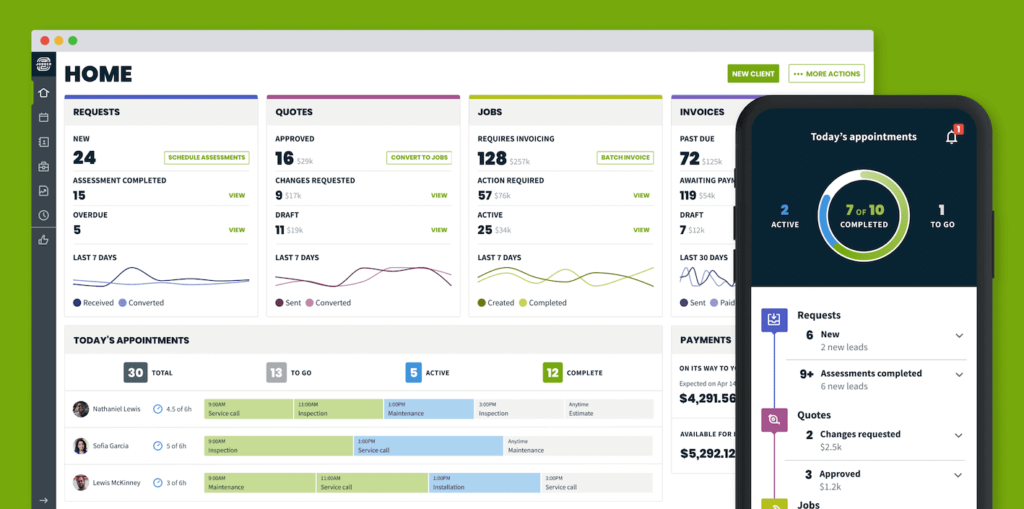
Jobber provides a user-friendly interface. Users find navigation simple and intuitive. The dashboard is organized and easy to understand. Tutorials and support are available for new users. Jobber’s mobile app enhances on-the-go management. Users appreciate its reliability and efficiency.
Comparing Features
When choosing between QuickBooks and Jobber, understanding the features of each is crucial. Which tool will serve you best? Let’s dive into the specifics. Whether you’re a small business owner or a freelancer, knowing how these tools stack up in terms of accounting, customer management, and scheduling can make your decision easier.
Accounting Capabilities
QuickBooks is renowned for its robust accounting capabilities. It offers comprehensive solutions for invoicing, payroll, and tax management. You can track expenses and generate detailed financial reports.
Jobber, on the other hand, focuses on service-based businesses. It provides basic invoicing and payment tracking but lacks advanced accounting features. If detailed financial analysis is a priority, QuickBooks might be your go-to.
Have you ever wondered how much time you spend on bookkeeping? QuickBooks can save you hours with its automated features, while Jobber keeps things simple and straightforward for smaller operations.
Customer Management Tools
QuickBooks offers basic customer management features like contact information storage and transaction history. It’s a great tool for keeping track of financial interactions.
Jobber shines with its customer management capabilities. It provides a centralized hub for client information, including service history and custom fields. This makes it easier to personalize customer experiences.
Imagine having all your customer data at your fingertips—Jobber provides this convenience, making it ideal for service-focused businesses looking to enhance client relationships.
Scheduling And Dispatch
QuickBooks offers scheduling features suitable for appointment-based businesses, but lacks advanced dispatch capabilities. It’s more focused on financial management than operational logistics.
Jobber excels in scheduling and dispatch. It allows you to schedule jobs, assign tasks to team members, and send real-time updates. It’s built for efficient field service management.
Ever missed an appointment due to scheduling errors? With Jobber’s real-time updates, you can minimize such mishaps, ensuring your team is always on track.
As you weigh your options, consider the specific needs of your business. Do you prioritize accounting features, or is customer management and scheduling your focus? Your answer will guide you to the best tool for your operations.
Credit: www.getjobber.com
Integration Options
Integration options are crucial for businesses seeking efficiency. QuickBooks and Jobber offer distinct integration possibilities. Understanding these options helps in choosing the right tool for your business needs.
Third-party Integrations
QuickBooks offers robust third-party integrations. It connects with over 650 apps, enhancing its functionality. From e-commerce to payroll, options are vast. This flexibility supports diverse business operations. Jobber, on the other hand, integrates with fewer apps. It focuses on field service management tools. This makes it suitable for specific industries. Yet, its integration list is growing, catering to more needs.
Compatibility With Other Software
QuickBooks boasts strong compatibility with other software. It works well with Microsoft Office and Google Workspace. This compatibility streamlines data management. It ensures smooth workflow transitions. Jobber also supports compatibility with essential software. It connects with calendar apps and accounting tools. This enhances scheduling and financial tracking. Both tools ensure data sync across platforms. This sync reduces manual data entry errors.
Scalability And Flexibility
Choosing the right software is crucial for business growth. Scalability and flexibility play a big role. Quickbooks and Jobber both offer unique advantages. Understanding these can guide you to the best choice.
Business Size Compatibility
Quickbooks supports a wide range of business sizes. It’s ideal for small to medium enterprises. Large businesses also find it useful with its vast features. Jobber, on the other hand, excels with small businesses. It fits perfectly for service-based industries. Each offers different strengths based on your business size.
Customization Options
Quickbooks provides numerous customization options. Users can tailor reports and invoices. It supports integrations with many apps and services. Jobber offers customization as well. It allows personalized client communications. Users can adjust workflows to match their needs. Both platforms provide flexibility, though in different ways.
Customer Support And Training
Choosing the right software involves checking its support and training options. Customer support and training are critical. They help users maximize their software’s potential. Quickbooks and Jobber both offer these services. But there are differences in their approaches.
Availability Of Support Channels
Quickbooks offers various support channels. Users can access phone support. Live chat is also available. There is an active community forum too. These options provide flexibility for users.
Jobber also provides multiple support channels. Customers can reach out via email. Phone support is available during business hours. Live chat is another option. Jobber’s support team is responsive and ready to assist.
Training And Resources
Quickbooks provides a comprehensive set of training tools. There are video tutorials for beginners. Users can find detailed guides online. Quickbooks also offers webinars for deeper learning.
Jobber offers a rich library of resources. Step-by-step guides are available. Video tutorials help with common tasks. Jobber’s resources are easy to understand. They cater to all user levels.
Cost Efficiency
Choosing the right financial software for your business can be a game-changer in terms of cost efficiency. When comparing QuickBooks and Jobber, it’s important to consider not just the upfront costs, but also the overall value each platform offers. Let’s break down the cost efficiency of these two popular tools.
Value For Money
QuickBooks is often praised for its comprehensive features that cater to a wide range of business needs. It provides robust accounting solutions, making it a favorite for those who want an all-in-one financial management system. Its packages offer scalability, which is great if you’re planning to grow your business.
Jobber, on the other hand, is specifically designed for service-based businesses. It focuses on job scheduling, client management, and invoicing. If your business primarily revolves around field service, you may find the focused features of Jobber more aligned with your needs, potentially offering better value for money in that niche.
Hidden Costs And Fees
Cost efficiency isn’t just about the subscription fee. You need to be aware of any hidden costs and fees that might sneak up on you. QuickBooks has been noted for its additional charges for payroll features, which can add up if you have a larger team.
Jobber, while generally upfront about its pricing, may require third-party integrations for certain functionalities, depending on your business requirements. These integrations can sometimes lead to unexpected costs. Are you prepared for these potential expenses?
Understanding these hidden costs is crucial. You don’t want to be caught off guard with fees that could have been anticipated. Always read the fine print and think about what features you truly need.
Have you had any surprising experiences with software fees? Share your thoughts in the comments below. Your insights might help others make a more informed decision.

Credit: www.youtube.com
User Reviews And Feedback
User reviews and feedback are vital in understanding software effectiveness. They provide real-world insights into how QuickBooks and Jobber perform. Users share their experiences, highlighting strengths and voicing concerns. This helps potential users make informed decisions.
Strengths Highlighted By Users
QuickBooks users praise its comprehensive financial tools. It simplifies accounting tasks significantly. Many appreciate its user-friendly interface. Jobber receives accolades for scheduling and dispatching features. Users find it efficient for managing field services. Both platforms offer robust reporting capabilities. Users value the detailed insights they provide.
Common Concerns And Complaints
QuickBooks users occasionally report issues with customer support. Some find the pricing structure complicated. Jobber users mention difficulties with integrations. A few note occasional glitches in the software. Both platforms face criticism for mobile app limitations. Users sometimes find them less intuitive than desktop versions.
Which Tool Fits Your Business?
Choosing the right tool for your business can feel like picking a favorite child. Both QuickBooks and Jobber offer unique benefits, but which one truly aligns with your needs? Whether you’re managing finances or scheduling jobs, understanding what each software brings to the table is crucial. Let’s dive into a structured assessment to help you make a confident decision.
Business Needs Assessment
Start by evaluating what your business really needs. Are you a small business focused on streamlined financial management? QuickBooks might be your go-to. It’s designed for accounting, offering features like invoicing, payroll, and tax filing.
On the flip side, if your priority is job scheduling and customer management, Jobber could be the perfect fit. It excels in operational tasks like dispatching, tracking job progress, and managing client relationships.
Think about your current challenges. Are you struggling more with finance or operations? This insight can guide your choice.
Decision-making Factors
Several factors can influence your decision. Budget is a big one. QuickBooks offers various pricing plans, making it adaptable to different financial situations. Jobber also provides tiered pricing, but it leans more towards service-based businesses.
Consider ease of use. QuickBooks is user-friendly but may require some accounting knowledge. Jobber, however, is straightforward with its intuitive interface designed for field service professionals.
Think about scalability. Are you planning to expand? QuickBooks can grow with your business, offering advanced features as needed. Jobber also supports growth, particularly for businesses adding more field staff.
Finally, ask yourself: what do you value more—financial precision or operational efficiency? Your answer might just lead you to the right choice.
Credit: www.method.me
Frequently Asked Questions
Who Is Quickbooks’ Biggest Competitor?
QuickBooks’ biggest competitor is Xero. Xero offers cloud-based accounting solutions. It is popular among small businesses. Users appreciate Xero’s intuitive interface and robust features. This software provides strong financial management tools, making it a strong alternative to QuickBooks.
Is Quickbooks Being Phased Out?
QuickBooks is not being phased out. Intuit continues to support and update it. They focus on enhancing cloud-based solutions. Users can still access and utilize QuickBooks Desktop and Online versions. For the latest features, consider migrating to QuickBooks Online. Always check Intuit’s official announcements for updates.
Does Jobber Work With Quickbooks?
Yes, Jobber integrates seamlessly with QuickBooks. It syncs invoices, payments, and expenses, streamlining your accounting process. This integration helps manage finances efficiently, saving time and reducing errors. Connect Jobber to QuickBooks easily through their settings, ensuring your financial data stays accurate and up-to-date.
Conclusion
Choosing between QuickBooks and Jobber depends on your business needs. QuickBooks excels in accounting. Perfect for tracking finances and expenses. Jobber shines in service management. Great for scheduling and customer management. Both offer unique features. Consider your priorities. Evaluate what your business requires most.
Budget, features, and ease of use matter. Test both platforms if possible. A trial can help decide. Ultimately, the right choice boosts efficiency. Improves overall productivity. Take time to assess carefully. Make an informed decision. Your business success depends on it.