
Use Mailchimp’s segmentation and A/B testing features for more effective email marketing campaigns. Personalize emails to boost engagement and conversions.
Mailchimp provides a powerful platform for email marketing, enabling businesses to connect with their audience effectively. Segmenting your audience helps tailor messages to specific groups, increasing relevance and engagement. Utilize A/B testing to determine which subject lines, content, and calls-to-action resonate most with your recipients.
Personalization, including the use of recipient names and past purchase data, can significantly boost open and click-through rates. Mailchimp’s analytics tools offer valuable insights into campaign performance, allowing for continuous optimization. Keep your emails concise, visually appealing, and mobile-friendly to ensure they capture attention. Consistently provide value to your subscribers to foster loyalty and drive long-term success.
Introduction To Email Marketing With Mailchimp
Email marketing remains a powerful tool for businesses. It helps reach and engage with customers directly. One of the top platforms for email marketing is Mailchimp. It offers a user-friendly interface and robust features.
In this blog post, we will explore why you should choose Mailchimp. We will also discuss key features that make Mailchimp stand out.
Why Choose Mailchimp?
Mailchimp is popular for several reasons. Here are some key benefits:
- Ease of Use: Mailchimp offers a simple and intuitive interface. Even beginners can navigate it easily.
- Automation: Automate your emails to save time and increase efficiency.
- Analytics: Get detailed reports to measure your email campaign’s success.
- Integration: Mailchimp integrates with many other tools and platforms.
Key Features Of Mailchimp
Mailchimp offers a variety of features to enhance your email marketing efforts. Here are some of the most notable:
| Feature | Description |
|---|---|
| Email Templates | Choose from a wide range of customizable templates. |
| Segmentation | Divide your audience into specific groups for targeted marketing. |
| A/B Testing | Test different email versions to see which performs better. |
| Mobile-Friendly | Ensure your emails look great on all devices. |
| Landing Pages | Create custom landing pages to capture leads. |
With these features, Mailchimp provides a comprehensive solution. It helps businesses execute effective email marketing campaigns.
Building Your Mailing List
Building a strong mailing list is essential for successful email marketing. With Mailchimp, you can effectively grow and manage your audience. Follow these simple tips to create an engaged and responsive mailing list.
Creating Compelling Opt-in Forms
Opt-in forms are crucial for capturing email addresses. A well-designed opt-in form can significantly increase your subscriber count.
- Clear Call-to-Action: Use action-oriented language.
- Simple Design: Keep the form clean and uncluttered.
- Enticing Offer: Offer a valuable incentive for signing up.
Place these forms strategically on your website. Use pop-ups, slide-ins, and embedded forms. These placements can attract more subscribers.
Managing Subscribers Effectively
Managing your subscribers well keeps your mailing list healthy. Mailchimp provides tools to segment and organize your audience.
- Segmentation: Divide your list based on behavior, preferences, or demographics.
- Automation: Use automated workflows to welcome new subscribers.
- Regular Cleaning: Remove inactive subscribers periodically.
By segmenting your list, you can send targeted and relevant emails. This increases engagement and reduces unsubscribe rates.
| Action | Benefit |
|---|---|
| Segmentation | Higher engagement |
| Automation | Time-saving |
| Cleaning | Better deliverability |
Mailchimp’s features make it easy to manage your subscribers efficiently. Use these tools to keep your audience engaged and responsive.
Designing Engaging Email Campaigns
Creating engaging email campaigns is crucial for successful email marketing. Using Mailchimp, you can design visually appealing emails that captivate your audience. Let’s explore some tips for designing effective email campaigns.
Utilizing Mailchimp’s Templates
Mailchimp offers a variety of pre-designed templates. These templates are easy to use and customizable. Here are some benefits:
- Professionally designed layouts
- Responsive design for mobile devices
- Easy drag-and-drop functionality
Choose a template that fits your campaign goal. Customize it to match your message.
Customizing Designs For Brand Identity
Your email design should reflect your brand identity. Consistency is key to building trust. Follow these tips:
- Use your brand colors and fonts
- Include your logo in a prominent position
- Maintain a clean and organized layout
A consistent design helps your audience recognize your emails. This builds a stronger connection with your brand.
Here’s a quick comparison of template usage vs. custom designs:
| Aspect | Mailchimp Templates | Custom Designs |
|---|---|---|
| Ease of Use | Very Easy | Requires Design Skills |
| Brand Consistency | Moderate | High |
| Time Investment | Low | High |
Both options have their pros and cons. Choose the one that best suits your needs.

Credit: www.youtube.com
Crafting Compelling Content
Creating engaging email content is key for successful email marketing. Mailchimp provides powerful tools, but the content matters most. Let’s explore how to craft compelling content that grabs attention and drives clicks.
Writing Subject Lines That Get Clicks
Subject lines are the first thing your audience sees. They need to be catchy and inviting.
- Keep it short: Aim for 6-10 words. Shorter subject lines are easy to read.
- Use action words: Words like “discover”, “learn”, and “save” inspire action.
- Personalize: Use the recipient’s name to make it personal.
- Create curiosity: Phrases like “Guess what?” or “Did you know?” spark interest.
- Use numbers: “5 Tips for…” or “Top 10…” attract attention.
Best Practices For Email Copy
Once the subject line gets a click, the email copy must deliver.
- Be concise: Keep sentences short and to the point. Avoid long paragraphs.
- Value first: Start with the most important information. Capture interest early.
- Use bullet points: Lists make information easy to scan.
- Include a clear CTA: Tell readers what you want them to do next. Make it visible.
- Use visuals: Images and graphics can enhance your message. Make sure they load quickly.
| Tips | Examples |
|---|---|
| Short Subject Lines | “Don’t Miss Out!” |
| Action Words | “Discover New Deals” |
| Personalization | “John, Special Offer Inside” |
| Curiosity | “You Won’t Believe This” |
| Use Numbers | “Top 10 Travel Tips” |
Segmentation And Personalization Strategies
Email marketing remains a crucial tool for engaging with your audience. With Mailchimp, you can enhance your campaigns using segmentation and personalization strategies.
Targeting Your Audience
Segmenting your audience allows you to create targeted campaigns. It helps in sending relevant content to specific groups.
- Demographic Segmentation: Separate your audience by age, gender, or location.
- Behavioral Segmentation: Group users based on their buying behavior.
- Engagement Level: Identify users by their engagement with past emails.
Using these segments, you can tailor your messages. This increases the chances of engagement and conversions.
Improving Engagement With Personalization
Personalization makes your emails feel unique and relevant. Mailchimp offers tools to personalize your emails effectively.
| Personalization Strategy | Description |
|---|---|
| Dynamic Content | Show different content to different segments. |
| Personalized Subject Lines | Use the recipient’s name in the subject. |
| Product Recommendations | Suggest products based on past purchases. |
Personalized emails often see higher open rates. They also increase click-through rates.
By combining segmentation and personalization, you can create effective email campaigns. Mailchimp makes it easier to execute these strategies.
Testing And Optimization
Email marketing is a powerful tool to reach your audience. To get the best results, focus on Testing and Optimization. These practices help refine your campaigns for better performance.
A/b Testing Your Emails
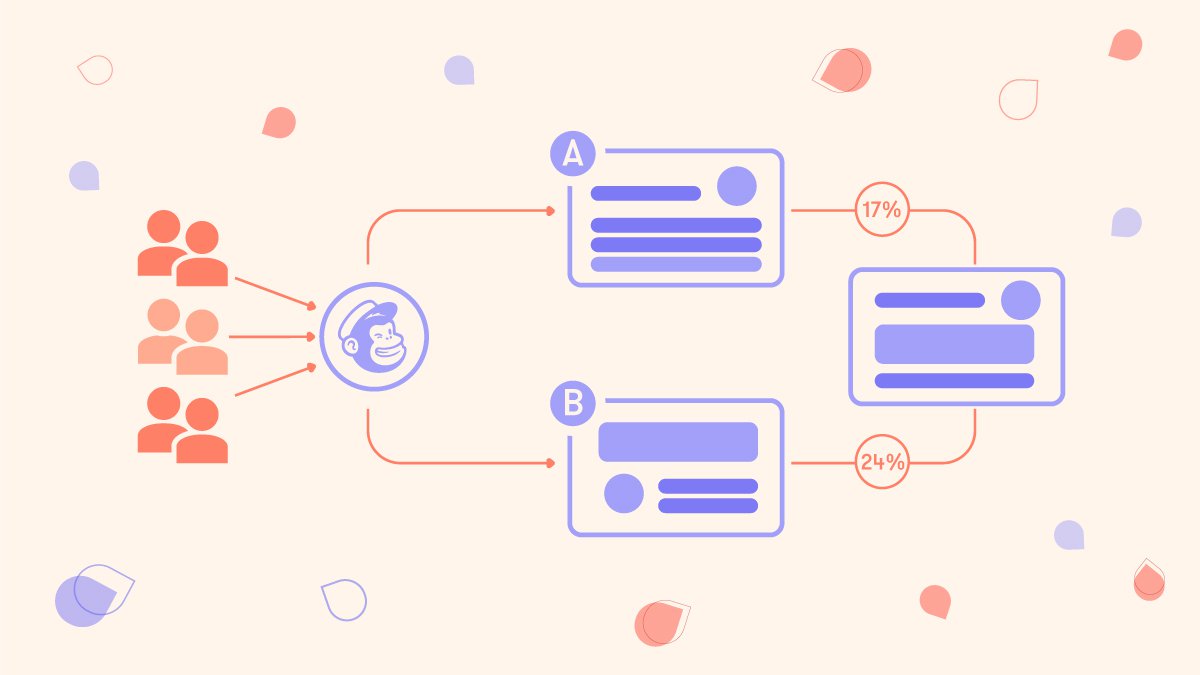
A/B testing is essential for email marketing. It helps you understand what works best. Create two versions of your email. Change one element, like the subject line or call-to-action.
- Version A: Original email
- Version B: Email with one change
Send both versions to a small part of your list. Track which email performs better. Use the winning version for the rest of your list. This process ensures your emails are effective.
Analyzing Campaign Performance
After sending your campaign, analyze the results. Mailchimp provides detailed reports. Focus on key metrics to gauge success.
| Metric | Importance |
|---|---|
| Open Rate | Shows how many people opened your email. |
| Click-Through Rate | Indicates how many clicked on links in your email. |
| Conversion Rate | Measures how many completed the desired action. |
Identify patterns in your results. Are certain subject lines more effective? Do specific call-to-actions drive more clicks? Use this data to optimize future emails.
Automation Features In Mailchimp
Mailchimp offers powerful automation features to streamline your email marketing efforts. These tools help you save time and increase efficiency. From autoresponders to email scheduling, Mailchimp has you covered.
Setting Up Autoresponders
Autoresponders are automated emails sent based on triggers. These triggers can be actions like signing up for a newsletter or making a purchase.
To set up an autoresponder in Mailchimp:
- Go to your Mailchimp dashboard.
- Select the ‘Automation’ tab.
- Click on ‘Create Automation’.
- Choose a trigger event and customize your email.
Autoresponders can nurture leads, welcome new subscribers, or thank customers.
Benefits Of Email Scheduling
Email scheduling allows you to send emails at the best times. You can plan your campaigns weeks or months in advance.
Here are some benefits of email scheduling:
- Consistency: Stay consistent with your communication.
- Optimal Timing: Send emails when your audience is most active.
- Time Management: Free up time for other tasks.
To schedule an email in Mailchimp:
- Create your email campaign.
- Select the ‘Schedule’ option.
- Choose the date and time for your email.
- Click ‘Schedule Campaign’.
Scheduled emails ensure your content reaches subscribers at the perfect moment.
Credit: www.youtube.com
Staying Compliant With Email Regulations
Staying compliant with email regulations is crucial for successful email marketing. Non-compliance can lead to hefty fines and damage to your brand reputation. Understanding and adhering to regulations like GDPR and CAN-SPAM ensures your email campaigns remain effective and trustworthy.
Understanding Gdpr And Can-spam
The General Data Protection Regulation (GDPR) is a European Union law. It protects the privacy of individuals’ data. Marketers must obtain explicit consent before sending emails. They must also provide an easy way to unsubscribe.
The CAN-SPAM Act is a U.S. law that sets rules for commercial emails. It requires the inclusion of a valid physical address. You must also provide a clear opt-out mechanism. Violating these rules can lead to severe penalties.
Maintaining Subscriber Trust
Maintaining subscriber trust is key to a successful email campaign. Here are some tips:
- Always use a clear and honest subject line.
- Provide valuable content in every email.
- Include a visible and functional unsubscribe link.
- Send emails only to subscribers who have opted in.
- Regularly clean your email list to remove inactive subscribers.
Trust is built through transparency and respect for your subscribers’ preferences. Respect their time by not sending too many emails. Ensure your emails provide real value to them.
Integrating Mailchimp With Other Tools
Integrating Mailchimp with other tools can elevate your email marketing strategy. Seamless integration allows you to enhance functionality and streamline processes. Below, we explore key integrations that can maximize your Mailchimp experience.
Syncing With Crms
Connecting Mailchimp with your CRM can provide a unified customer view. This integration helps in segmenting your audience more effectively. You can automate data syncing between Mailchimp and your CRM. This ensures that your contact lists are always up-to-date.
Benefits of syncing Mailchimp with CRMs include:
- Automated contact updates
- Enhanced audience segmentation
- Streamlined workflows
Popular CRMs that integrate well with Mailchimp:
| CRM | Key Features |
|---|---|
| Salesforce | Robust data management, detailed customer insights |
| HubSpot | Marketing automation, contact management |
| Zoho CRM | Customizable, affordable |
Leveraging Analytics And Reporting
Integrating Mailchimp with analytics tools can provide deeper insights. These insights help you understand how your campaigns are performing. You can track metrics like open rates, click rates, and conversions.
Key analytics tools to consider:
- Google Analytics
- Tableau
- Power BI
Using these tools, you can create detailed reports. These reports help in making data-driven decisions. Here’s how:
- Connect Mailchimp to your chosen analytics tool.
- Set up tracking for key metrics.
- Generate reports to visualize performance.
Regularly reviewing these reports can help optimize your email marketing strategy.
Credit: www.mayple.com
Advanced Mailchimp Tips
Boost your email marketing with advanced Mailchimp tips. These tips can help you connect better with your audience and get more engagement.
Using Merge Tags For Personalization
Merge tags are powerful tools for personalizing your emails. They allow you to insert dynamic content like the recipient’s name, location, or other details.
To use merge tags, simply include them in your email templates. For example, use |FNAME| to address your reader by their first name.
Here is a list of common merge tags you can use:
- |FNAME| – First Name
- |LNAME| – Last Name
- |EMAIL| – Email Address
- |DATE:FORMAT| – Custom Date Format
Using merge tags makes your emails feel more personal. This can lead to higher open rates and better engagement.
Exploring Mailchimp’s Advanced Features
Mailchimp offers many advanced features to enhance your email campaigns. These features can help you automate tasks and analyze performance.
Here’s a table of some advanced features and their benefits:
| Feature | Benefit |
|---|---|
| Automation | Send emails based on triggers and schedules. |
| A/B Testing | Test different email versions to see which performs best. |
| Segmentation | Group your audience for targeted campaigns. |
| Analytics | Track and analyze email performance. |
Using these advanced features can save you time. They also provide insights to improve your future campaigns.
Frequently Asked Questions
What Are The Best Mailchimp Email Marketing Tips?
To optimize your Mailchimp campaigns, segment your audience, personalize content, and use A/B testing. Consistent branding and mobile-friendly designs are essential. Monitor analytics to refine strategies.
How Do I Segment My Mailchimp Audience?
Segment your Mailchimp audience by demographics, behavior, and engagement levels. Use tags and groups to organize contacts. This ensures targeted, relevant emails.
How Can I Improve My Mailchimp Open Rates?
Improve open rates with compelling subject lines and preheaders. Personalize emails and send them at optimal times. Use A/B testing to find what works best.
What Is A/b Testing In Mailchimp?
A/B testing in Mailchimp involves sending two versions of an email to a small audience segment. Analyze results to determine the most effective version and send it to the larger audience.
Conclusion
Mastering email marketing with Mailchimp can boost your business success. Apply these tips to optimize your campaigns. Engage your audience effectively and watch your conversions grow. Continually refine your strategies for the best results. Start leveraging Mailchimp’s powerful tools today for a robust email marketing strategy.
Your success is just an email away.



